
The problem
Applications are tracked in spreadsheets, and applicants wait without updates.
One application queue per intake, with a checklist, review history and routing to faculty reviewers.
Education
Every Term, Organised. From Application to Results.
CampusX runs the college from application to graduation: applicants apply online and AI checks their documents, the timetable resolves its own clashes, lecture attendance is taken by QR, at-risk students are flagged early, and students have everything in one app.
Screens shown with sample data
What it does
CampusX is designed around the way a college actually runs: in academic terms. Admissions officers work through each intake with a checklist and review history, the academic office sets up programmes, class sections, rooms and lecturers, students register for the term, lecturers record attendance and assessment, and the registrar reviews results. Each person sees the work that belongs to their role, for the term and campus they are working in.
Who it’s for
User roles
Product status: available and in use. CampusX is a Zensoft product in use by customers, set up for each customer's roles and workflow. The screens on this page are shown with sample people and figures, not any customer's records.
Problems it addresses
The problem
One application queue per intake, with a checklist, review history and routing to faculty reviewers.
The problem
A weekly teaching grid flags room conflicts and seat capacity before the timetable is published.
The problem
AI early warning combines attendance, marks, online learning activity and fees to flag at-risk students, and assigns an adviser.
Built for campus life
College life happens in lecture halls, labs, offices and on the walkways between them. CampusX connects students, lecturers and the academic office.

QR attendance

On campus

Student advising

Lecture hall

Admissions office
Illustrative photos.
Term and campus context
Every application, class, timetable and result in CampusX belongs to a campus and an academic term, so each team always knows which term it is working in.
01
Campus
Where the college runs
02
Academic term
Semesters, dates and deadlines
03
Faculty
Schools and departments
04
Programme
Diplomas and other courses of study
05
Course & class section
What students register for
Key features
10 key capabilities of CampusX, shown in the product screens below.
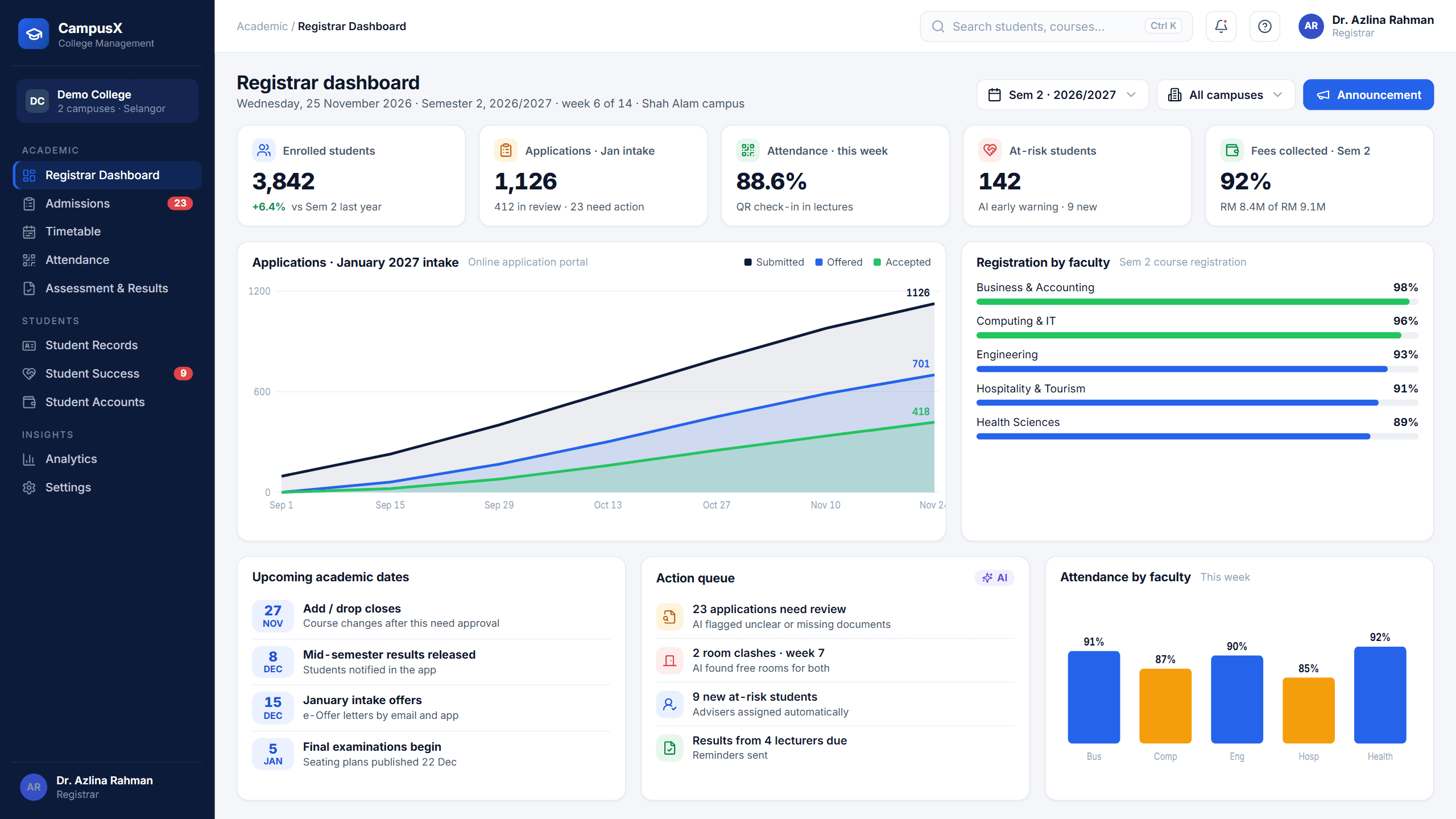
Enrolment, applications, attendance, at-risk students and fees for the term, with key dates and an AI action queue.
Applicants apply and pay online, upload documents from their phone and track their application.
MyKad and SPM, STPM or UEC certificates read by OCR, checked for consistency and against entry requirements.
Offer letters sent online, accepted and signed by the applicant, with the registration fee paid by QR.
A weekly teaching grid by room and lecturer; AI finds free rooms and times when classes clash.
Students scan the lecture's code in the app; attendance is recorded by room and class.
At-risk students flagged from attendance, marks, online learning activity and fees, with advisers assigned.
Today's classes, room changes, results, a digital student ID and online fee payment.
Marks by course and faculty reviewed and released to students in the app.
Enrolment, retention and registration by term, campus and faculty.
Smart technology
CampusX uses modern technology to remove paperwork, keep timetables clash-free and catch struggling students early.
Apply, upload documents and pay the fee online, from a phone.
Results and personal details read from photos and checked by AI.
Offers accepted and signed online, without printing.
Clashes found and resolved with free rooms and times.
Students scan in at each lecture with the app.
At-risk students flagged and advisers assigned.
A secure, refreshing QR student ID in the app.
Fees, PTPTN disbursements and balances, paid by QR.
Product screens
Four screens of CampusX, from the dashboard to the reports, shown with sample data. Select a screen to enlarge it.
Screen 01 · Dashboard
The term at a glance: enrolment, the next intake's applications, attendance, at-risk students, fees and key dates.
Sample data · people, IDs, dates and figures are examples, not real records
Screen 02 · Admissions
An intake's applications sorted by readiness, with documents read and checked by AI, SPM results, intake progress and the e-offer.
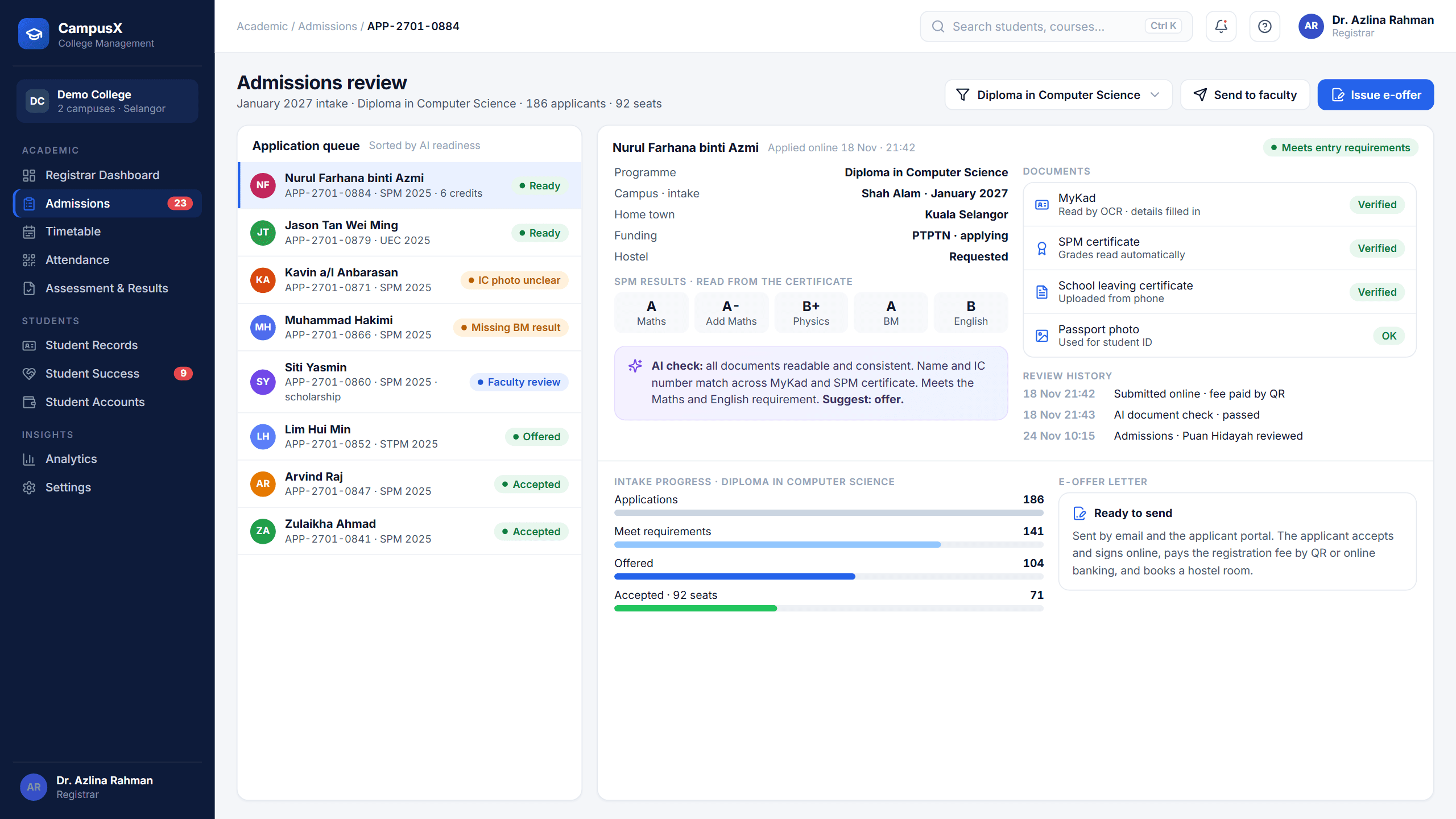
Sample data · people, IDs, dates and figures are examples, not real records
Screen 03 · Management
A week's classes by day and room, with a room clash flagged and AI suggesting free rooms and times.
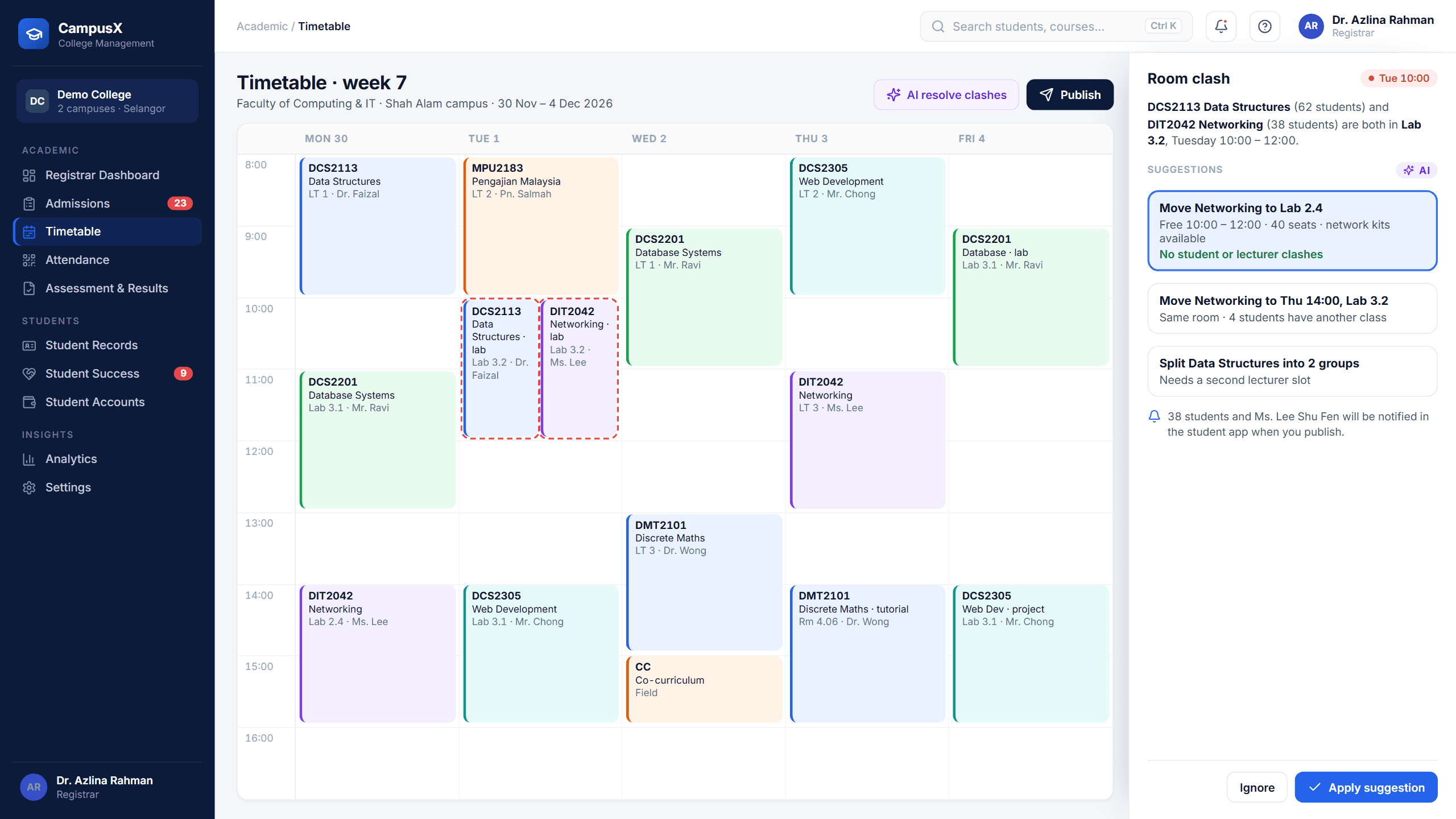
Sample data · people, IDs, dates and figures are examples, not real records
Screen 04 · Reports & analytics
AI early warning: at-risk students, the signals behind each flag, retention by faculty and the support already arranged.
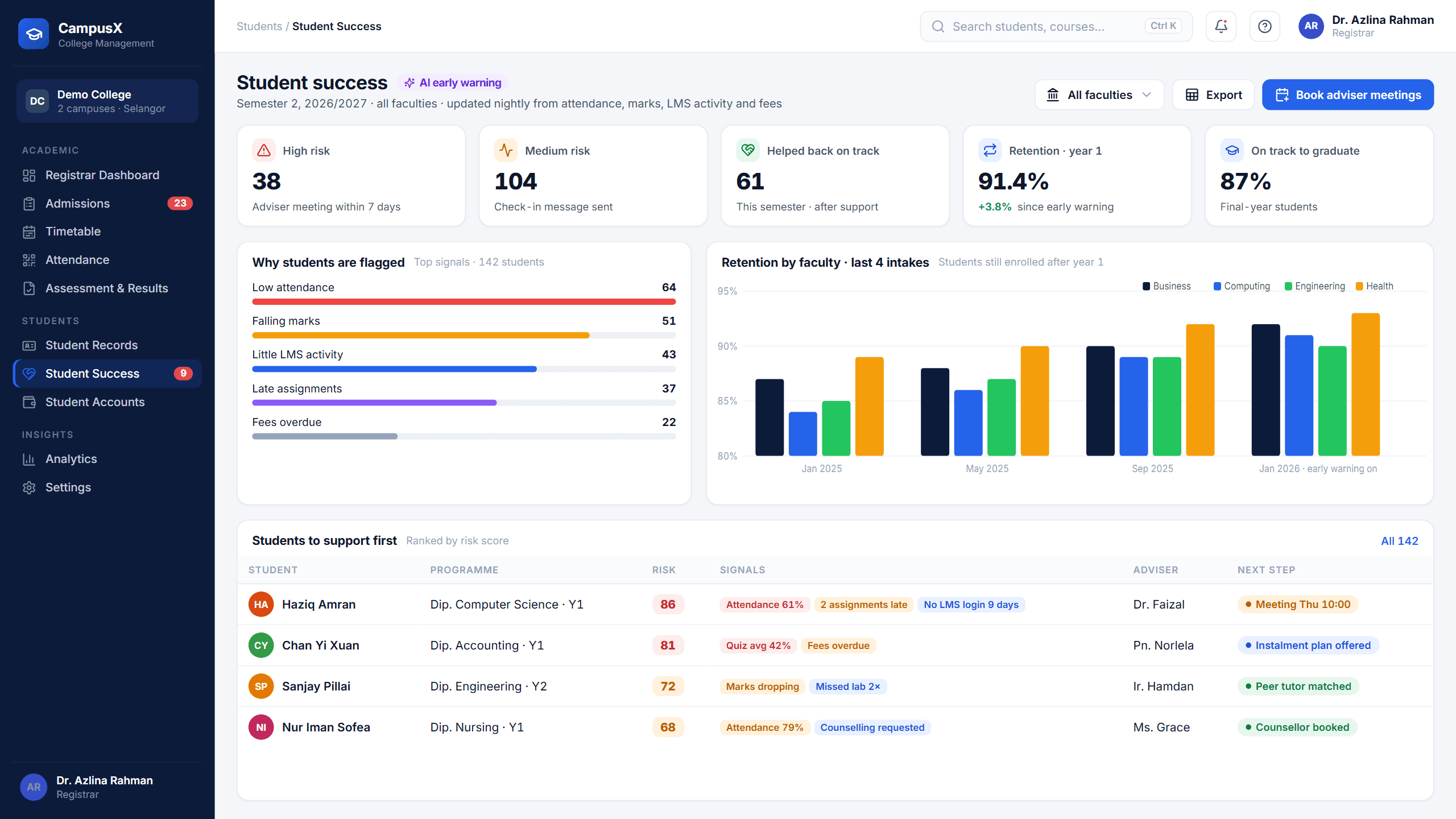
Sample data · people, IDs, dates and figures are examples, not real records
Student app
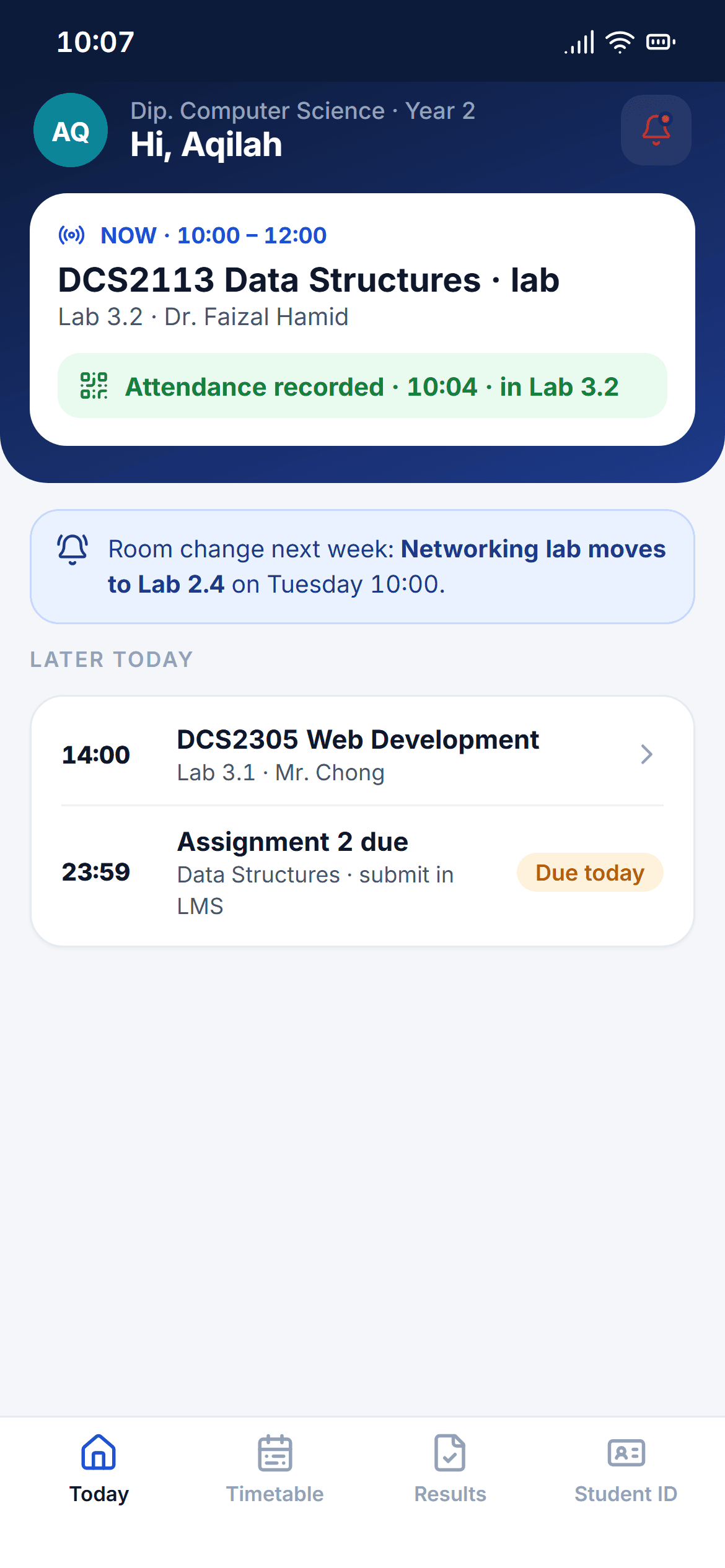
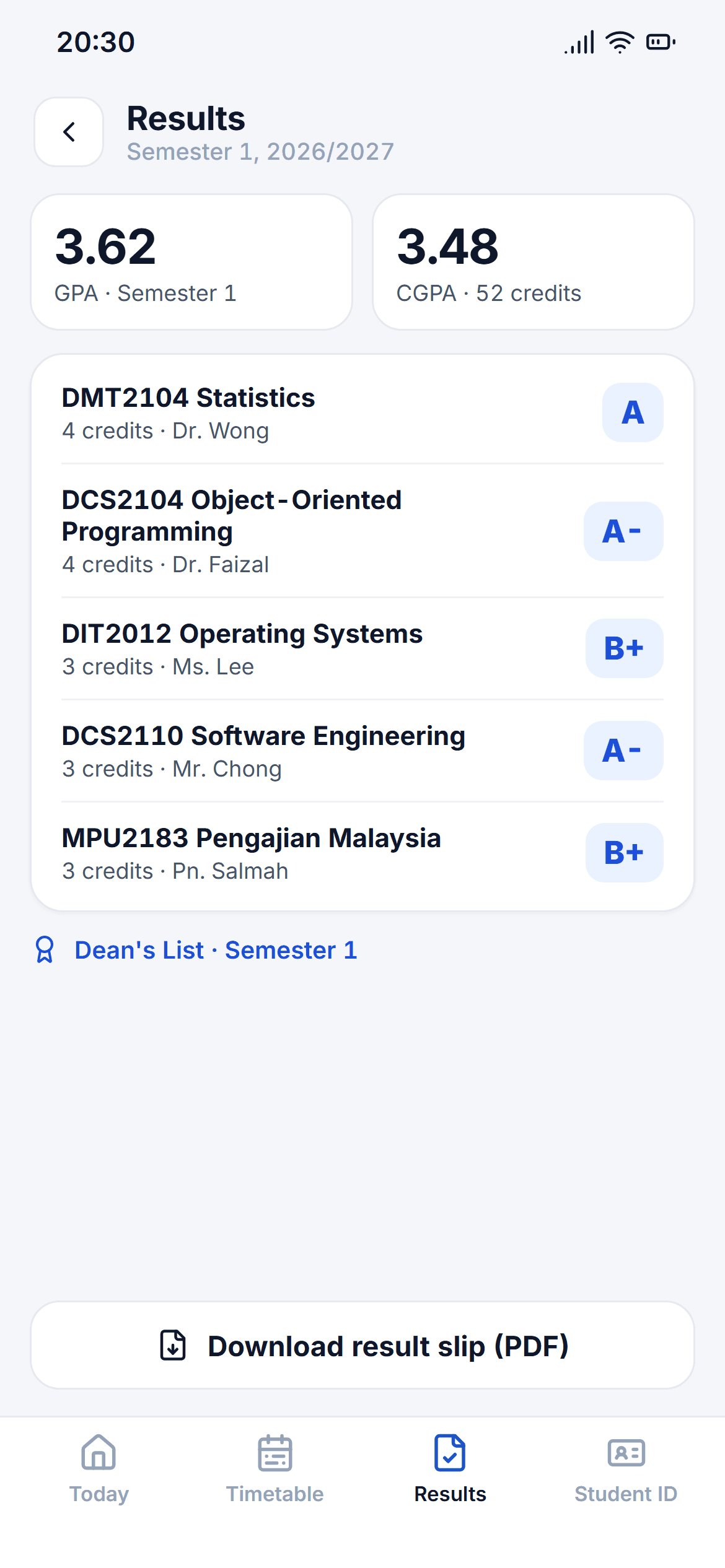
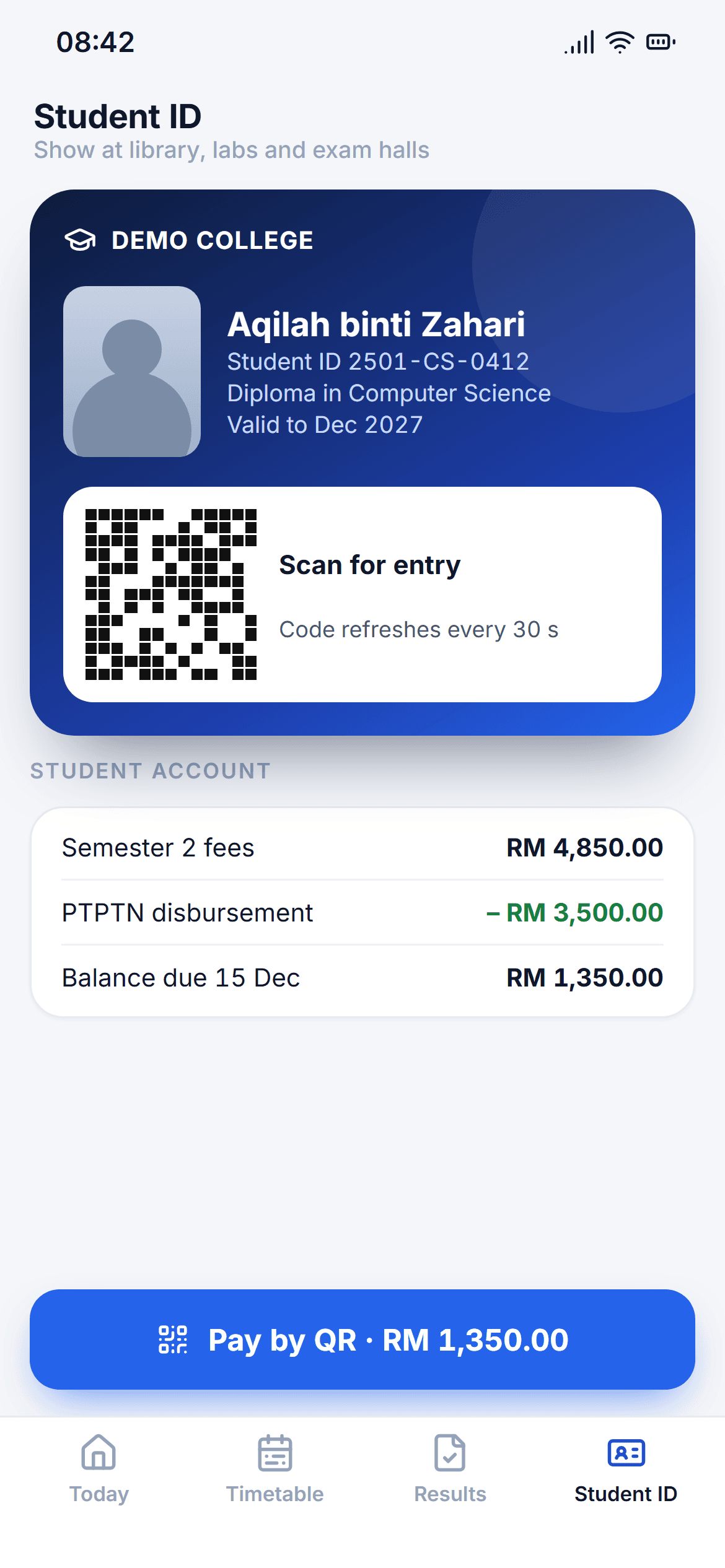
Students see today's classes and room changes, record attendance by QR, check their results, carry a digital student ID and pay fees.
App · 01
The current lecture with attendance recorded, room changes and what's due.
App · 02
GPA, CGPA and each course's grade, released straight to the app.
App · 03
A digital student ID with a refreshing QR code, and the fee balance paid by QR.
Sample data · names, sites and times are examples, not real records
Modules
The modules of CampusX, sharing the same records so information is entered once.
The structure every term is built on.
01Campus & Academic Terms
Campuses, academic terms, term dates and the academic calendar.
02Faculties, Programmes & Courses
Faculties, programmes, courses and the class sections opened each term.
03Rooms, Timetable & Lecturers
Room and lecturer assignments, capacity review and the published timetable.
From first application to enrolled student.
04Admissions
Application intake, applicant checklist, review and decision history.
05Student Records
Student profile and academic record, kept by programme and term.
06Registration & Enrolment
Class registration for each term and the student's enrolment status.
07Student Self-ServiceOptional
Schedule, term dates, to-dos and academic progress for students.
Recording the term and reporting on it.
08Attendance, Assessment & Results
Attendance and assessment recorded per class section, and results reviewed.
09Student Accounts
A student account summary and fee status.
10Reports, Permissions & Audit
Reports, role permissions, data import and export, and audit history.
Workflows
2 connected workflows in CampusX.
Workflow 1
From the first application to a registered student.
Workflow 2
How each term is set up, taught and reviewed.
What students can see and do on their own is decided with each college during setup.
At each step the record is designed to show its status, owner, next action and due date, and authorised users can return incomplete work with a reason.
Benefits
What CampusX is designed to change for the people who use it every day.
Getting started
Step by step, starting from your own workflow.
Confirm scope and roles
We agree which modules, roles and rules your organisation needs.
Configure the workflow and records
Your workflow and the records it keeps are set up and approved with you.
Try it with sample data
Your team tries the system with sample data first, never your real records.
Review permissions and exceptions
Access rights, returned work and corrections are checked.
Go live with one workflow first
One end-to-end workflow goes live before the next is added.
Verify with your team
The people who use it confirm it works for them, and then more is added.
Questions
Yes. CampusX is available and in use by customers. Each new customer's setup starts from the modules and roles described on this page. Request a demo to see it.
No. The CampusX screens on this page are shown with sample people, records and figures. They are not screenshots of any customer's system and contain no real customer data.
Yes. The roles, workflow steps and the details of each module are agreed with you during setup.
No connections to other systems are assumed. If you need CampusX to work with another system, it is discussed and agreed during scoping.
Request a demo
See CampusX in a demo with our team and tell us how your college handles admissions, terms, timetables and results.