
The problem
Supplier bills are typed in by hand and coded inconsistently.
Bills emailed to FinCore are read by AI, coded like previous bills from the same supplier and matched to the purchase order and goods received.
Finance & Business Management
Every Entry Checked. Every Account Reconciled.
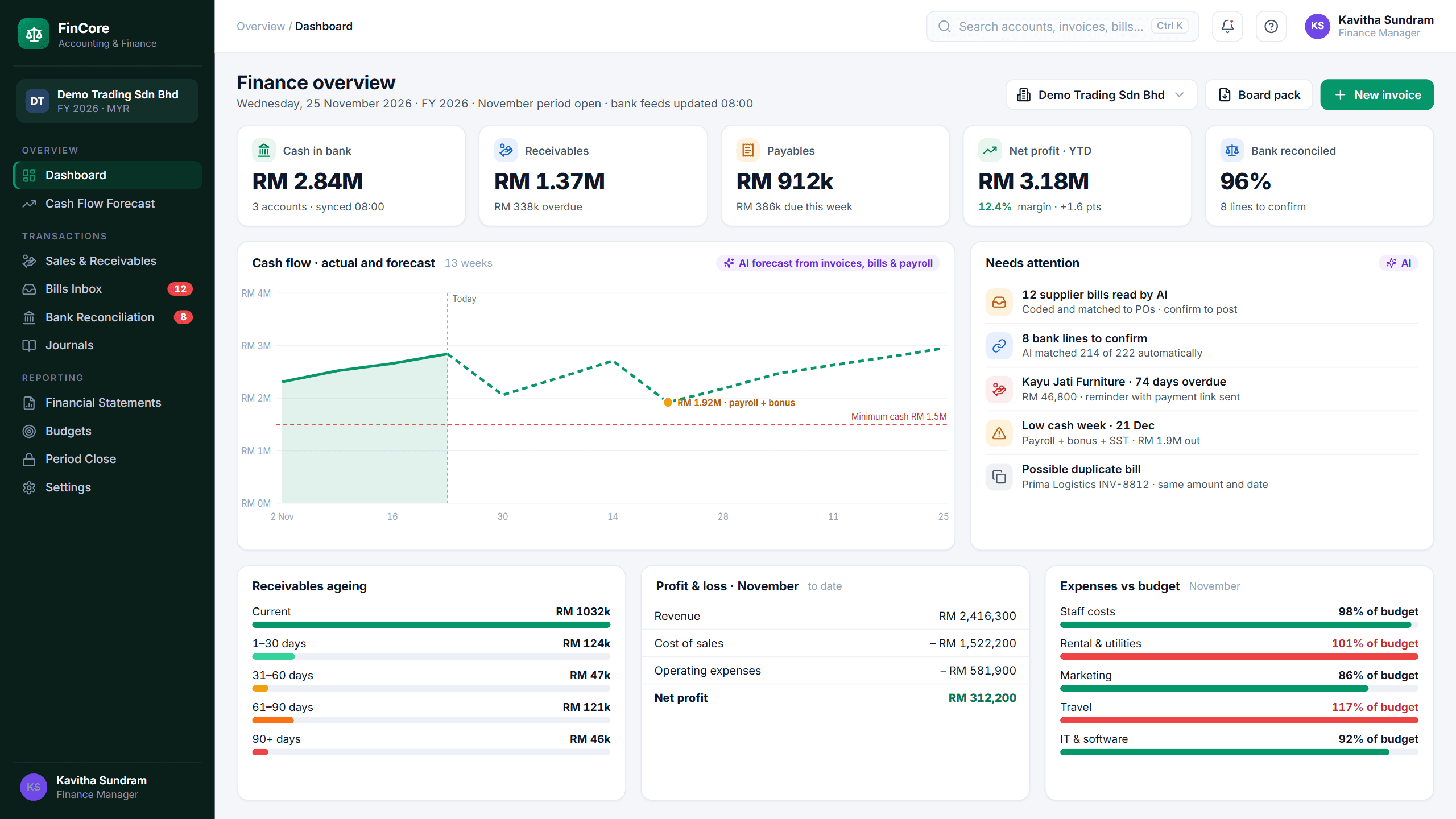
FinCore keeps the books up to date every day: bank lines arrive automatically and AI matches them, supplier bills are read and coded for you, customers pay through payment links, and an AI forecast shows your cash 13 weeks ahead.
Screens shown with sample data
What it does
FinCore is designed around a reviewed, balanced ledger. Transactions are entered or imported, checked for coding and supporting documents, approved and posted. Bank activity is matched against the books in a reconciliation workspace, management reports are reviewed, and the period is closed under period controls.
Who it’s for
User roles
Product status: available and in use. FinCore is a Zensoft product in use by customers, set up for each customer's roles and workflow. The screens on this page are shown with sample people and figures, not any customer's records.
Problems it addresses
The problem
Bills emailed to FinCore are read by AI, coded like previous bills from the same supplier and matched to the purchase order and goods received.
The problem
A reconciliation workspace matches statement lines to book entries, with suggested matches confirmed by a person.
The problem
Cash, receivables, payables and unreconciled items are visible on the finance dashboard throughout the period.
Built for the finance team
Finance work happens at the accountant's desk, the shop counter and the board table. FinCore keeps the numbers up to date for all of them.

Accountant at work

Cash-flow review

Photographing a supplier bill

Board meeting

Paying by QR
Illustrative photos.
Key features
8 key capabilities of FinCore, shown in the product screens below.
Cash, receivables, payables, profit and reconciliation status, with an AI cash-flow forecast and items needing attention.
Bank lines arrive automatically each day for every account.
Bank lines matched to invoices, bills and payroll automatically, with a confidence score and rules for routine items.
Supplier bills emailed, uploaded or photographed are read by AI, coded and checked for duplicates.
Bills matched to the purchase order and goods received before they are posted.
Invoices with payment links, automatic reminders and ageing by customer.
13 weeks ahead from open invoices, bills and payroll, with low-cash weeks flagged.
Profit and loss, balance sheet and cash flow, with a close checklist and locked periods.
Smart technology
FinCore uses modern technology so the finance team spends less time typing and matching, and more time on the numbers that matter.
Bank lines brought in automatically every day.
Most bank lines matched automatically, with confidence scores.
Supplier bills read from email, PDF or a phone photo.
Bills checked against purchase orders and goods received.
Cash 13 weeks ahead, with low-cash weeks flagged early.
Customers pay invoices online by QR, card or online banking.
Overdue customers reminded with a link to pay.
Period close tracked step by step, then locked.
Product screens
Four screens of FinCore, from the dashboard to the reports, shown with sample data. Select a screen to enlarge it.
Screen 01 · Dashboard
Cash, receivables, payables and profit, a 13-week AI cash-flow forecast and what needs attention today.
Sample data · people, IDs, dates and figures are examples, not real records
Screen 02 · Bills inbox
Supplier bills read by AI, coded to accounts and cost centres and matched to the purchase order and goods received.
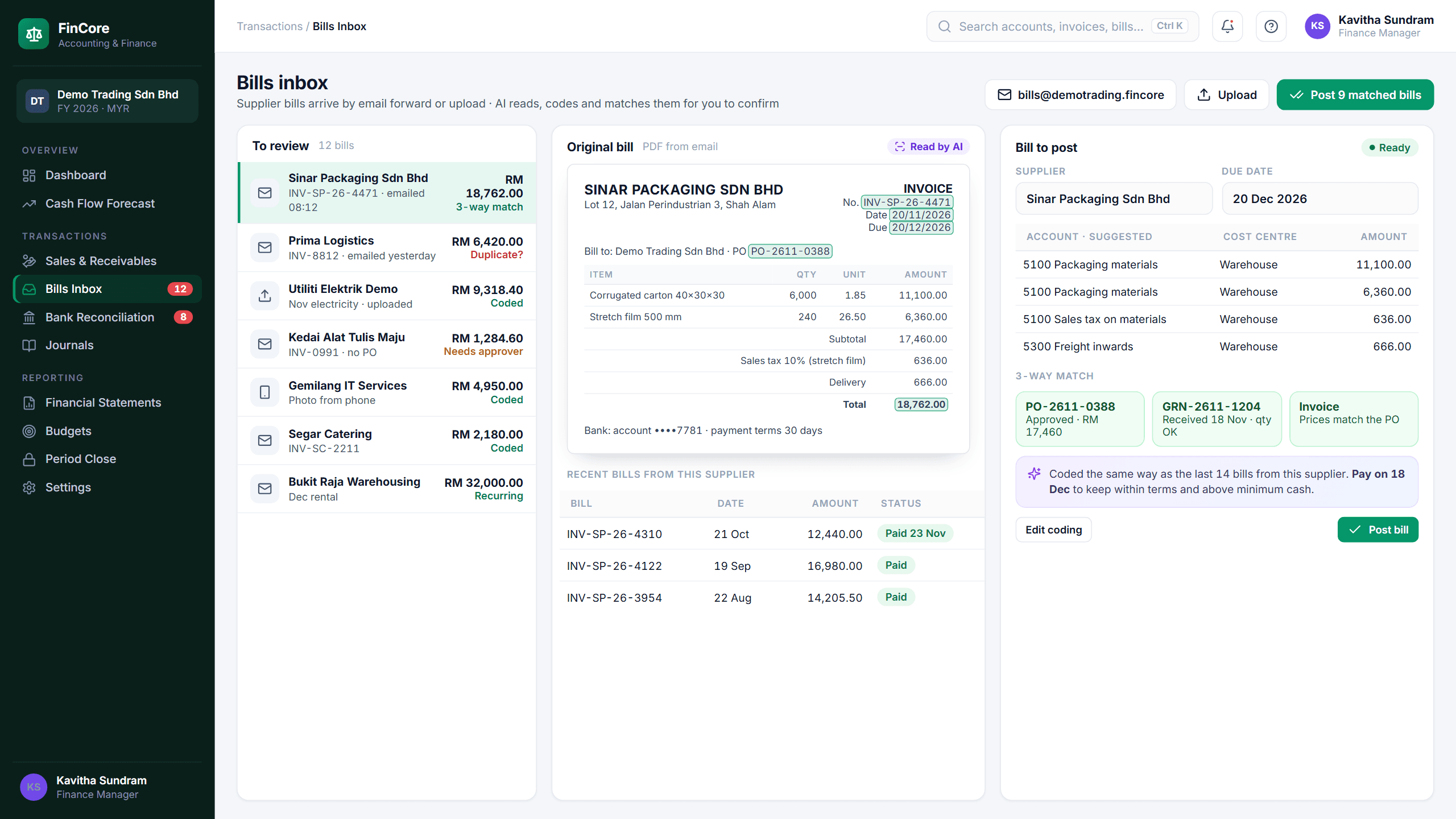
Sample data · people, IDs, dates and figures are examples, not real records
Screen 03 · Management
The month's bank lines matched to the books by AI, with confidence scores, rules and the few lines left to confirm.
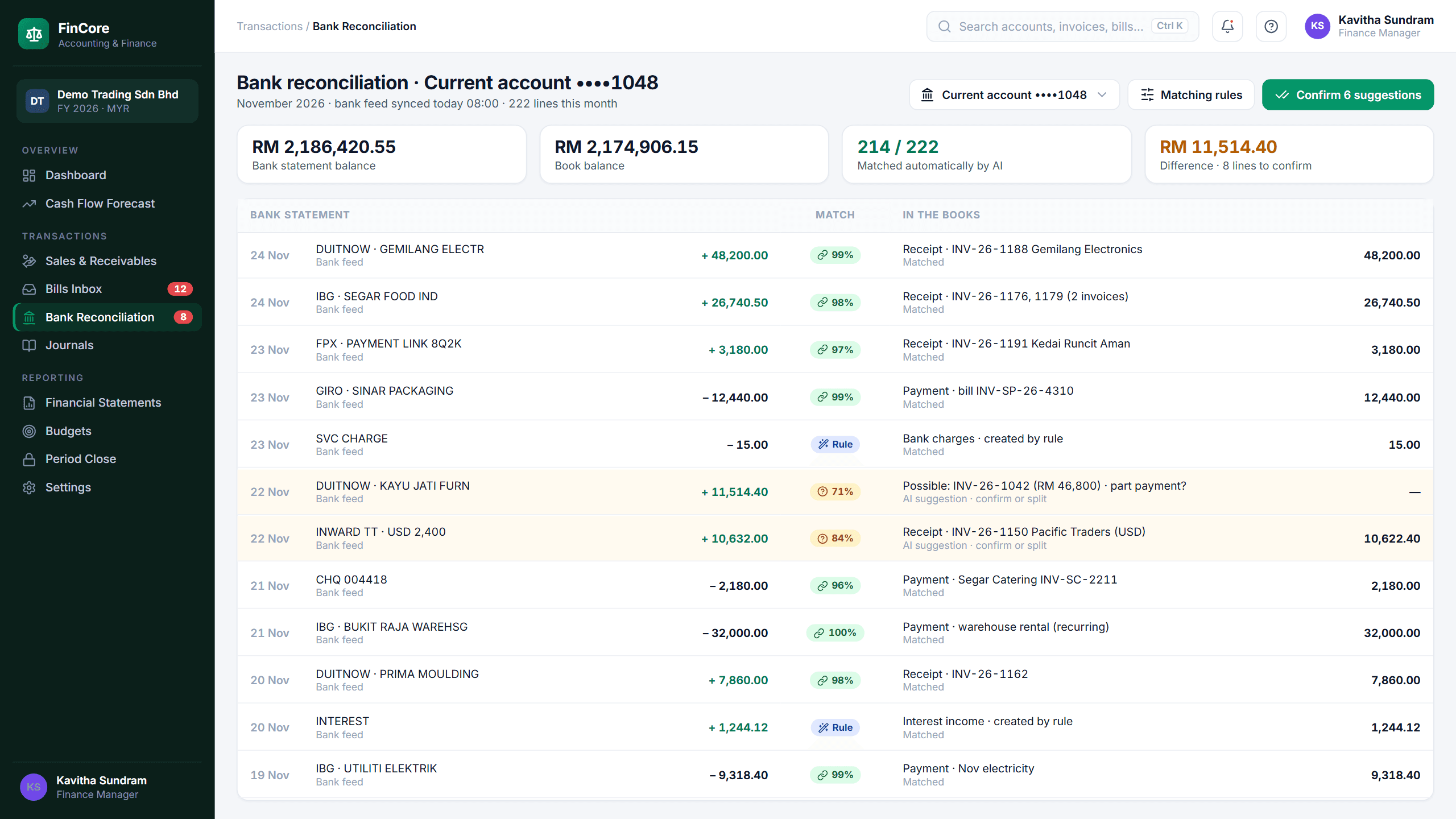
Sample data · people, IDs, dates and figures are examples, not real records
Screen 04 · Reports & analytics
Profit and loss for the year to date against last year, revenue and margin by month and the period-close checklist.
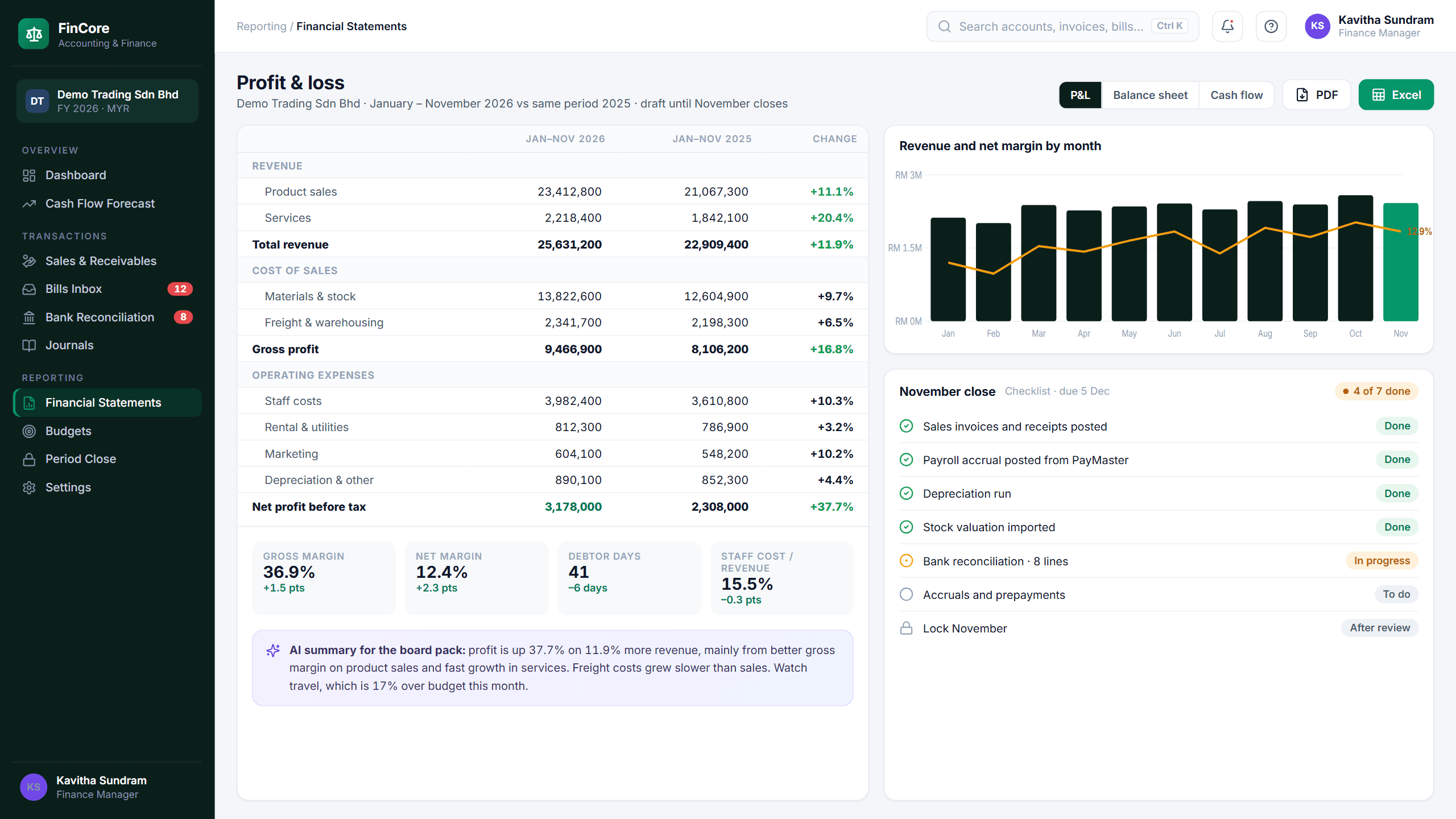
Sample data · people, IDs, dates and figures are examples, not real records
Modules
The modules of FinCore, sharing the same records so information is entered once.
The structure and the entries.
01Finance Dashboard
Cash, balances and reconciliation progress.
02Chart of Accounts
The organisation's account structure.
03Ledger & Journals
Journals entered, checked, approved and posted.
04Cost Centres & Projects
Coding transactions to cost centres and projects.
Customers, suppliers and banks.
05Receivables
Customer invoices and payments.
06Bills Inbox & Payables
Bills read by AI, matched and paid.
07Bank & Cash Accounts
Bank and cash account activity.
08AI Reconciliation
Bank feed lines matched to the books automatically.
Approvals, budgets and close.
09Approval Rules
Who approves what before posting.
10Budgets & Cash Forecast
Budget vs actual and a 13-week cash forecast.
11Financial Statements
Management reports and financial statements.
12Period Controls
Period close and locked periods.
Workflow
How finance work is designed to flow through FinCore.
At each step the record is designed to show its status, owner, next action and due date, and authorised users can return incomplete work with a reason.
Benefits
What FinCore is designed to change for the people who use it every day.
Getting started
Step by step, starting from your own workflow.
Confirm scope and roles
We agree which modules, roles and rules your organisation needs.
Configure the workflow and records
Your workflow and the records it keeps are set up and approved with you.
Try it with sample data
Your team tries the system with sample data first, never your real records.
Review permissions and exceptions
Access rights, returned work and corrections are checked.
Go live with one workflow first
One end-to-end workflow goes live before the next is added.
Verify with your team
The people who use it confirm it works for them, and then more is added.
Questions
Yes. FinCore is available and in use by customers. Each new customer's setup starts from the modules and roles described on this page. Request a demo to see it.
No. The FinCore screens on this page are shown with sample people, records and figures. They are not screenshots of any customer's system and contain no real customer data.
Yes. The roles, workflow steps and the details of each module are agreed with you during setup.
No connections to other systems are assumed. If you need FinCore to work with another system, it is discussed and agreed during scoping.
Request a demo
See FinCore in a demo with our team and tell us how your journals, reconciliations and period close work today.