
The problem
Patient details are written down again at every counter.
One patient record is registered once and used by reception, nurses, doctors, the pharmacy and billing.
Healthcare
Manage Your Clinic. Simplify Every Patient Journey.
MediFlow runs the clinic from booking to receipt: patients book online and check in by QR, doctors dictate notes that AI drafts for review, prescriptions are checked for allergies and dispensed by barcode, and panel claims, WhatsApp reminders and video consultations are built in.
Screens shown with sample data
What it does
MediFlow is designed to bring a clinic's daily operations into one centralised platform. Reception registers patients and manages appointments and the queue, nurses record vital signs, doctors complete consultations and prescriptions, the pharmacy dispenses from tracked stock, and billing closes each visit with an invoice and payment. Every record stays linked to the patient, and owners see the clinic's activity and revenue in one place.
Who it’s for
User roles
Product status: available and in use. MediFlow is a Zensoft product in use by customers, set up for each customer's roles and workflow. The screens on this page are shown with sample people and figures, not any customer's records.
Problems it addresses
The problem
One patient record is registered once and used by reception, nurses, doctors, the pharmacy and billing.
The problem
Consultation, prescription, laboratory and billing records stay linked to the same patient visit.
The problem
A dashboard and reports show patients, appointments, the queue and revenue by date and branch.
Built for the clinic
Clinic work happens at reception, in the consultation room, at the pharmacy counter and in the waiting area. MediFlow connects every step of the patient's visit.

Doctor consultation

Reception check-in

Barcode dispensing

Vital signs

Queue on the phone
Illustrative photos.
Key features
8 key capabilities of MediFlow, shown in the product screens below.
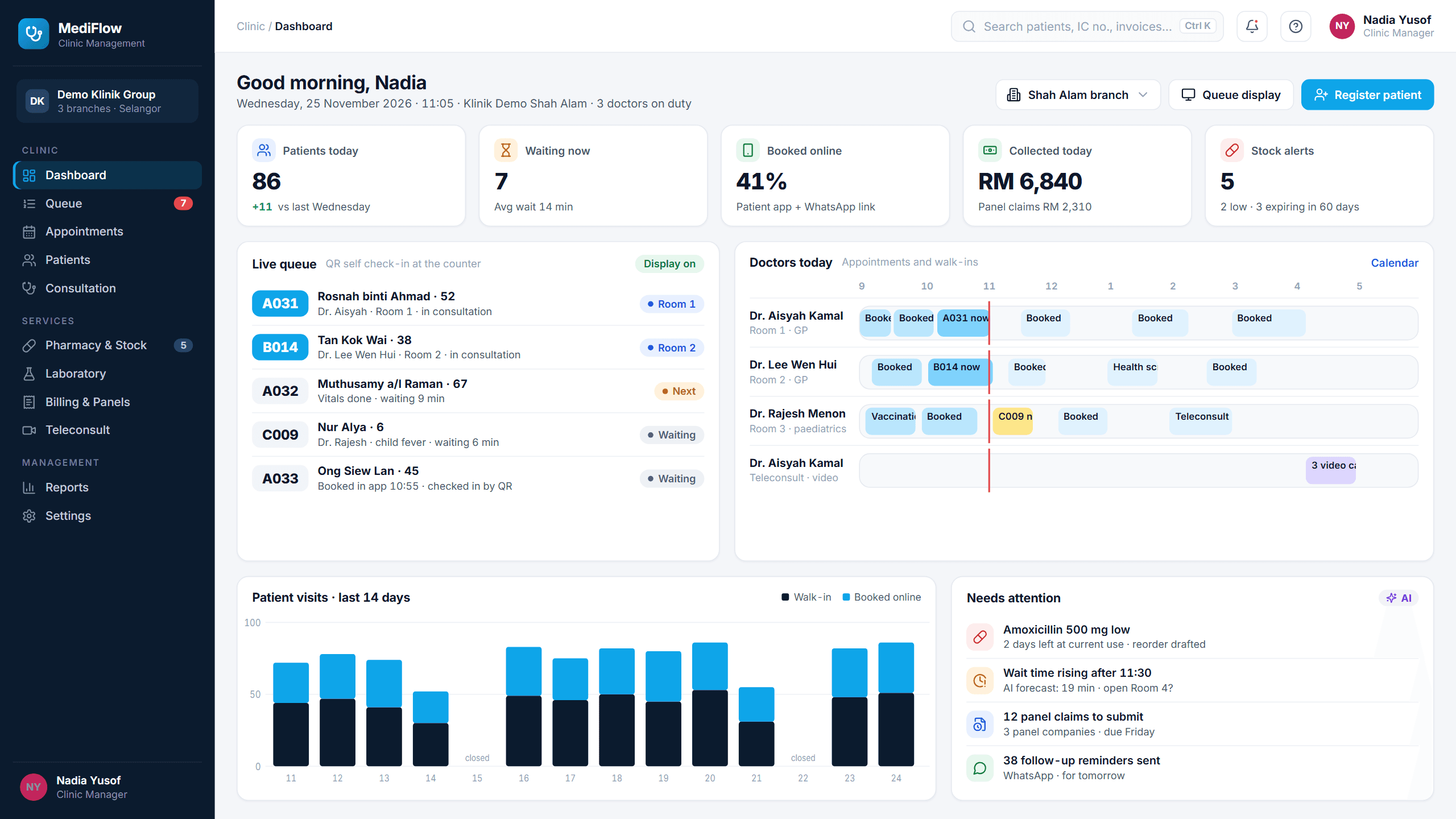
Patients today, waiting time, online bookings, collections and stock alerts, with the live queue and every doctor's day.
Patients book a clinic visit or video call in the app or from a WhatsApp link, with reminders the day before.
Patients check in by QR at the counter, follow their queue number on their phone and on the queue display.
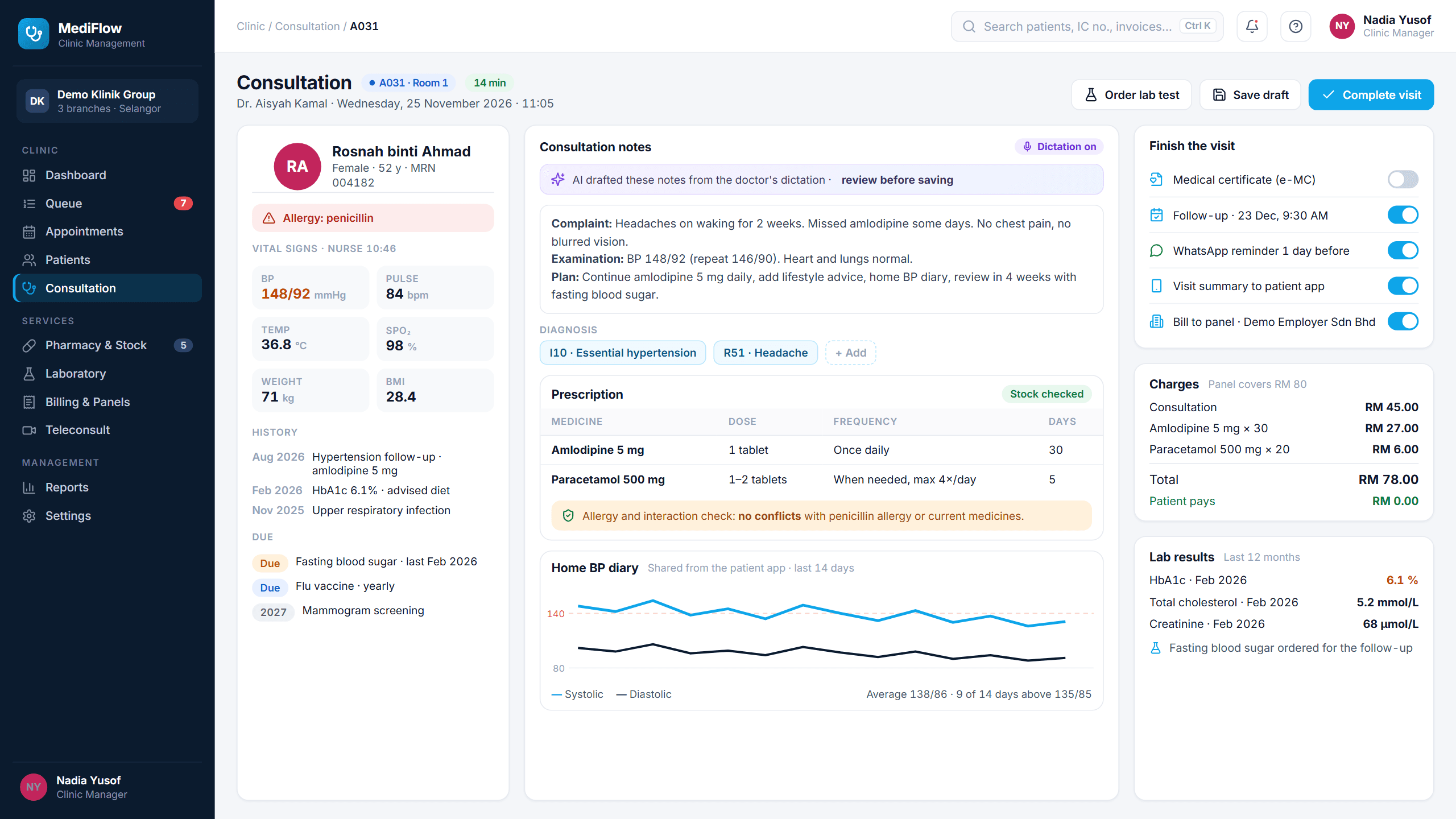
Vital signs, history, due screenings and the patient's home readings beside the notes, diagnosis and plan.
The doctor dictates and AI drafts the consultation notes, for the doctor to review before saving.
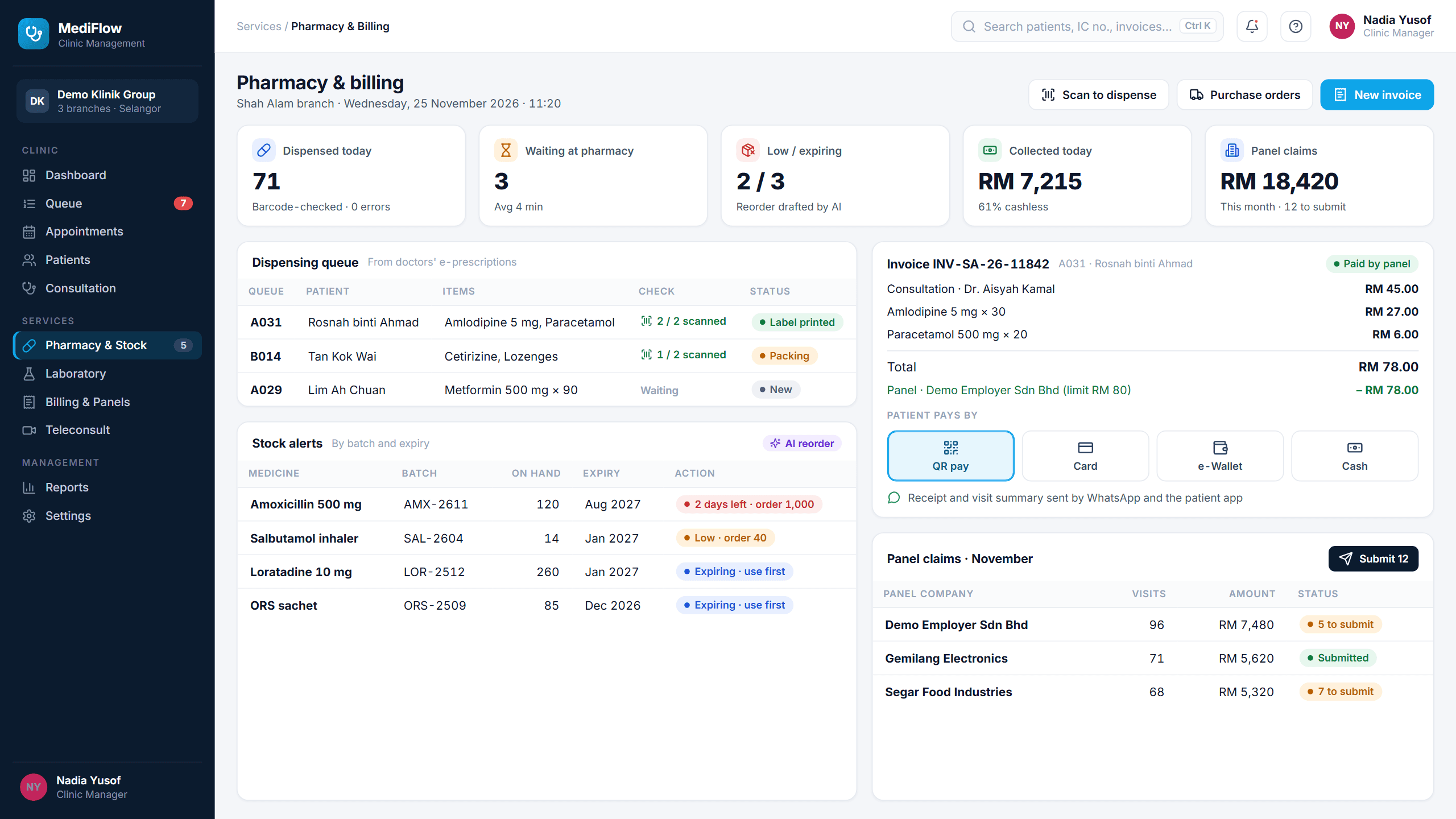
Prescriptions checked against allergies, interactions and stock, then dispensed with a barcode check.
Invoices billed to the patient or the panel company, QR, card and e-wallet payments, and panel claims by company.
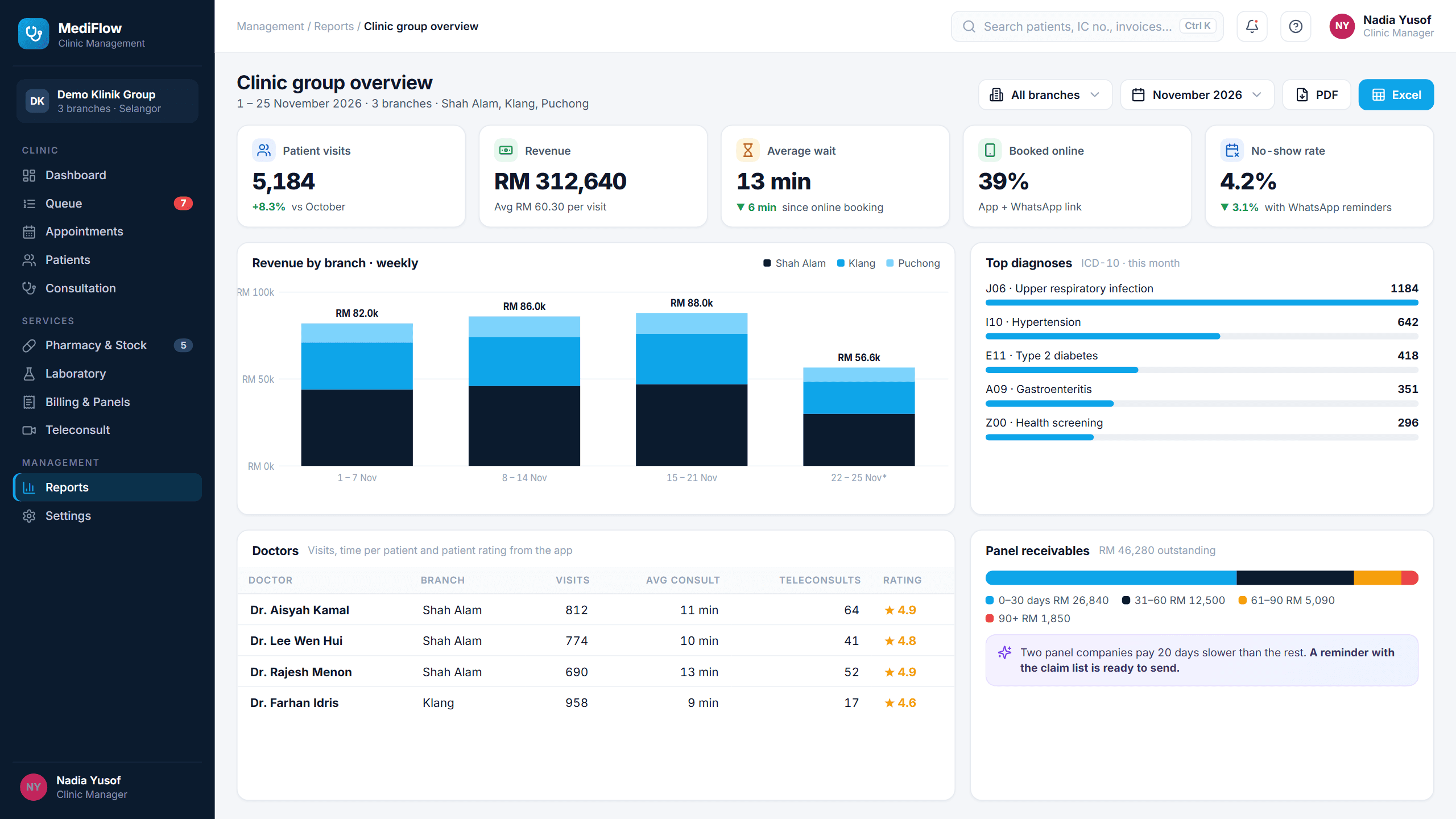
Visits, revenue by branch, waiting time, top diagnoses, doctor performance and panel receivables.
Smart technology
MediFlow brings the technology patients now expect into the clinic, while keeping the doctor in control of every clinical decision.
Book a clinic visit or video call in the app or from a WhatsApp link.
Check in by QR and follow your queue number on your phone.
Doctors dictate; AI drafts the notes for the doctor to review.
Every prescription checked against allergies and current medicines.
Each medicine scanned before it is handed over.
Appointment, follow-up and vaccination reminders, plus receipts.
Queue, bookings, visit summaries, e-MCs, lab results and a home BP diary.
Follow-up visits by video, with shared readings and records.
Product screens
Four screens of MediFlow, from the dashboard to the reports, shown with sample data. Select a screen to enlarge it.
Screen 01 · Dashboard
The clinic's day: patients, waiting time, online bookings and collections, with the live queue and each doctor's schedule.
Sample data · people, IDs, dates and figures are examples, not real records
Screen 02 · Consultation
Vitals, history and due screenings beside AI-drafted notes, diagnosis, a checked prescription, home BP readings and lab results.
Sample data · people, IDs, dates and figures are examples, not real records
Screen 03 · Pharmacy & billing
Barcode-checked dispensing, stock by batch and expiry with AI reorders, an invoice billed to a panel, and panel claims.
Sample data · people, IDs, dates and figures are examples, not real records
Screen 04 · Reports & analytics
Visits, revenue by branch, waiting time, no-shows, top diagnoses, doctors and panel receivables across the group.
Sample data · people, IDs, dates and figures are examples, not real records
Patient app
Patients follow their place in the queue, book clinic or video visits, and keep their medicines, follow-ups and records on their phone.
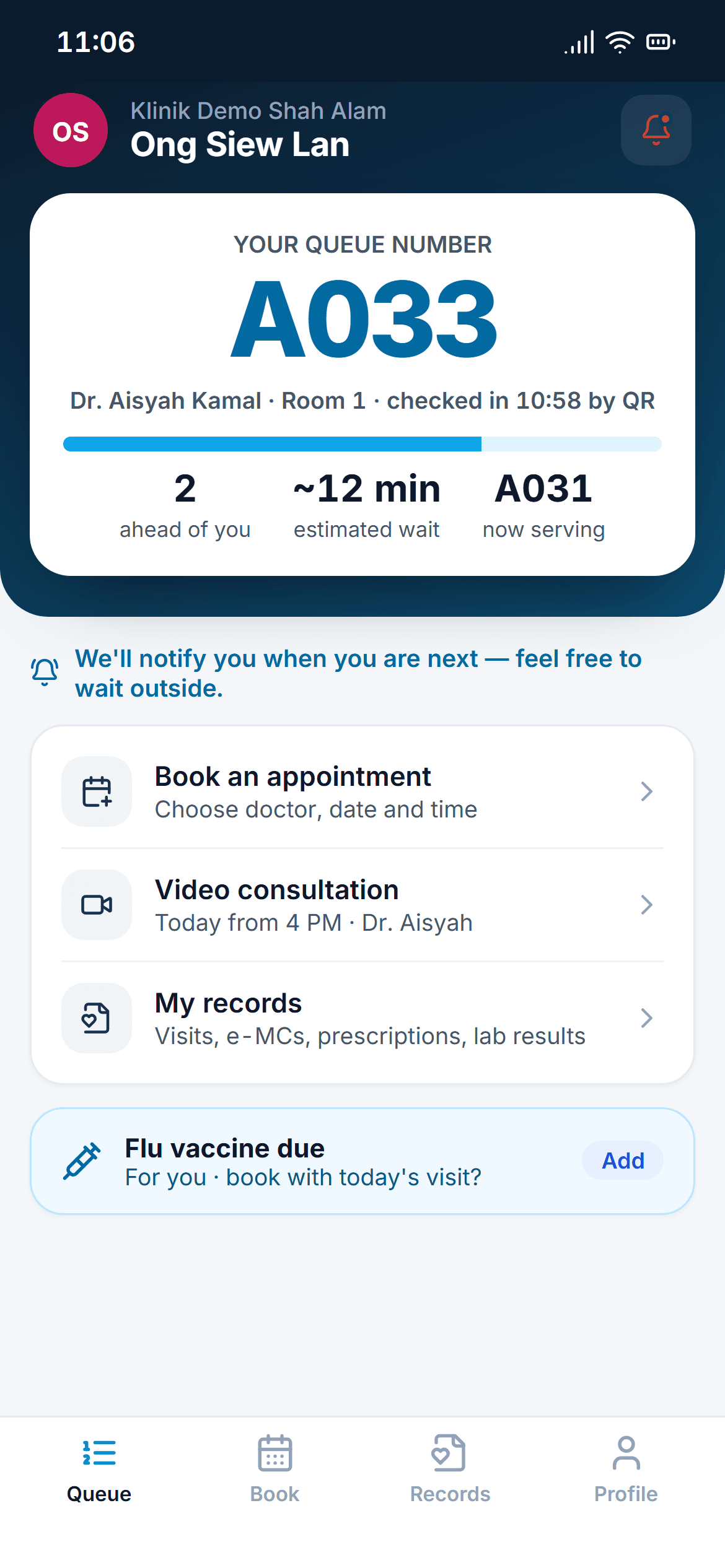
App · 01
Queue number, people ahead and estimated wait, with a reminder when it's your turn.
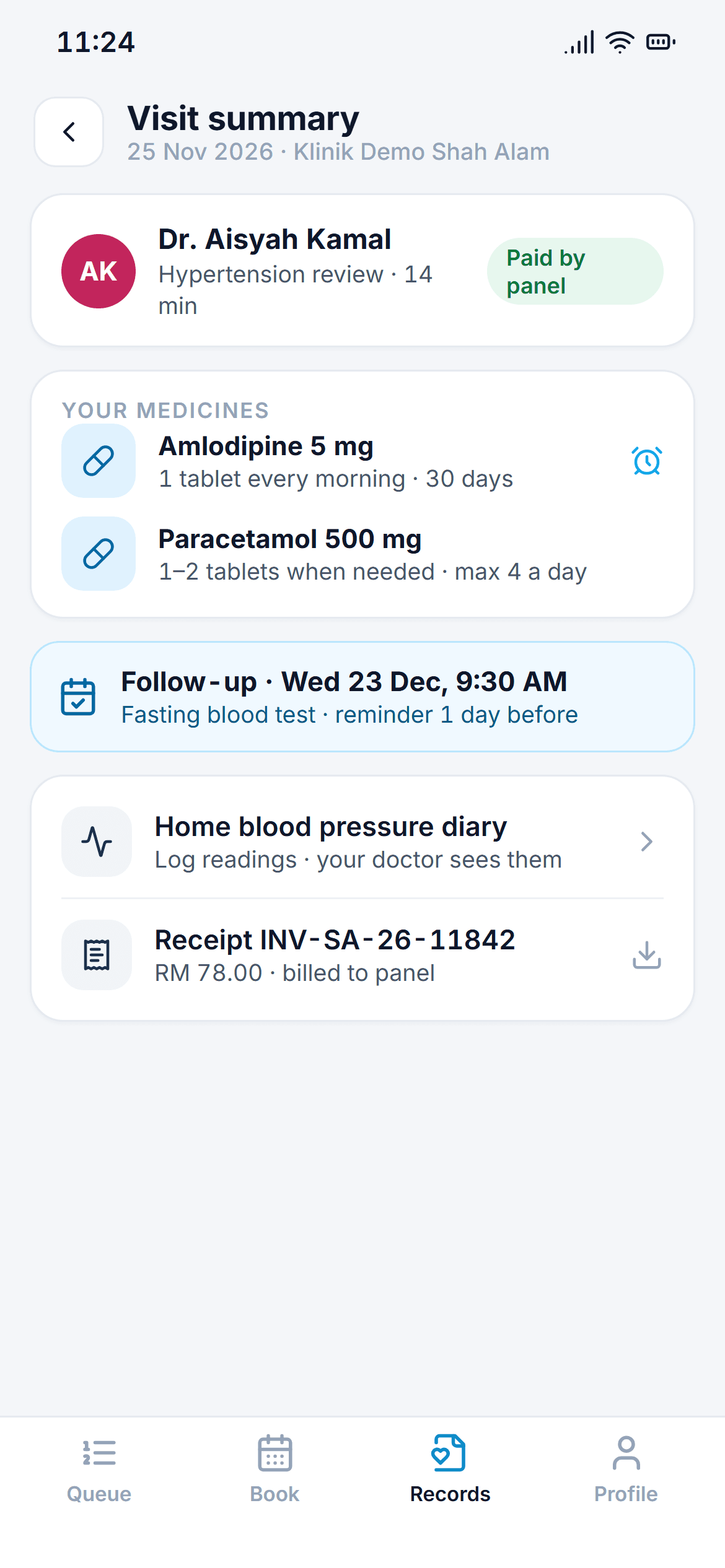
App · 02
Medicines with reminders, the follow-up date, the BP diary and the receipt.
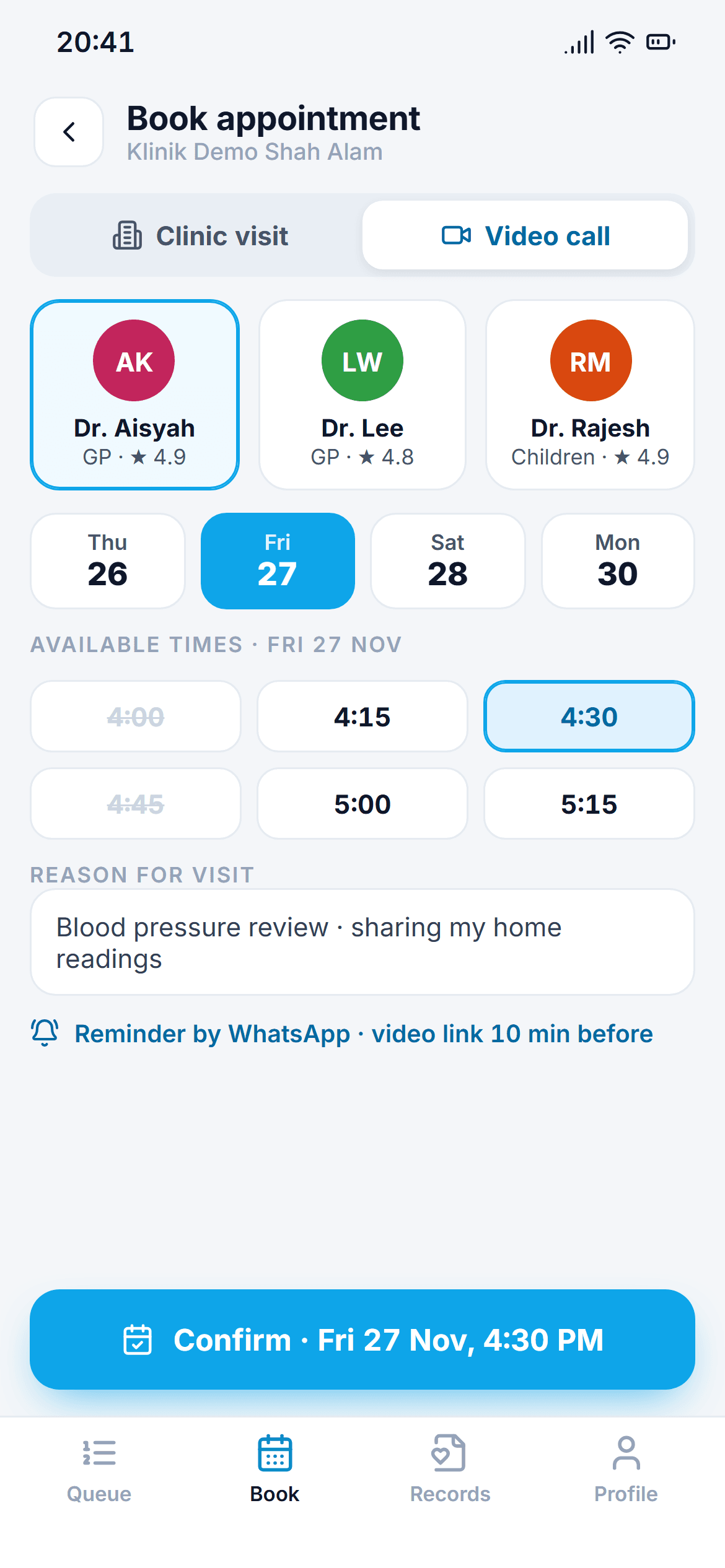
App · 03
Choose clinic or video, the doctor, the day and a free time slot.
Sample data · names, sites and times are examples, not real records
Modules
The modules of MediFlow, sharing the same records so information is entered once.
From the first hello to the consultation room.
01Dashboard
Today's patients, appointments, queue and revenue, by date and branch, for each role.
02Patient Management
Register, search and update patients, with duplicate checks and a patient timeline.
03Appointment Management
Doctor availability, clinic hours, booking status and clash checks.
04Queue Management
Queue numbers, call next, skip or recall, and check-in times to measure waiting time.
The visit itself, properly recorded.
05Consultation
Visit notes, vital signs, diagnosis, treatment and follow-up, saved as a draft then finalised.
06Prescription
Medicines from the clinic catalogue, stock checks and prescription history.
07Pharmacy
Receiving, dispensing, adjustments, batches, expiry dates and reorder levels.
08Laboratory
Test catalogue, requests, sample status and reviewed results on the patient record.
Money, people and control.
09Billing
Invoices, price lists, discounts, payments, receipts, refunds and daily collections.
10Staff Management
Staff and doctor profiles, schedules, roles and branch access.
11Reports
Operational, financial and inventory reports, with export and print.
12Multi-Branch Management
Branch settings, branch-level access and consolidated owner reports.
13System Settings
Clinic profile, services and prices, catalogues, queues, notifications and audit log.
Workflow
How a visit is designed to flow through MediFlow, with each team picking up where the last one finished.
New patients registered, returning patients found in seconds.
A booked appointment or a walk-in, checked in at the counter.
A queue number is given and the waiting list updates.
Blood pressure, temperature, pulse, SpO₂, weight and height.
History and alerts reviewed, complaint and notes recorded.
Diagnosis, treatment plan and follow-up instructions.
Medicines prescribed and lab tests requested when needed.
Medicines dispensed and the stock movement recorded.
The invoice is created from the visit and payment recorded.
Reports update and the next visit is planned.
The order can follow the way your clinic works, for example payment before dispensing.
Benefits
What MediFlow is designed to change for the people who use it every day.
Getting started
Step by step, starting from your own workflow.
Foundation
Clinic and branch setup, users, roles and permissions, and an audit log.
Front desk
Patient registration, appointments and the queue.
Clinical operations
Consultation records, vital signs, prescriptions and patient history.
Pharmacy and laboratory
Medicine stock, dispensing, and laboratory requests and results.
Finance
Price lists, invoices, payments, receipts and financial reports.
Management
Staff, multi-branch operations, analytics and settings.
Testing and acceptance
Permission, data and user acceptance testing with your clinic team.
Questions
Yes. MediFlow is available and in use by customers. Each new customer's setup starts from the modules and roles described on this page. Request a demo to see it.
No. The MediFlow screens on this page are shown with sample people, records and figures. They are not screenshots of any customer's system and contain no real customer data.
Yes. The roles, workflow steps and the details of each module are agreed with you during setup.
No connections to other systems are assumed. If you need MediFlow to work with another system, it is discussed and agreed during scoping.
MediFlow is not presented as clinically validated or certified. Clinical workflows, terminology and privacy requirements are reviewed with qualified healthcare stakeholders before any use.
Request a demo
See how MediFlow can help streamline your clinic operations and improve day-to-day management.