
The problem
Borrower details and documents are spread across files and folders.
Each application is matched to one borrower record, with a document checklist before review.
Finance & Business Management
Every Loan Account, Clearly Recorded and Serviced.
LoanPro runs loan administration from application to final payment: borrowers apply and verify their identity on the phone, documents are read for the loan officer, agreements are e-signed, repayments are made by QR or payment link and reminders go out automatically. Every credit decision stays with your staff.
Screens shown with sample data
What it does
LoanPro is designed to keep loan administration in order. An application is matched to its borrower, documents are checked and an assessment is recorded for an authorised decision maker. The agreement, repayment schedule and disbursement are recorded, receipts are allocated to instalments, and follow-up is noted on the account. LoanPro records decisions made by people; it does not make credit decisions.
Who it’s for
User roles
Product status: available and in use. LoanPro is a Zensoft product in use by customers, set up for each customer's roles and workflow. The screens on this page are shown with sample people and figures, not any customer's records.
Problems it addresses
The problem
Each application is matched to one borrower record, with a document checklist before review.
The problem
Receipts are allocated to instalments on the repayment schedule, so the balance stays current.
The problem
An arrears queue groups accounts by days overdue, and servicing notes are kept on the account.
Built for responsible lending
Lending happens at the branch, on the borrower's phone and in the management office. LoanPro keeps every step clear, recorded and in staff hands.

eKYC at home

At the branch

e-Signing the agreement

Paying by QR

Portfolio review
Illustrative photos.
Key features
8 key capabilities of LoanPro, shown in the product screens below.
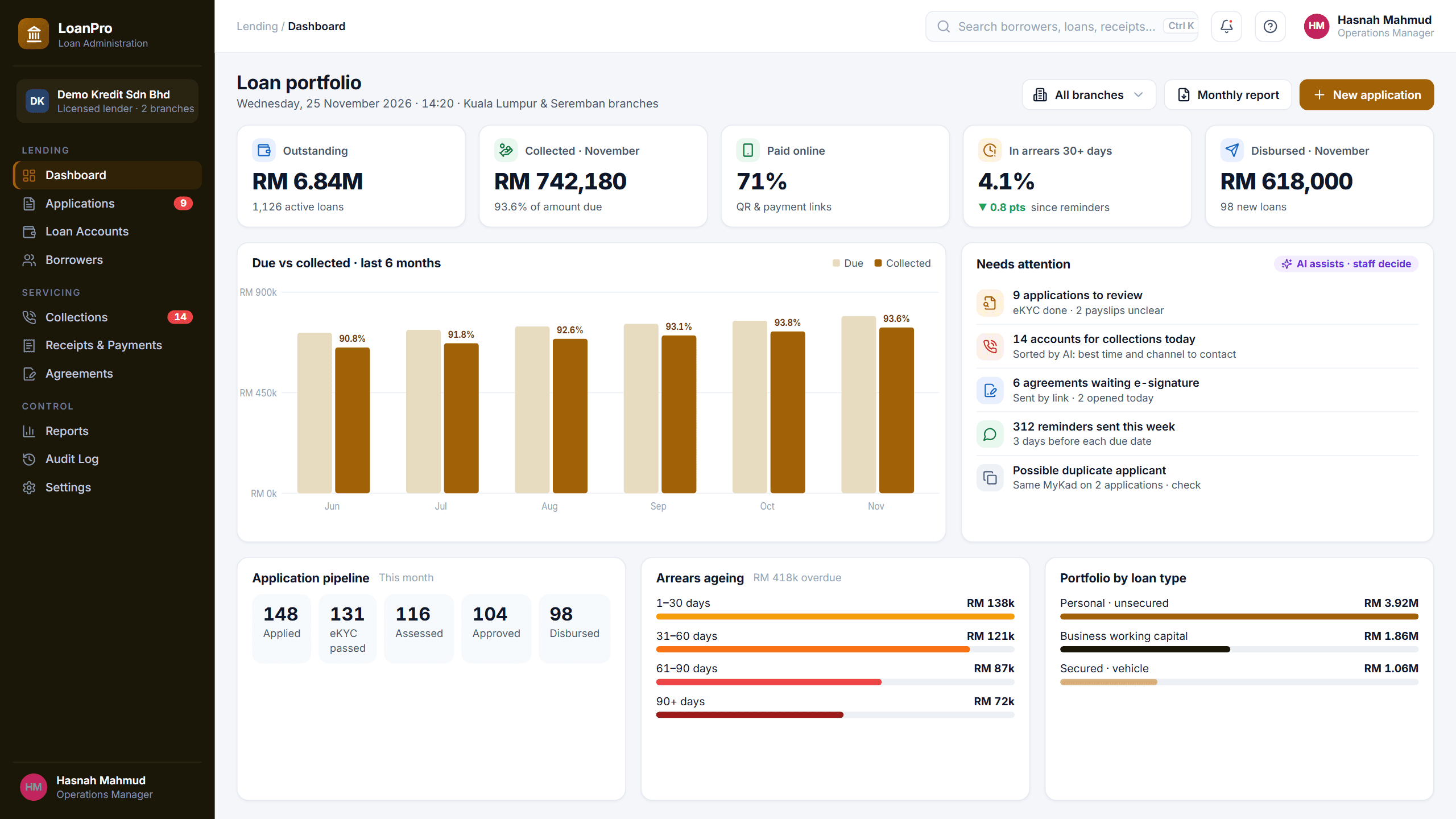
Outstanding loans, collections, online payments, arrears and disbursements, with the application pipeline and arrears ageing.
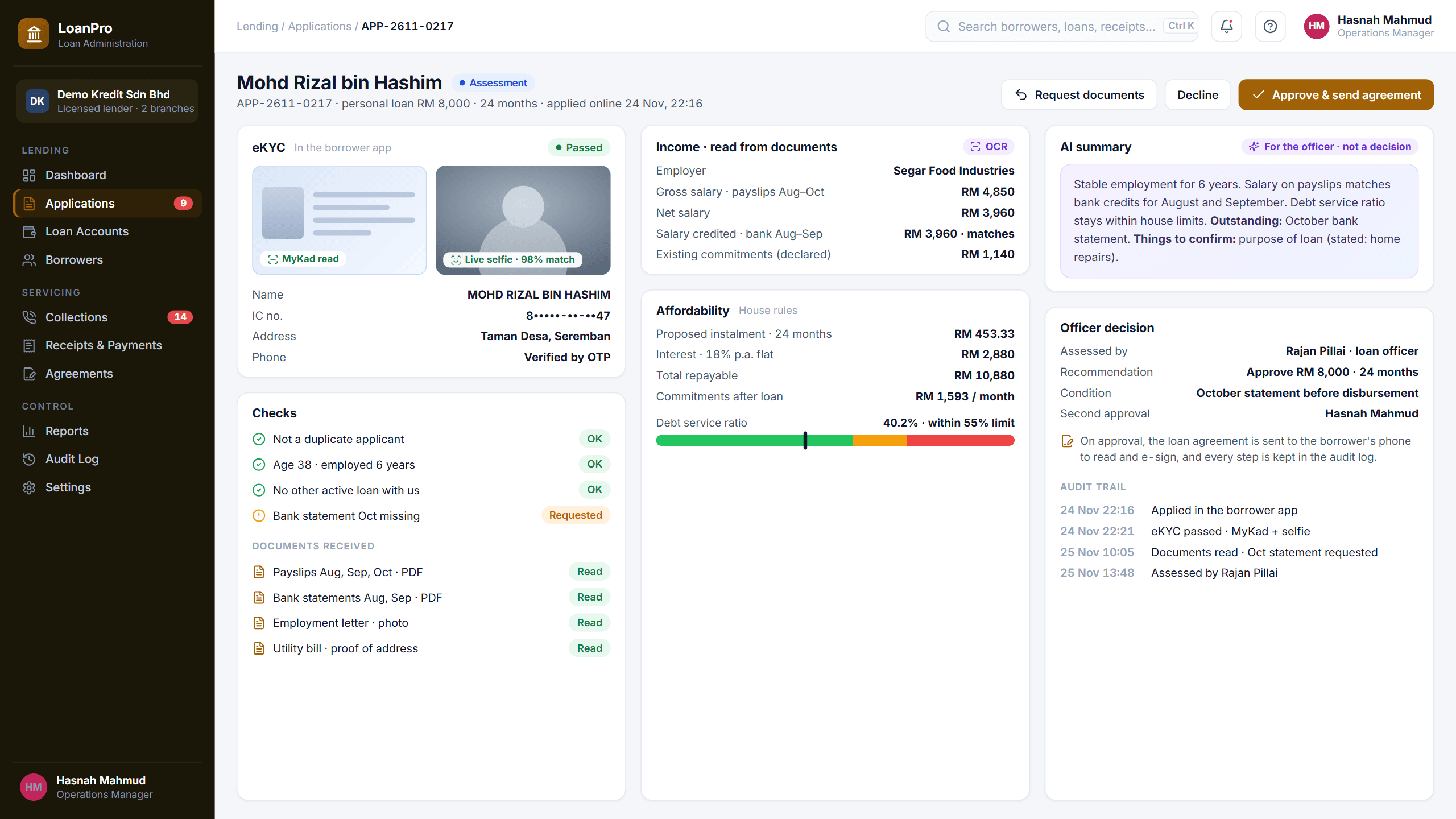
Borrowers apply on their phone and upload payslips, bank statements and other documents.
MyKad read by the camera and a live selfie matched to it, with the phone number verified by OTP.
Income read from payslips and bank statements and checked against each other for the loan officer.
Instalment, interest, total repayable and debt service ratio worked out against your house rules.
Agreements sent to the borrower's phone to read in English or Bahasa Melayu and sign with OTP.
Borrowers pay by QR, payment link or auto-debit, and receipts are allocated automatically.
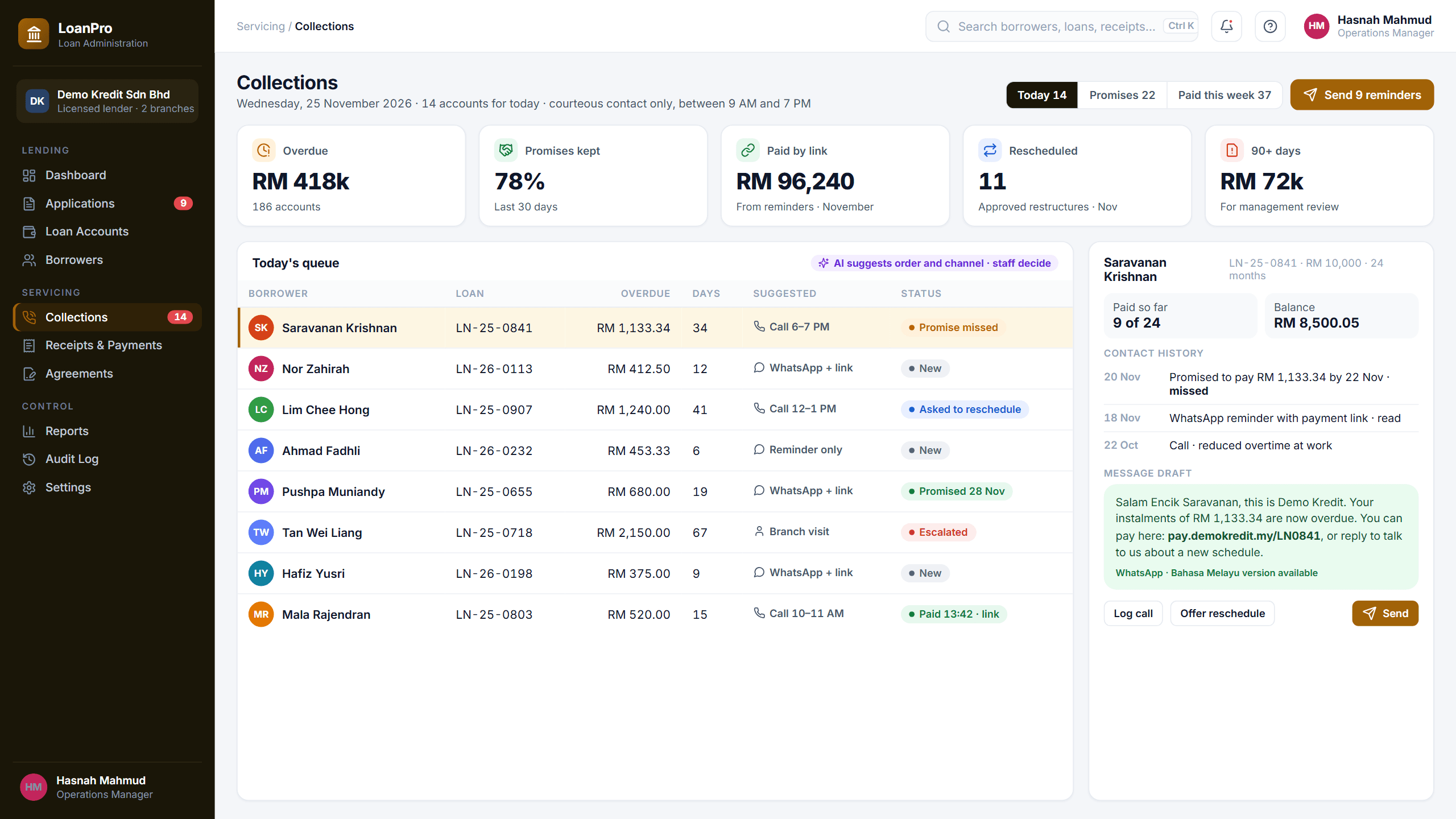
Reminders before each due date, and a collections queue with AI-suggested timing and channel.
Smart technology
LoanPro uses modern technology to remove paperwork and late payments, while every credit decision stays with your staff.
MyKad scan and live selfie match, with OTP-verified phone numbers.
Income read from payslips and bank statements.
A short summary for the loan officer, never an automated decision.
Agreements read and signed on the phone with OTP.
Repayments by QR, link or auto-debit, allocated automatically.
Courteous reminders before each due date, in English or Bahasa Melayu.
Apply, sign, pay and see the loan balance on the phone.
Every application step, decision and payment recorded.
Product screens
Four screens of LoanPro, from the dashboard to the reports, shown with sample data. Select a screen to enlarge it.
Screen 01 · Dashboard
Outstanding loans, collections and arrears, due against collected by month, the application pipeline and what needs attention.
Sample data · people, IDs, dates and figures are examples, not real records
Screen 02 · Application
eKYC, checks and documents read by OCR, an affordability calculation, an AI summary for the officer and the officer's decision.
Sample data · people, IDs, dates and figures are examples, not real records
Screen 03 · Management
Today's accounts with AI-suggested timing and channel, contact history and a courteous reminder with a payment link.
Sample data · people, IDs, dates and figures are examples, not real records
Screen 04 · Reports & analytics
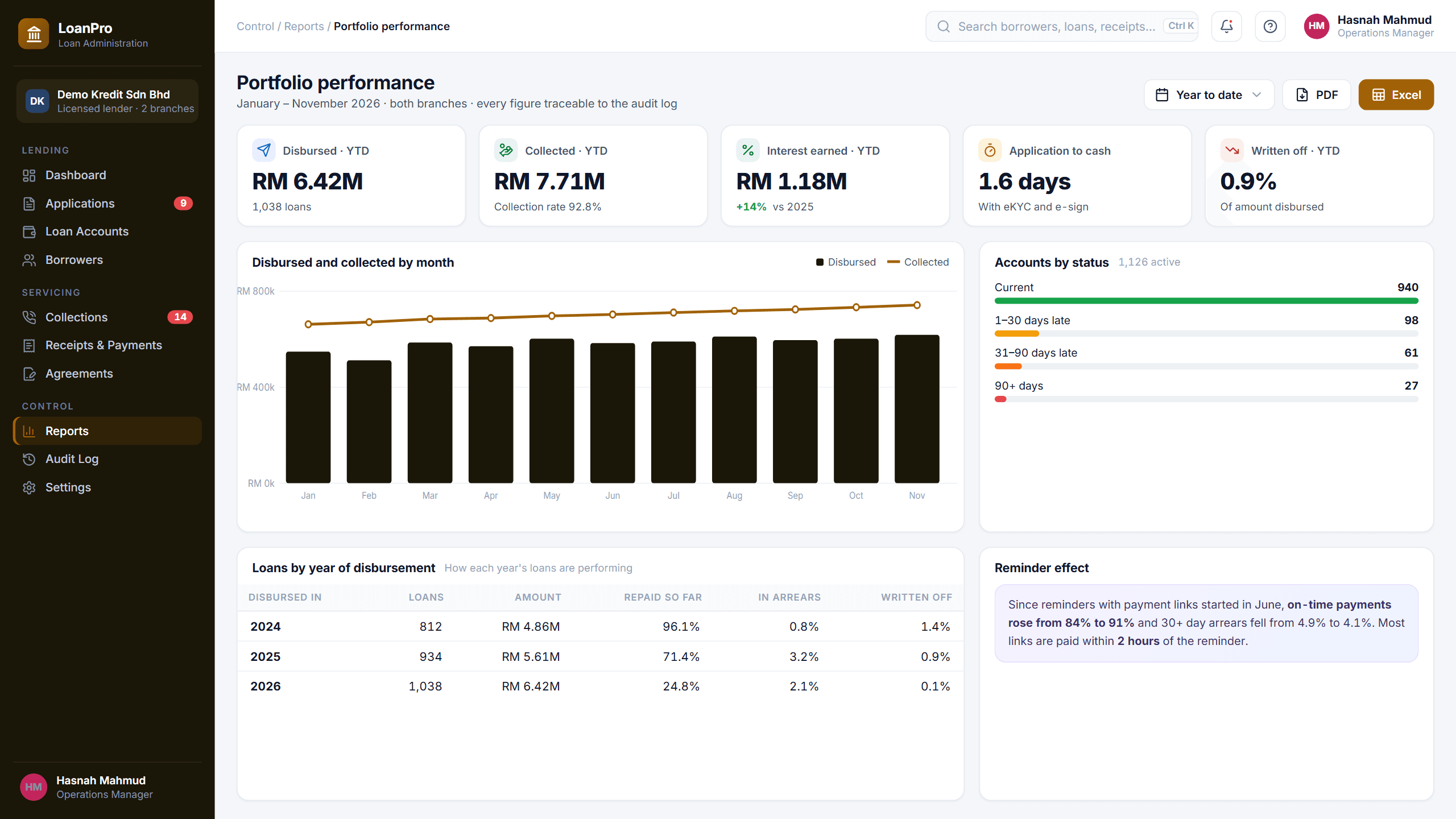
Disbursed and collected by month, accounts by status, loans by year of disbursement and the effect of reminders.
Sample data · people, IDs, dates and figures are examples, not real records
Borrower app
Borrowers verify their identity, read and e-sign their agreement and pay each instalment by QR, with reminders before every due date.
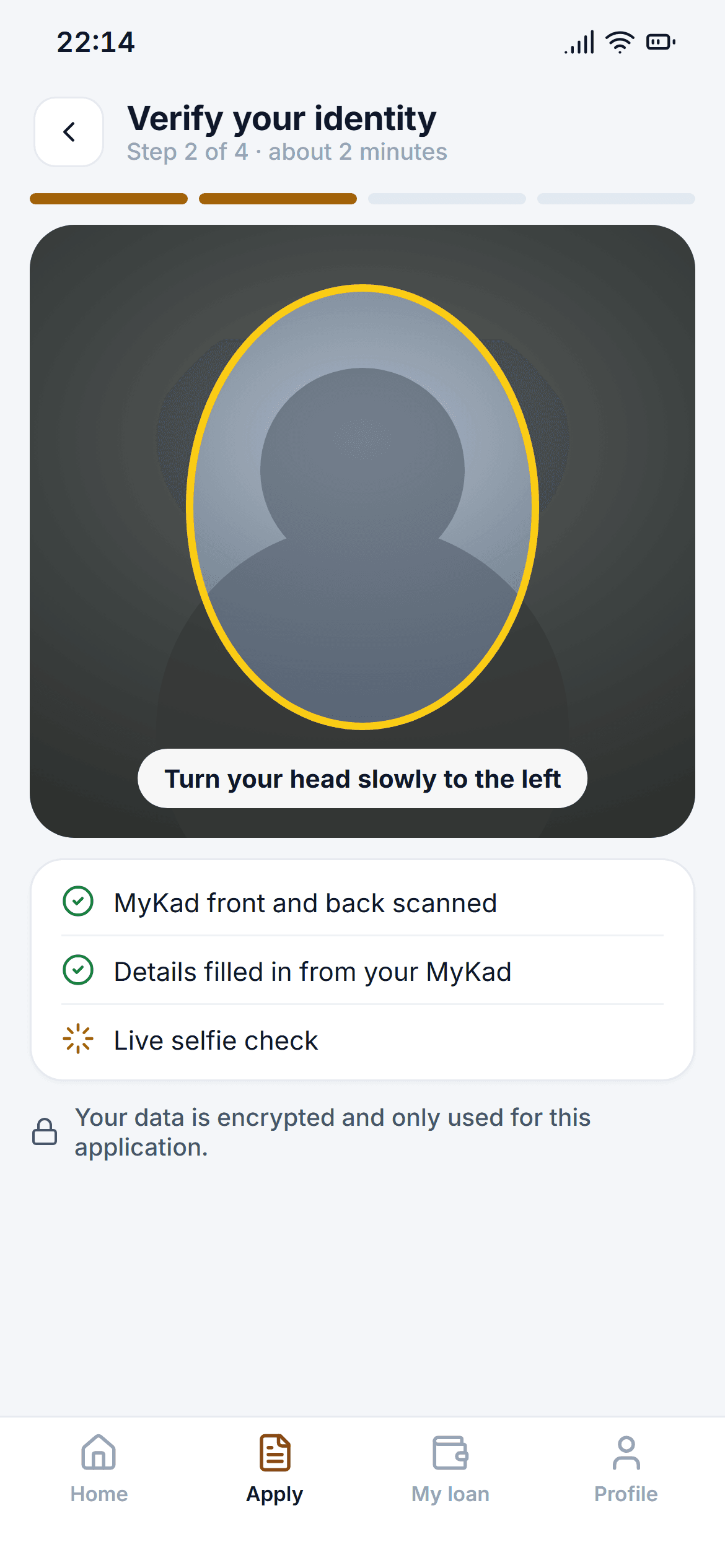
App · 01
MyKad scanned and a live selfie check, in about two minutes.
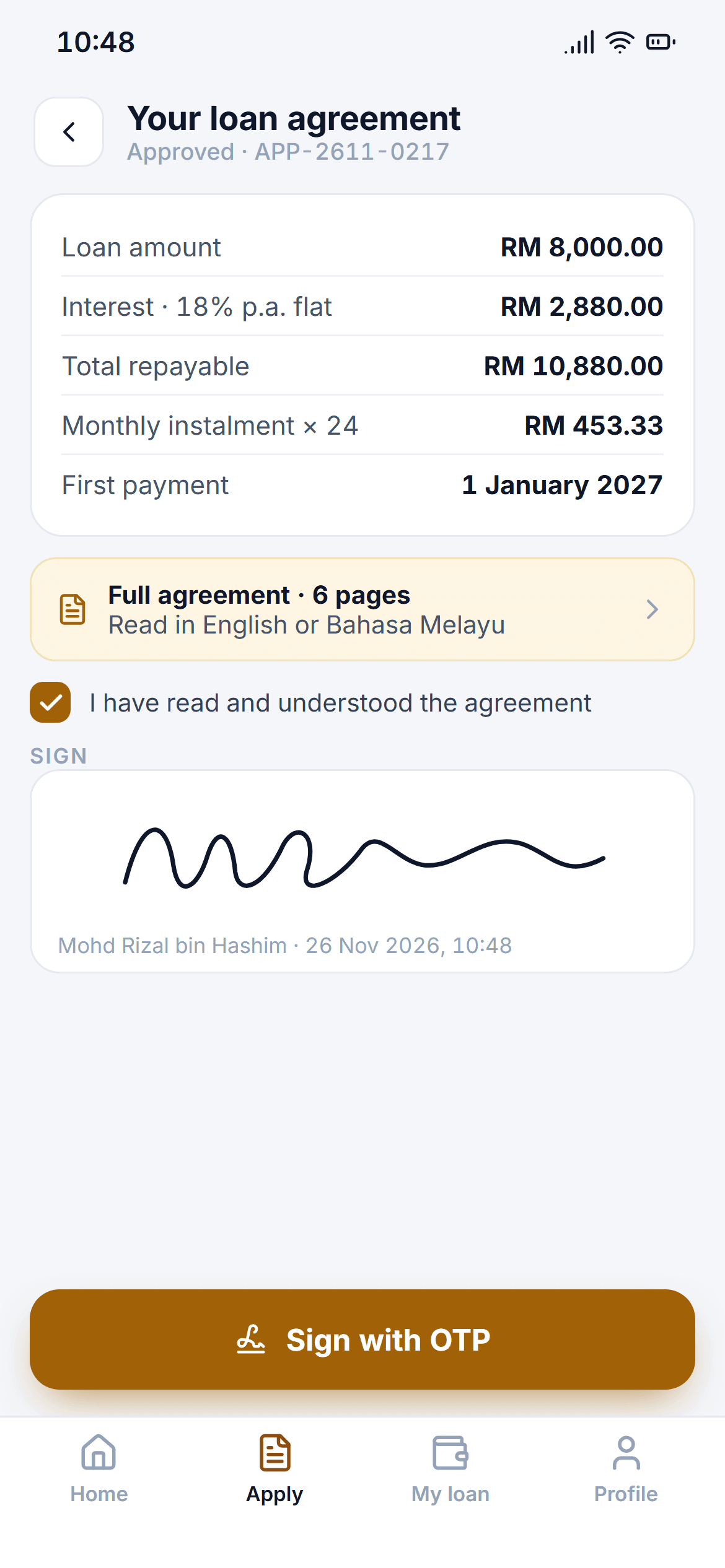
App · 02
The loan terms, the full agreement and a signature confirmed by OTP.
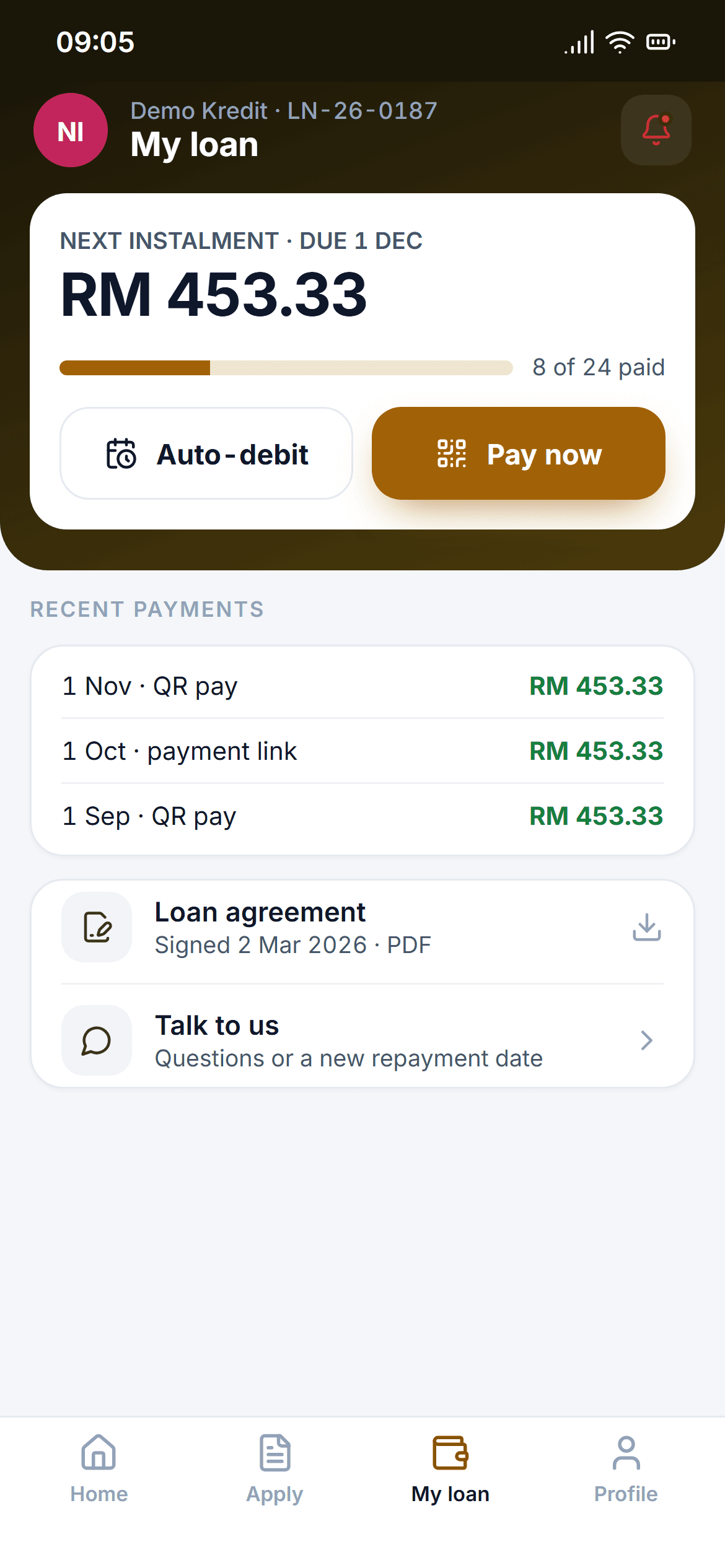
App · 03
The next instalment, progress and recent payments, paid by QR.
Sample data · names, sites and times are examples, not real records
Modules
The modules of LoanPro, sharing the same records so information is entered once.
Before the loan is made.
01Loan Book Dashboard
Accounts, amounts due and follow-up.
02Borrower Records
Borrower details and their accounts.
03Application Register
Applications and their stage.
04eKYC & Document OCR
MyKad, selfie and income documents checked.
Terms, decisions and contracts.
05Loan Products & Terms
The products and terms the business offers.
06Review & Approval
Assessment records for authorised decisions.
07e-Signed Agreements
Agreements signed on the phone with OTP.
08Repayment Schedule
Instalments and due dates.
After the loan is made.
09QR Repayments & Allocation
QR, link and auto-debit payments allocated to instalments.
10Reminders & Collections
Reminders and an AI-sorted collections queue.
11Servicing Notes
Contact and servicing activity on the account.
12Reports
Portfolio and servicing reports.
Workflow
How a loan account is designed to move through LoanPro.
At each step the record is designed to show its status, owner, next action and due date, and authorised users can return incomplete work with a reason.
Benefits
What LoanPro is designed to change for the people who use it every day.
Getting started
Step by step, starting from your own workflow.
Confirm scope and roles
We agree which modules, roles and rules your organisation needs.
Configure the workflow and records
Your workflow and the records it keeps are set up and approved with you.
Try it with sample data
Your team tries the system with sample data first, never your real records.
Review permissions and exceptions
Access rights, returned work and corrections are checked.
Go live with one workflow first
One end-to-end workflow goes live before the next is added.
Verify with your team
The people who use it confirm it works for them, and then more is added.
Questions
Yes. LoanPro is available and in use by customers. Each new customer's setup starts from the modules and roles described on this page. Request a demo to see it.
No. The LoanPro screens on this page are shown with sample people, records and figures. They are not screenshots of any customer's system and contain no real customer data.
Yes. The roles, workflow steps and the details of each module are agreed with you during setup.
No connections to other systems are assumed. If you need LoanPro to work with another system, it is discussed and agreed during scoping.
LoanPro is an administration system. It does not make automated credit decisions, and no regulatory compliance is claimed.
Request a demo
See LoanPro in a demo with our team and tell us how your applications, agreements and repayments are handled today.