
The problem
Shipment details are copied between quotations, emails and spreadsheets.
An approved quotation becomes one shipment file holding the route, carrier, dates, cargo and documents.
Logistics & Transportation
Every Shipment File, From Quotation to Billing.
FreightFlow runs forwarding from enquiry to invoice: enquiries become quotes in minutes, accepted quotes become shipment files, milestones update from carrier feeds, documents are read and checked by AI, customers track shipments in their own app, and every file shows its profit.
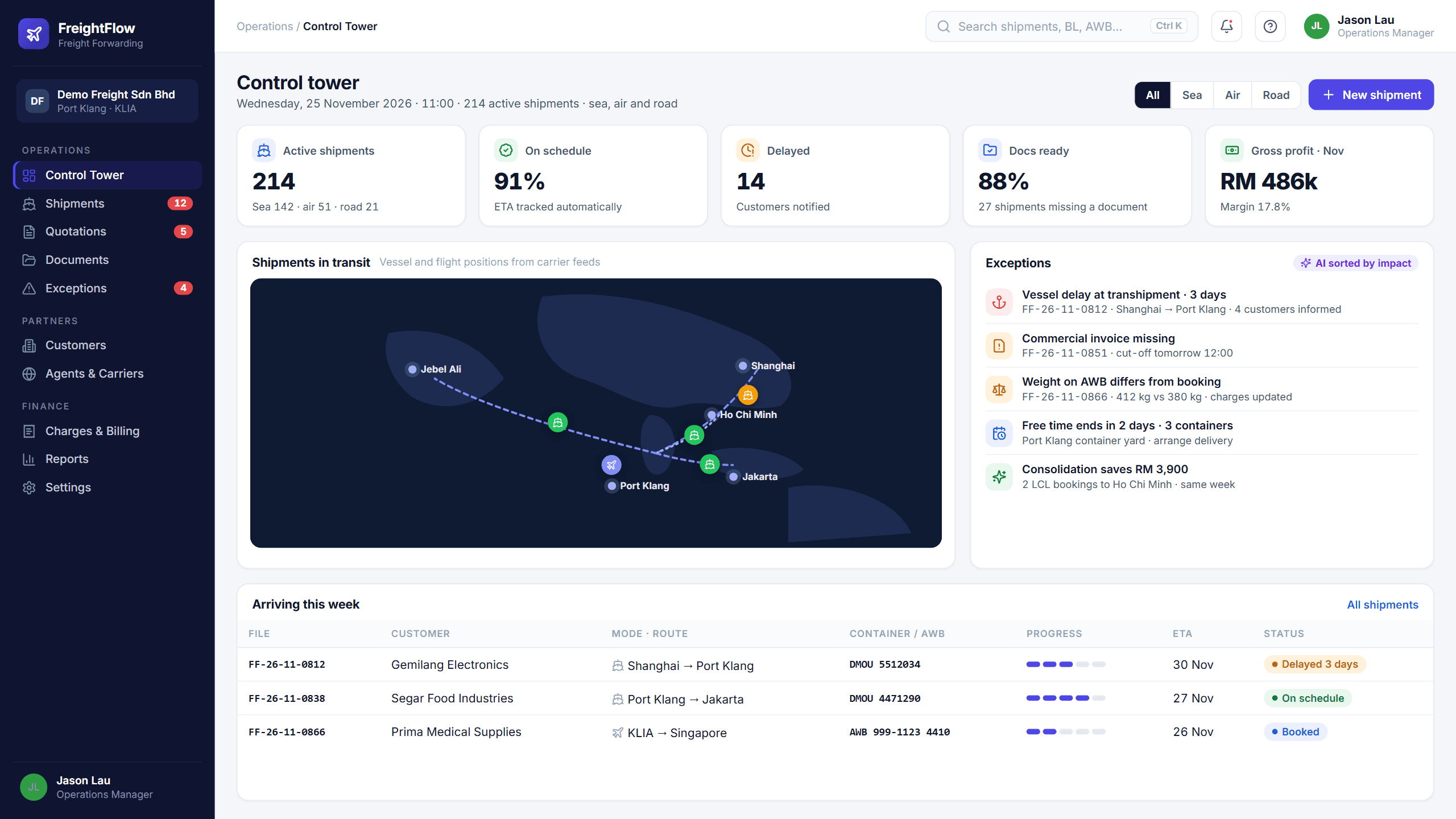
Screens shown with sample data
What it does
FreightFlow is designed around the shipment file. An enquiry's route and cargo details lead to an approved quotation, which becomes a shipment file with its carrier and movement details. Documents are checked, milestones and exceptions are recorded as the shipment moves, charges are reconciled and the file is handed over for billing, with service and margin reports afterwards.
Who it’s for
User roles
Product status: available and in use. FreightFlow is a Zensoft product in use by customers, set up for each customer's roles and workflow. The screens on this page are shown with sample people and figures, not any customer's records.
Problems it addresses
The problem
An approved quotation becomes one shipment file holding the route, carrier, dates, cargo and documents.
The problem
A document checklist and a milestone timeline with planned and actual dates show what needs attention.
The problem
The charge and cost sheet is reconciled against the file before it is handed to billing.
Built for the work on the ground
Forwarding work runs across the operations desk, the port, the air cargo terminal and the customer's own warehouse. FreightFlow keeps everyone working from the same shipment file.

Air cargo acceptance

Operations control tower

Tracking from the warehouse

Sea freight at the port

Snapping shipment documents
Illustrative photos.
Key features
8 key capabilities of FreightFlow, shown in the product screens below.
Active shipments by mode, on-schedule and delayed files, missing documents and gross profit, with a live map and AI-sorted exceptions.
Enquiries read from the customer's email, carrier options compared and the margin worked out before sending.
Shipper, consignee, carrier, vessel, bill of lading, containers, cargo and agent in one file, created from the accepted quote.
Milestones and ETAs updated from carrier and agent feeds, with delays flagged straight away.
Bills of lading, invoices and packing lists read and checked against the booking and each other.
Delay notices, milestone updates and a live tracking link sent by email and WhatsApp.
Charges and costs side by side for every file, with gross profit and invoice preparation.
Shipments by mode, margin by mode, top trade lanes and quote win rate.
Smart technology
FreightFlow uses modern technology to cut typing, spot delays early and keep customers informed without being asked.
Every shipment on one map, with exceptions sorted by impact.
Milestones and ETAs updated automatically.
BLs, invoices and packing lists read and cross-checked.
Enquiries turned into draft quotes in minutes.
Best carrier option, consolidations and storage-charge alerts.
Delays and milestones sent by email and WhatsApp.
Track shipments, accept quotes and upload documents.
Charges and costs side by side before invoicing.
Product screens
Four screens of FreightFlow, from the dashboard to the reports, shown with sample data. Select a screen to enlarge it.
Screen 01 · Dashboard
Every active shipment on a live map, AI-sorted exceptions and what arrives this week.
Sample data · people, IDs, dates and figures are examples, not real records
Screen 02 · Main operations
One shipment's details, milestones from carrier feeds, documents checked by AI, customer updates and profit.
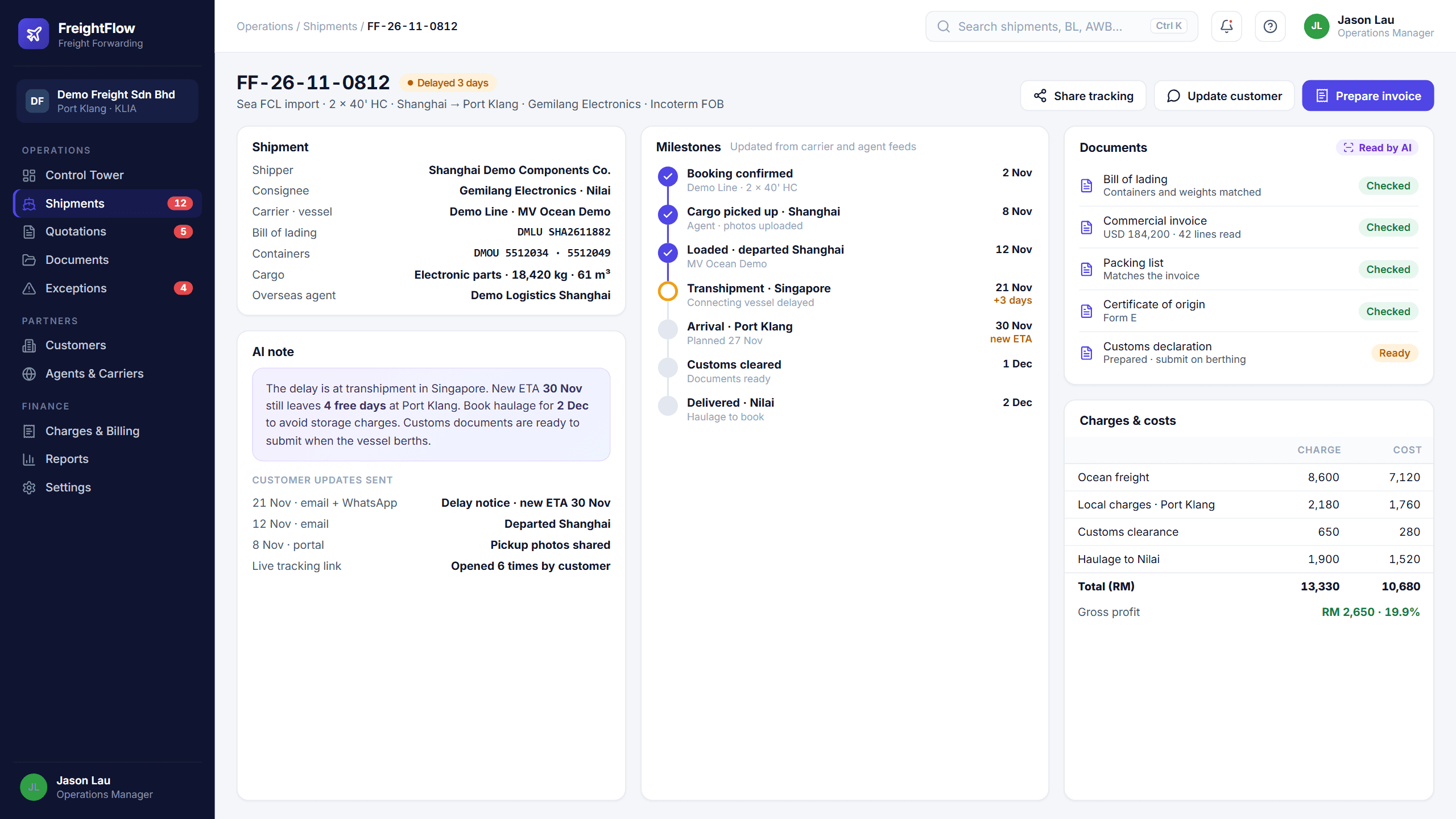
Sample data · people, IDs, dates and figures are examples, not real records
Screen 03 · Quotation
An enquiry read from email, carrier options compared, an AI suggestion and the quote with its cost and margin.
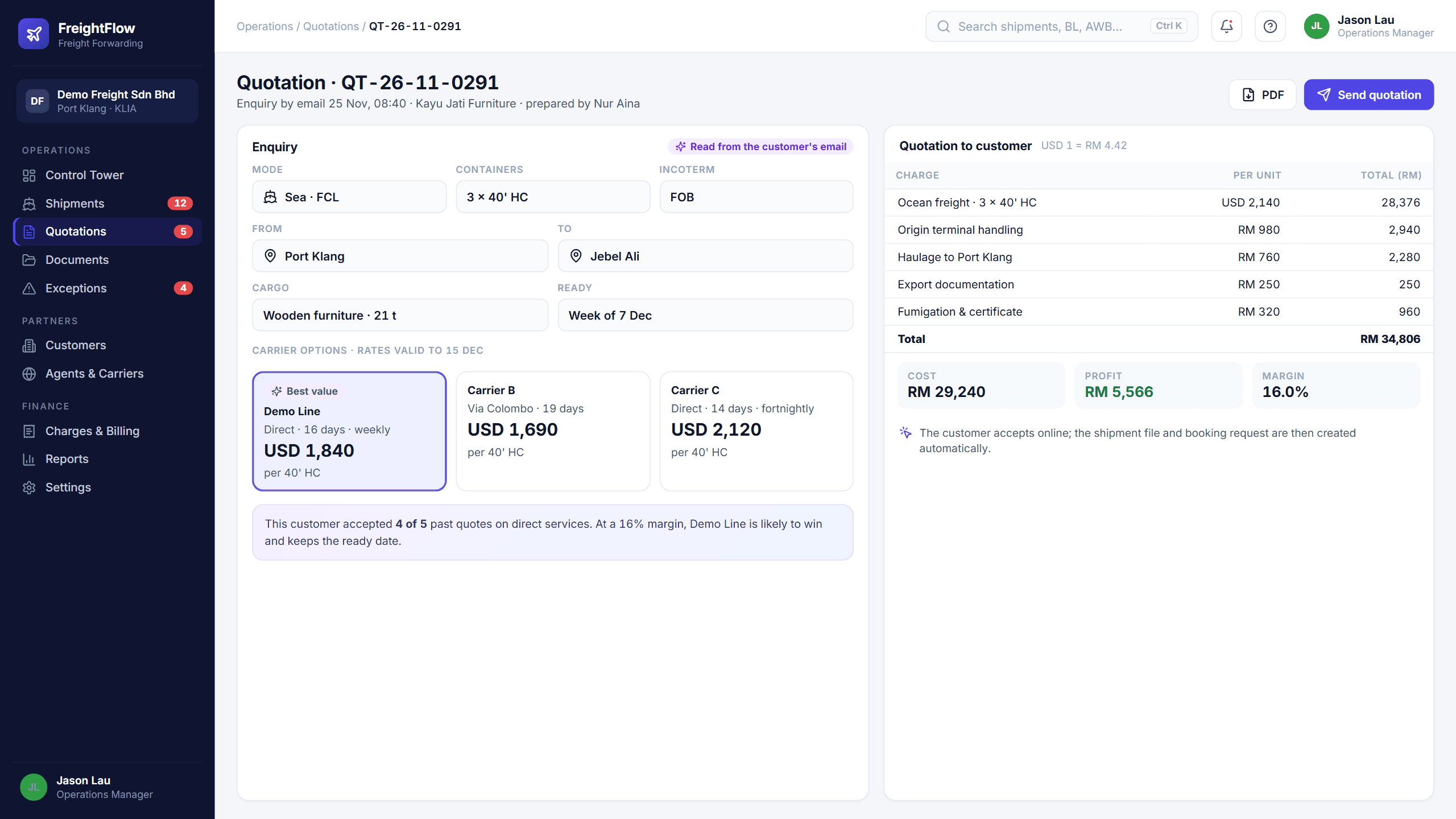
Sample data · people, IDs, dates and figures are examples, not real records
Screen 04 · Reports & analytics
Shipments by month and mode, margin by mode, top trade lanes and an AI insight.
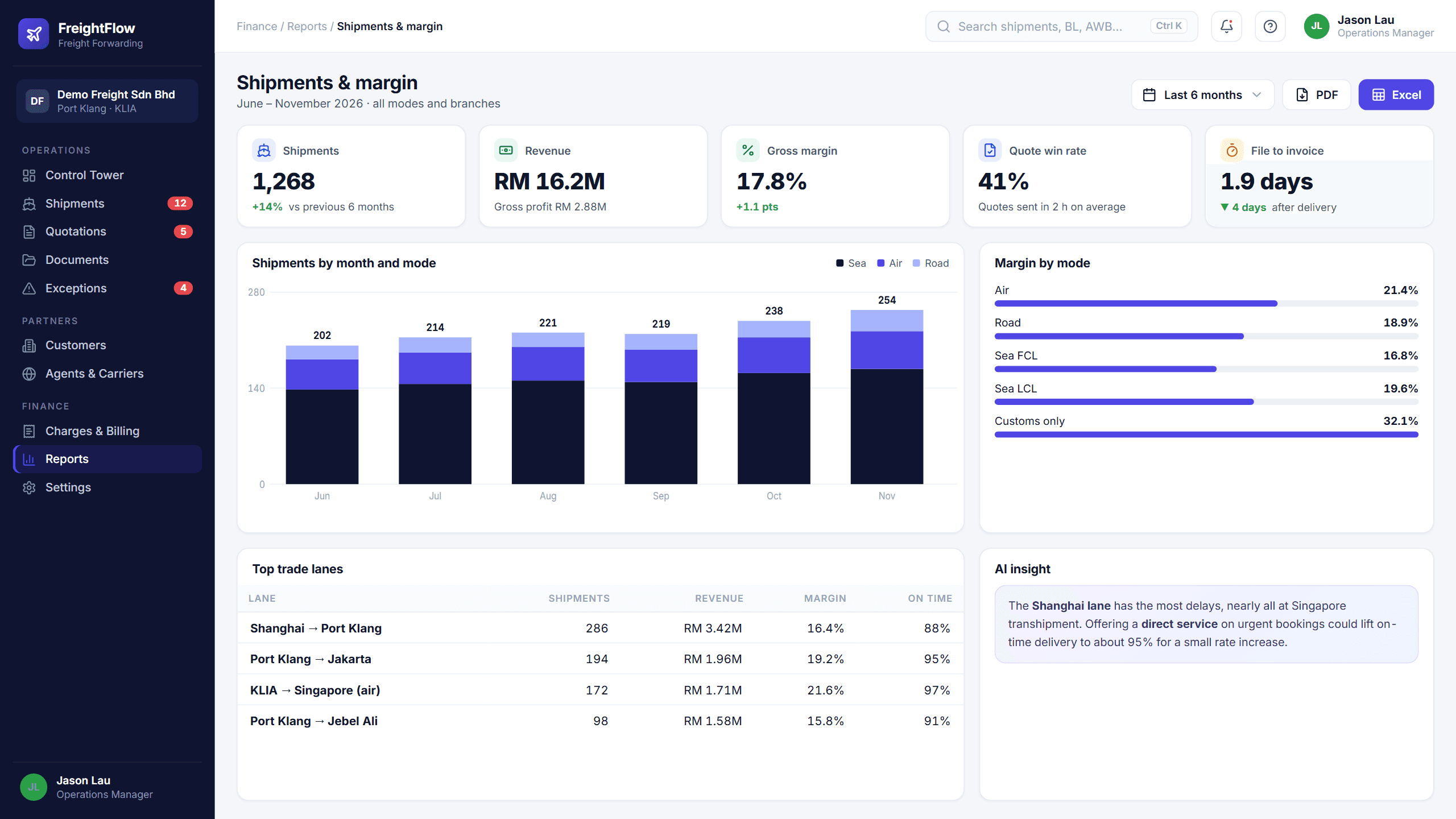
Sample data · people, IDs, dates and figures are examples, not real records
Customer app
Customers follow their shipments on a map, accept quotations and upload documents that are checked straight away.
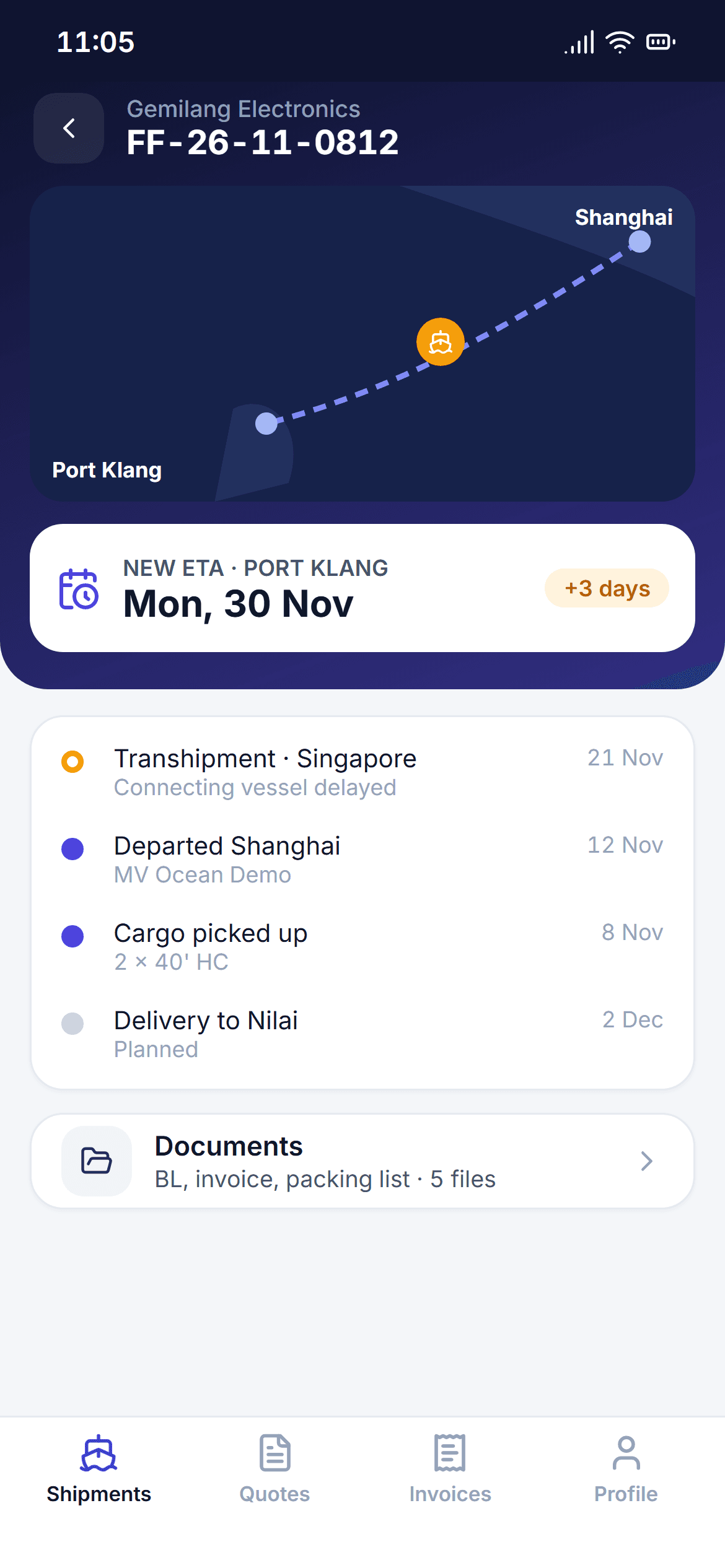
App · 01
The vessel on the map, the revised ETA and each milestone.
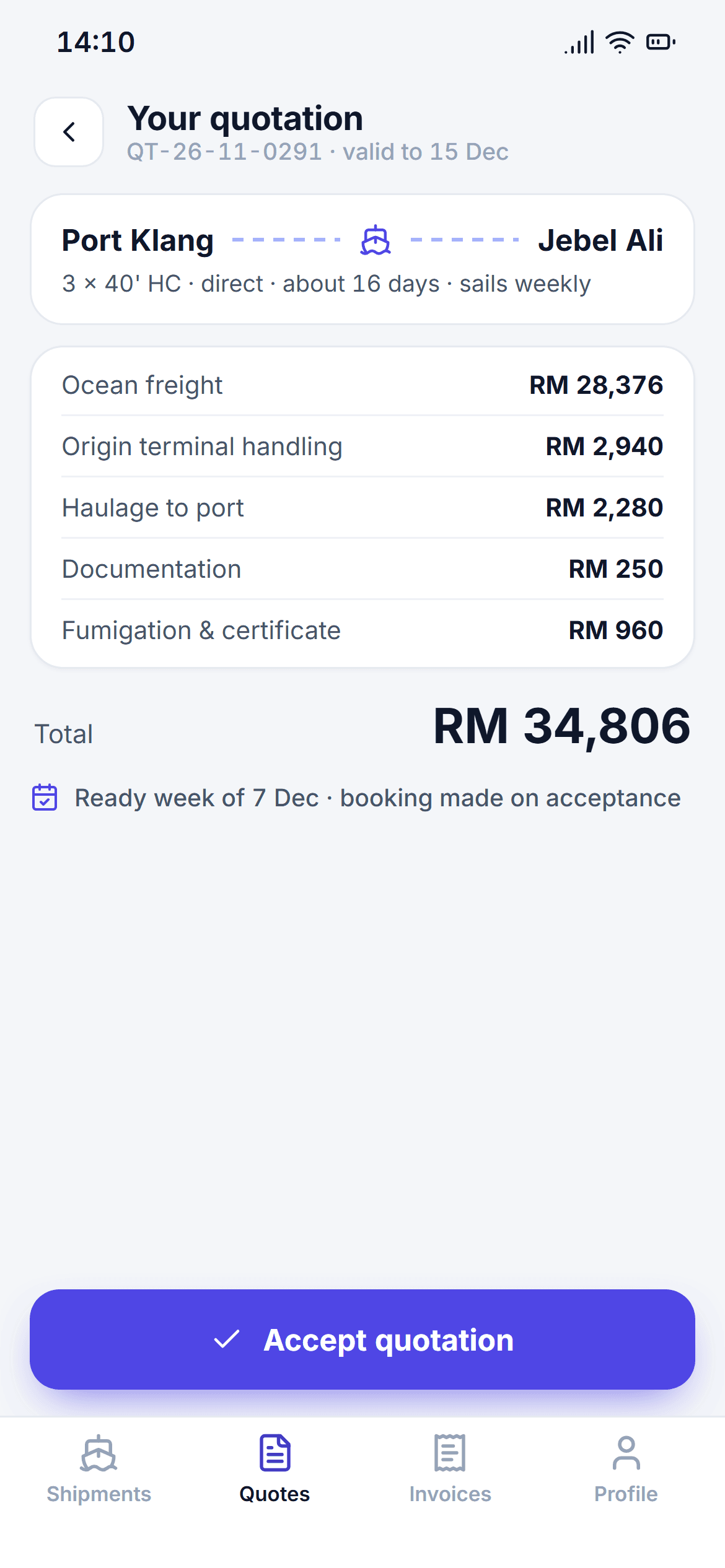
App · 02
Route, service, charges and total, accepted in one tap.
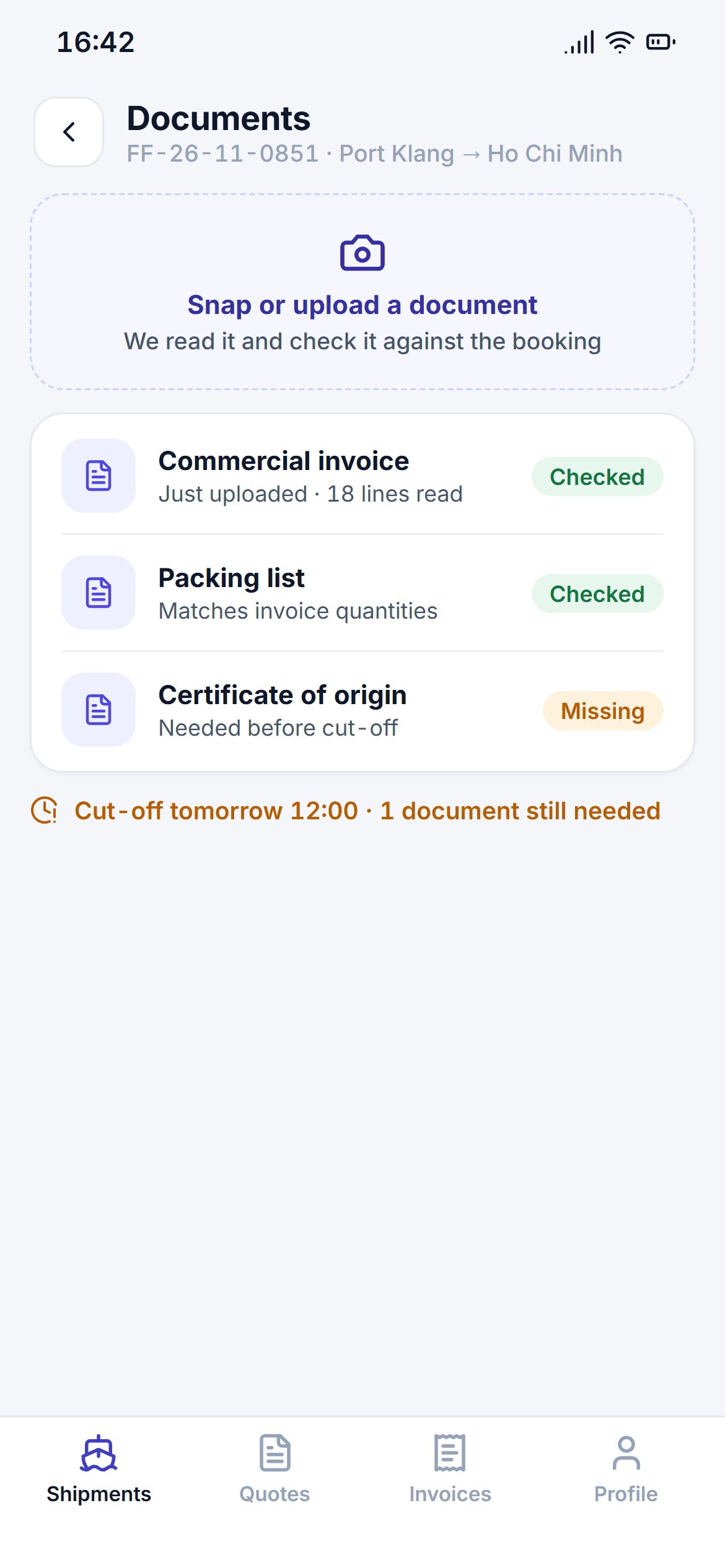
App · 03
Snap a document; it is read and checked against the booking.
Sample data · names, sites and times are examples, not real records
Modules
The modules of FreightFlow, sharing the same records so information is entered once.
Winning and setting up the work.
01Freight Dashboard
Open shipments, departures and exceptions.
02Customer & Agent Directory
Customers and overseas agents.
03Quotation Register
Quotations and their approval.
04Carrier / Service Register
Carriers and the services used.
Moving the cargo.
05Shipment File
The shipment's details in one file.
06Routing / Mode Details
Route segments and service mode.
07Milestone Timeline
Planned and actual milestones.
08Document Checklist & Versions
Documents and their versions.
Closing the file out.
09Charge & Cost Sheet
Charges and costs for the shipment.
10Billing Handoff
Reconciled charges handed to billing.
11Exception Queue
Shipment exceptions to act on.
12Reports & Audit
Service and margin reports, with audit history.
Workflow
How a shipment is designed to move through FreightFlow.
At each step the record is designed to show its status, owner, next action and due date, and authorised users can return incomplete work with a reason.
Benefits
What FreightFlow is designed to change for the people who use it every day.
Getting started
Step by step, starting from your own workflow.
Confirm scope and roles
We agree which modules, roles and rules your organisation needs.
Configure the workflow and records
Your workflow and the records it keeps are set up and approved with you.
Try it with sample data
Your team tries the system with sample data first, never your real records.
Review permissions and exceptions
Access rights, returned work and corrections are checked.
Go live with one workflow first
One end-to-end workflow goes live before the next is added.
Verify with your team
The people who use it confirm it works for them, and then more is added.
Questions
Yes. FreightFlow is available and in use by customers. Each new customer's setup starts from the modules and roles described on this page. Request a demo to see it.
No. The FreightFlow screens on this page are shown with sample people, records and figures. They are not screenshots of any customer's system and contain no real customer data.
Yes. The roles, workflow steps and the details of each module are agreed with you during setup.
No connections to other systems are assumed. If you need FreightFlow to work with another system, it is discussed and agreed during scoping.
Request a demo
See FreightFlow in a demo with our team and tell us how your quotations, shipment files and documents are handled today.