
The problem
Overtime and allowance inputs arrive late and without their source.
Each variable input is reviewed against its source, quantity, rate and cost centre before it enters the pay run.
Human Resources & Administration
Every Pay Run Reviewed Before It Is Approved.
PayMaster prepares every pay run with fewer surprises: overtime and claims flow in automatically, AI flags anything unusual before approval, approvers sign off on their phone, and employees get e-payslips, claims and leave in their own app.
Screens shown with sample data
What it does
PayMaster is designed around the pay period. Pay profiles and components are maintained once, the period is opened, variable inputs such as overtime are reviewed against their source, exceptions are resolved and the calculation is previewed. Approvers sign off in sequence, the period is locked, and payslips and a payment and accounting summary are prepared for export.
Who it’s for
User roles
Product status: available and in use. PayMaster is a Zensoft product in use by customers, set up for each customer's roles and workflow. The screens on this page are shown with sample people and figures, not any customer's records.
Problems it addresses
The problem
Each variable input is reviewed against its source, quantity, rate and cost centre before it enters the pay run.
The problem
Exceptions are flagged and pay is previewed per employee before approval and before the period is locked.
The problem
Employees snap receipts and apply for leave in the app; approved claims and leave flow straight into the pay run.
Built for payday
Payroll touches the HR office, the finance director, the shop floor and every employee's phone. PayMaster keeps them all on the same, checked numbers.

Payslip on the phone

Payroll team

Snapping a claim receipt

Approval on the tablet

Shift attendance
Illustrative photos.
Key features
8 key capabilities of PayMaster, shown in the product screens below.
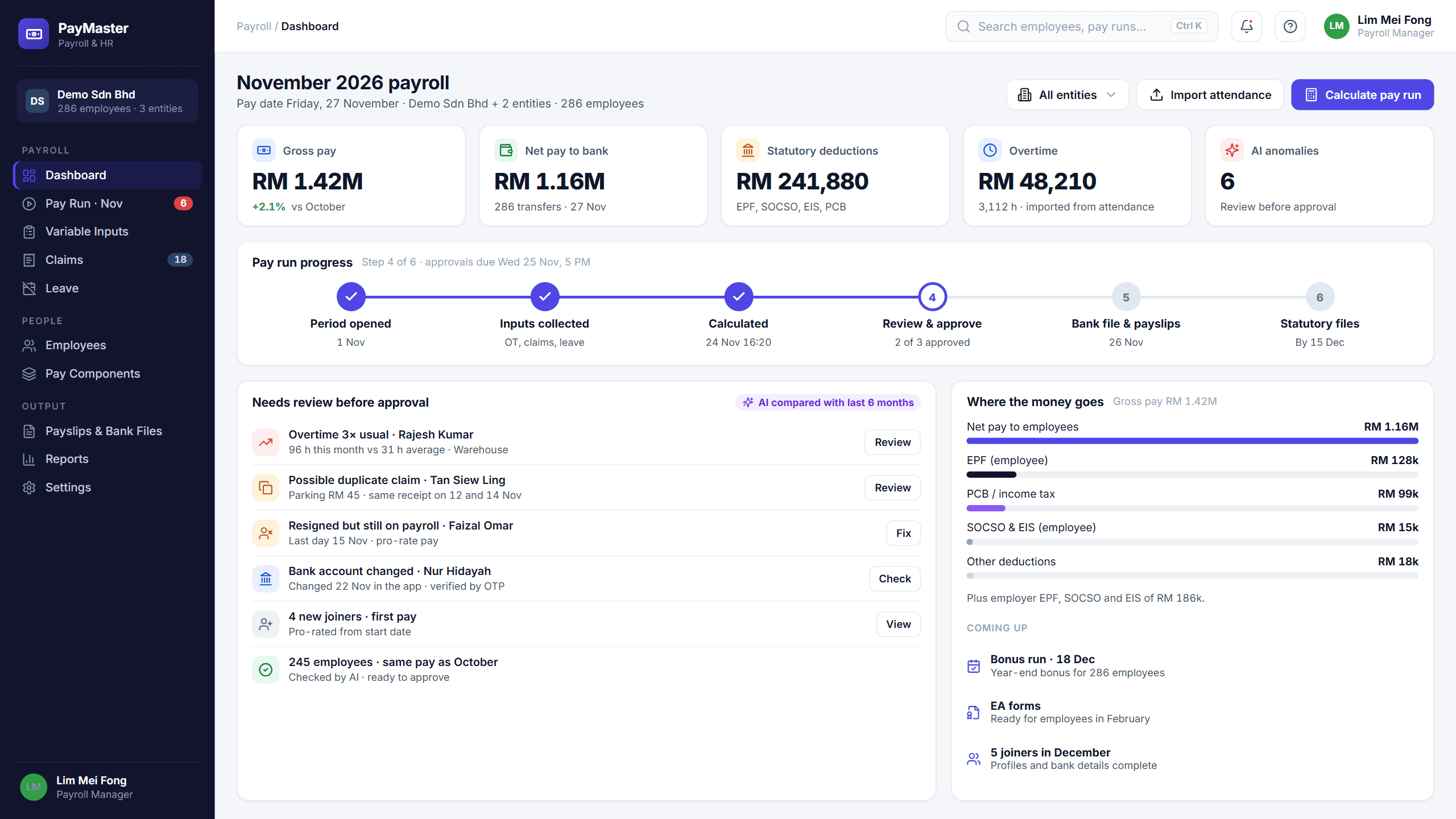
Gross and net pay, statutory deductions, overtime and AI anomalies, with the pay run's progress step by step.
Each employee's pay compared with past months, flagging unusual overtime, duplicate claims and leavers still on payroll.
EPF, SOCSO, EIS and PCB calculated for every employee, set up and reviewed with your payroll adviser.
Overtime and attendance imported for the period and reviewed before they are paid.
Receipts photographed in the app; amount, date and merchant filled in and checked against policy.
Pay runs, claims and leave approved in sequence, with an audit history.
Bank payment files and EPF, SOCSO, EIS and PCB files prepared when the period is locked.
e-Payslips, year-to-date totals, claims and leave for every employee.
Smart technology
PayMaster uses modern technology to catch mistakes early and to give every employee their pay details on their phone.
Unusual overtime, duplicate claims and leavers flagged before approval.
Claim receipts read from a photo, with amount, date and merchant filled in.
EPF, SOCSO, EIS and PCB worked out for every employee.
Overtime and attendance brought in automatically for review.
Approve pay runs, claims and leave from the phone.
Payment and statutory files prepared in one step.
Payslips and year-to-date totals in the employee app.
Bank details changed only with OTP verification, all audited.
Product screens
Four screens of PayMaster, from the dashboard to the reports, shown with sample data. Select a screen to enlarge it.
Screen 01 · Dashboard
The month's payroll: pay totals, statutory deductions, the pay run's progress and the AI checks to review before approval.
Sample data · people, IDs, dates and figures are examples, not real records
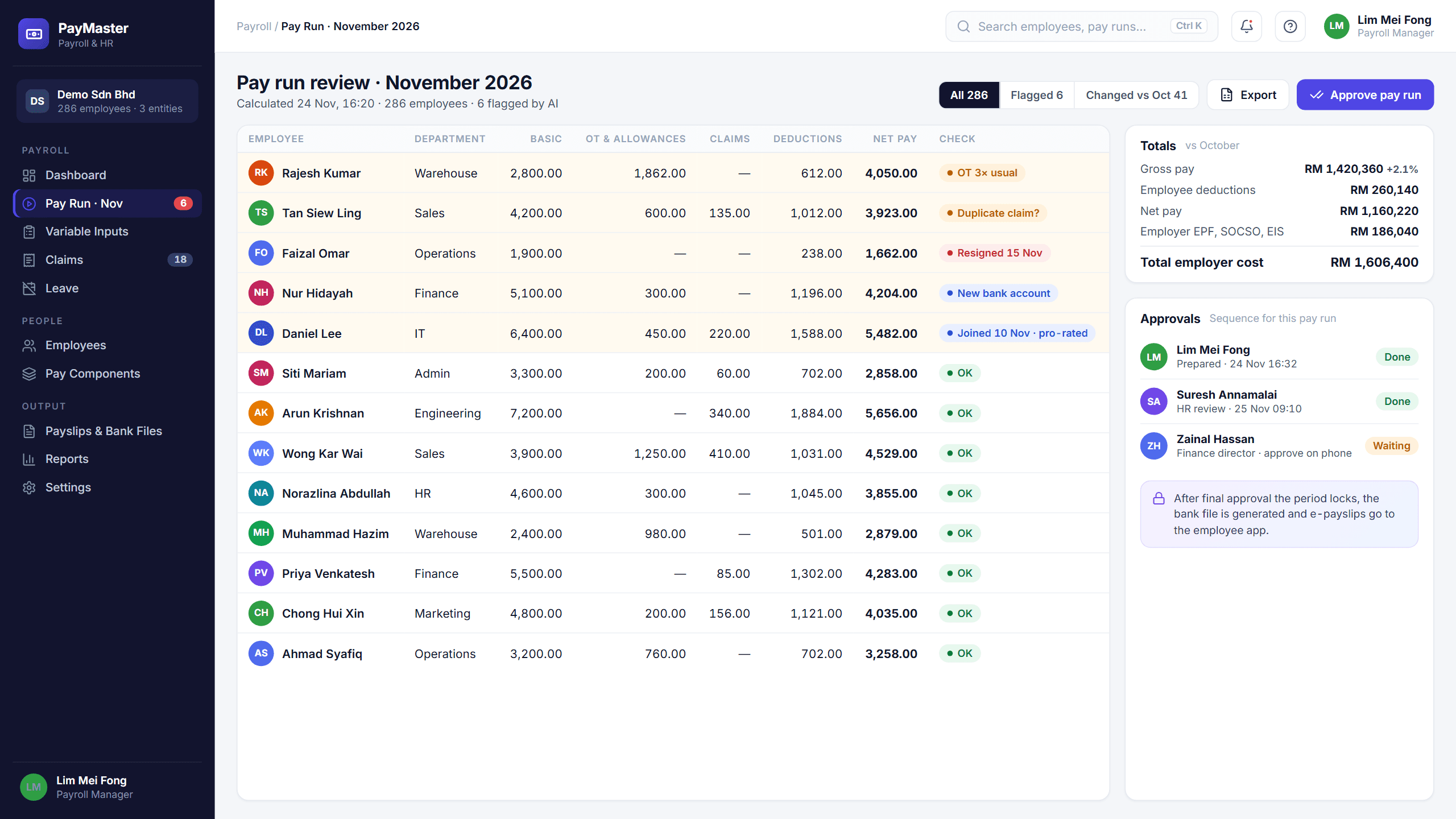
Screen 02 · Pay run
Every employee's pay with flagged items highlighted, totals against last month and the approval sequence.
Sample data · people, IDs, dates and figures are examples, not real records
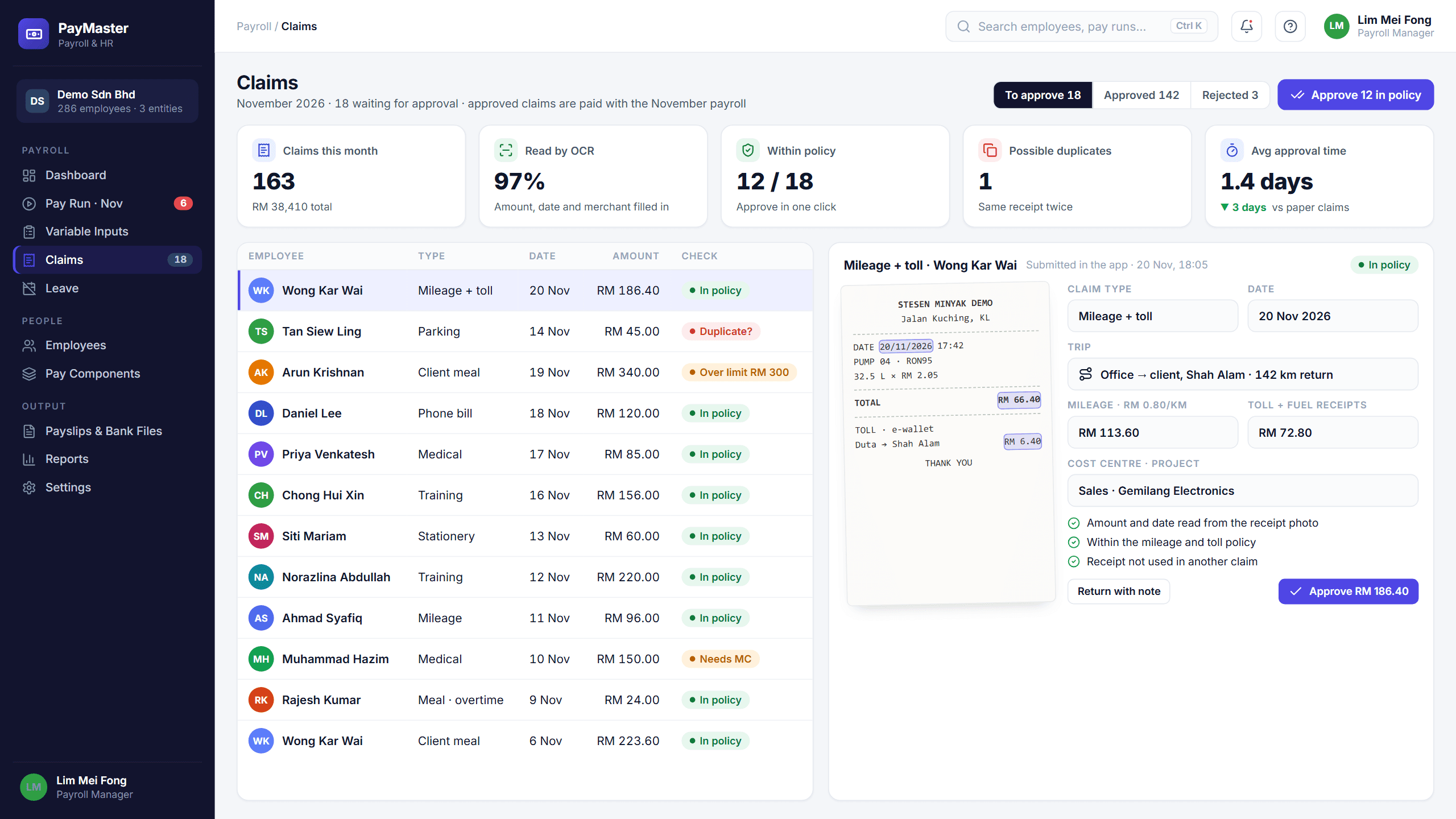
Screen 03 · Claims
Claims waiting for approval, checked against policy, with the receipt read by OCR beside the claim.
Sample data · people, IDs, dates and figures are examples, not real records
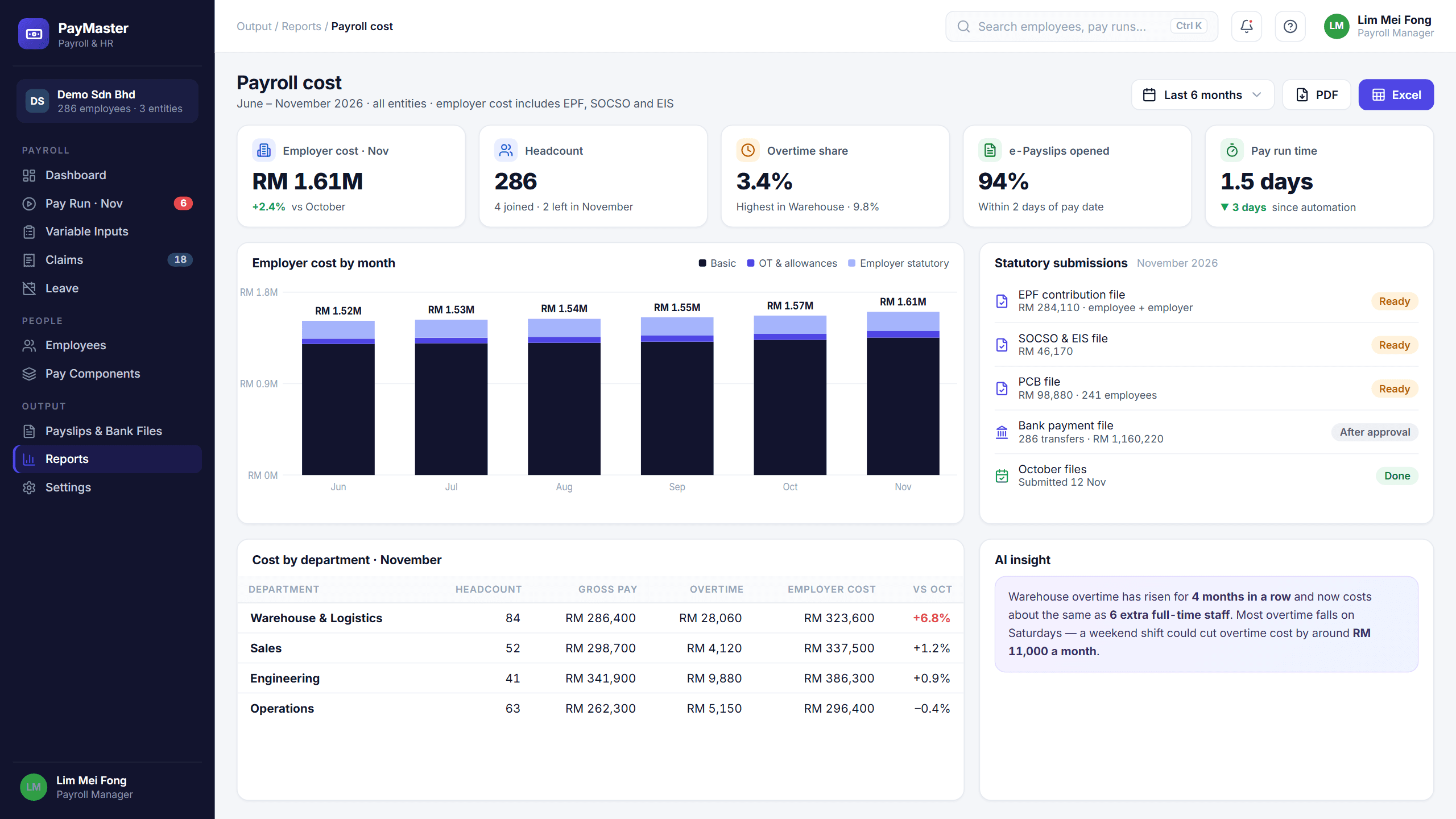
Screen 04 · Reports & analytics
Employer cost by month and department, statutory files ready to submit and an AI insight on overtime.
Sample data · people, IDs, dates and figures are examples, not real records
Employee app
Employees open their e-payslip, claim expenses by snapping the receipt and apply for leave, without forms or emails.
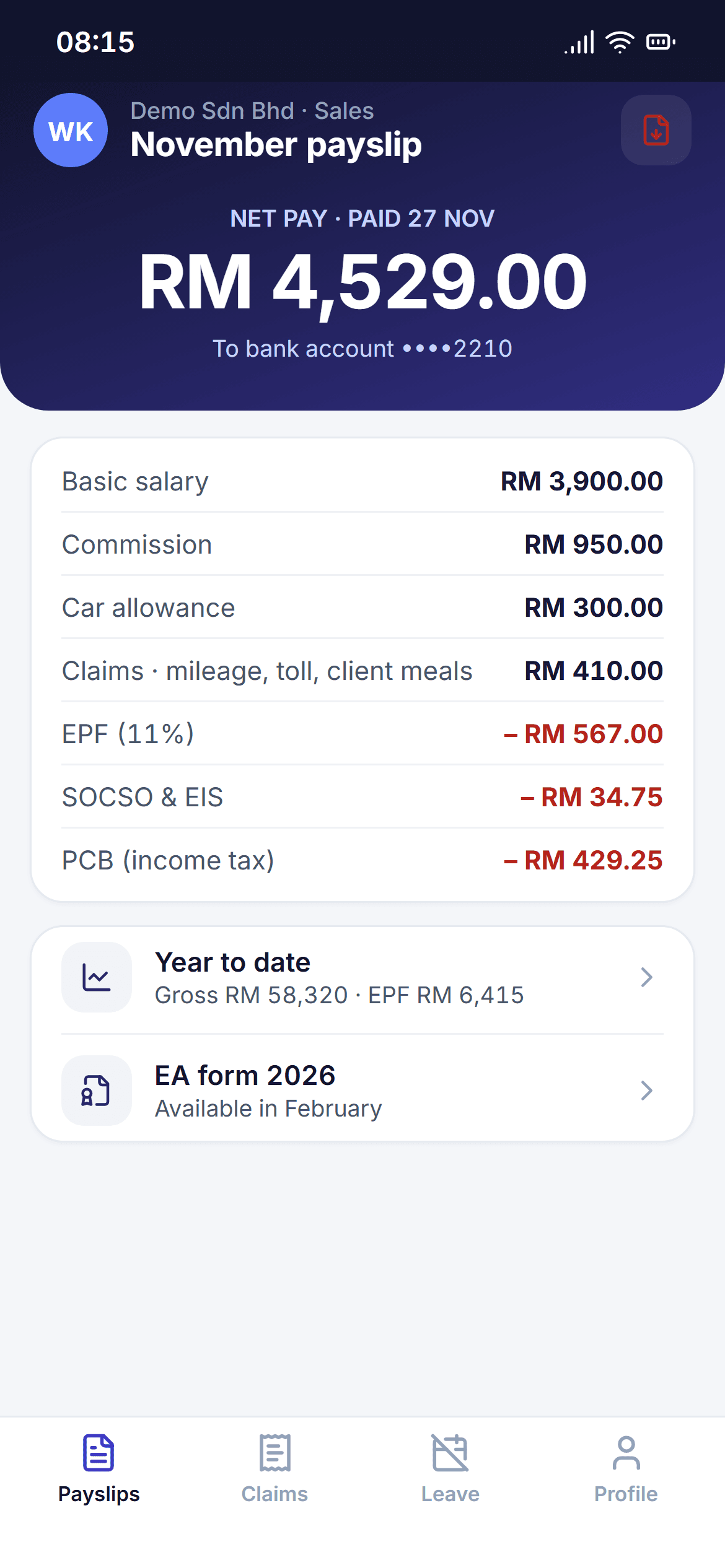
App · 01
Net pay, earnings and deductions, plus year-to-date totals.
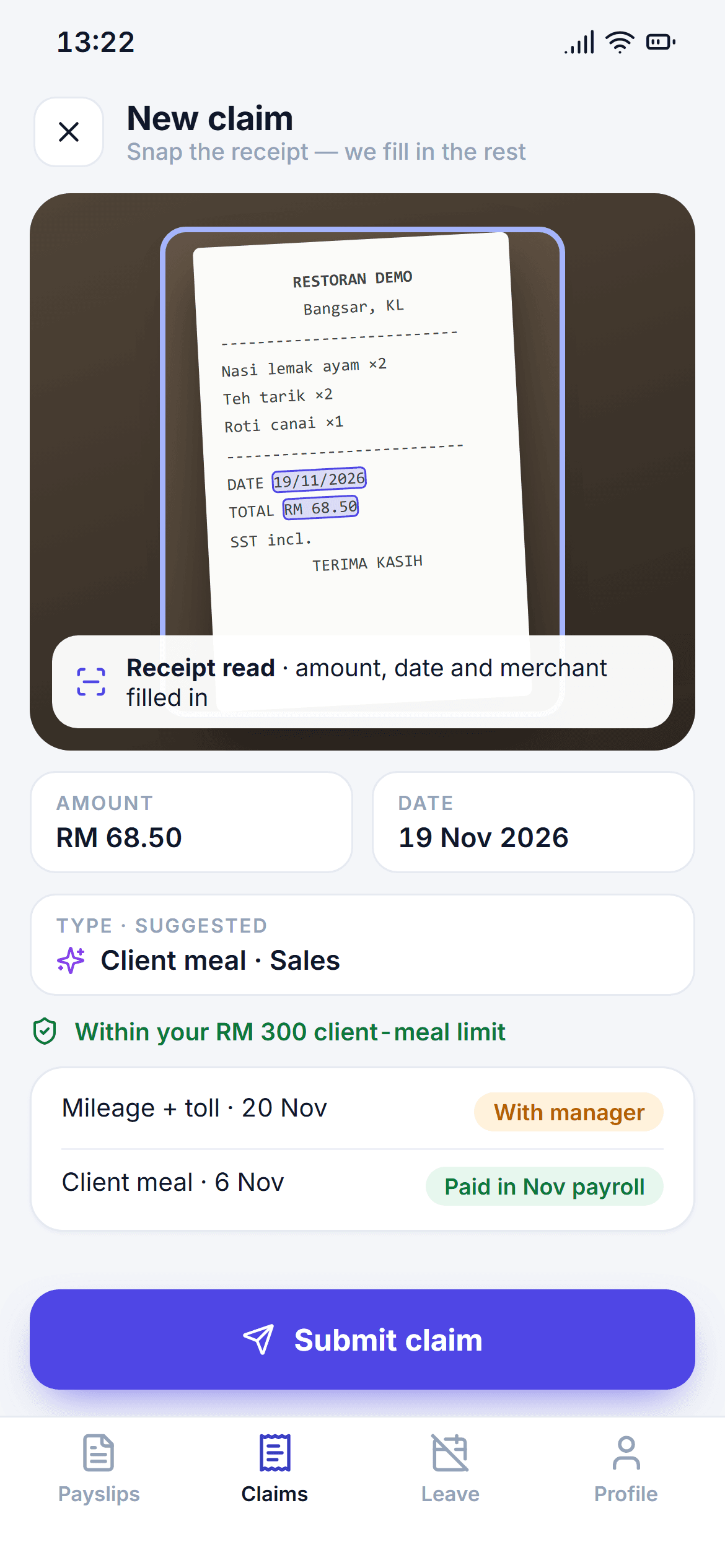
App · 02
The receipt is read automatically and checked against the claim limit.
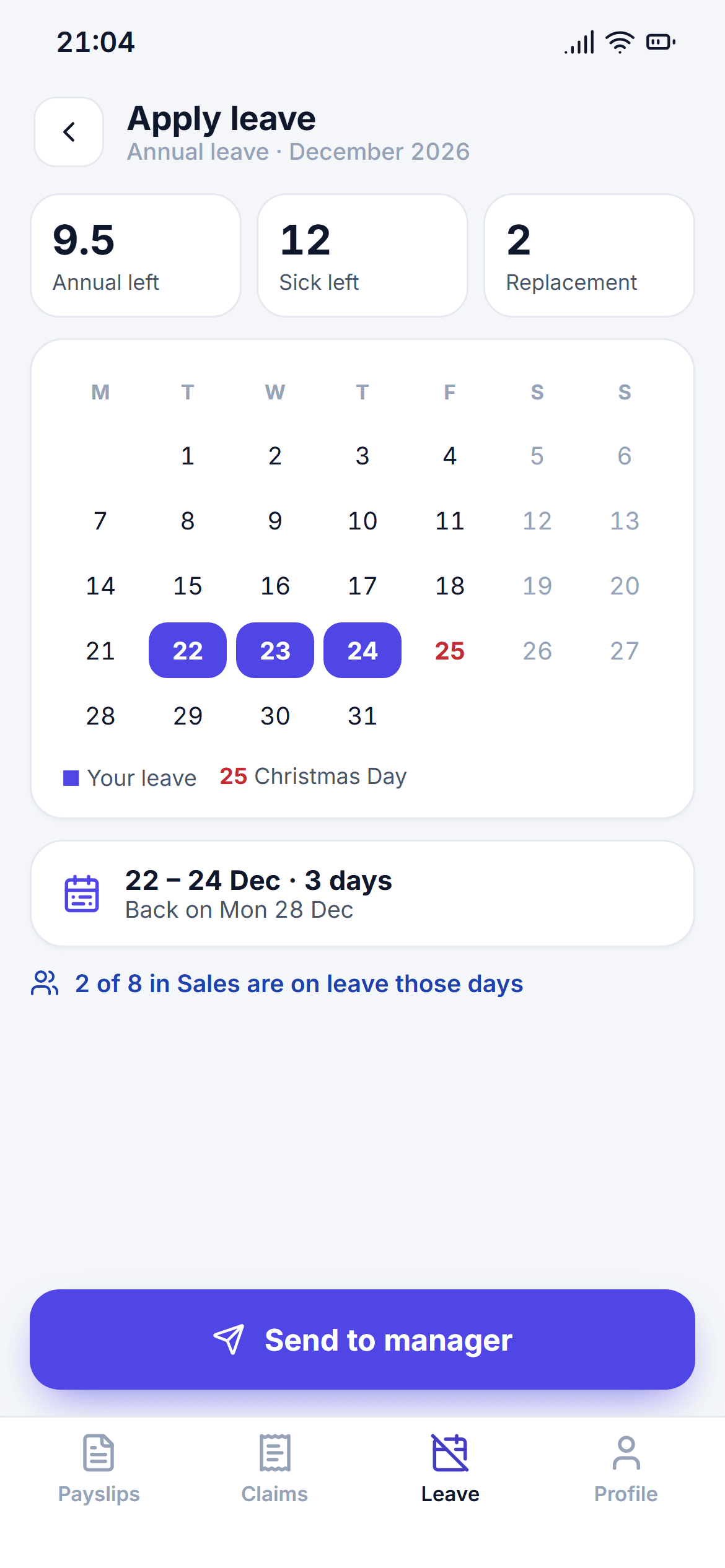
App · 03
Leave balances, a calendar with public holidays and the team's leave.
Sample data · names, sites and times are examples, not real records
Modules
The modules of PayMaster, sharing the same records so information is entered once.
Who is paid, and how.
01Payroll Dashboard
Pay run progress and items to review.
02Employee Pay Profiles
Each employee's pay details.
03Pay Components
Earnings and deductions used in the pay run.
04Pay Periods
Opening, locking and closing pay periods.
Getting the numbers right.
05Variable Inputs
Overtime, allowances and other inputs for the period.
06Attendance Import Review
Imported attendance reviewed before use.
07Claims & Leave
Receipt OCR claims and leave from the employee app.
08Calculation Preview
Pay previewed before approval.
09AI Anomaly Checks
Unusual items flagged against past months.
Signing off and handing over.
10Approval Workflow
The approval sequence for each pay run.
11e-Payslips & Employee App
Payslips, claims and leave on the phone.
12Payment Summary Export
A payment and accounting summary for export.
13Audit History
A history of changes and approvals.
Workflow
How a pay period is designed to move through PayMaster.
At each step the record is designed to show its status, owner, next action and due date, and authorised users can return incomplete work with a reason.
Benefits
What PayMaster is designed to change for the people who use it every day.
Getting started
Step by step, starting from your own workflow.
Confirm scope and roles
We agree which modules, roles and rules your organisation needs.
Configure the workflow and records
Your workflow and the records it keeps are set up and approved with you.
Try it with sample data
Your team tries the system with sample data first, never your real records.
Review permissions and exceptions
Access rights, returned work and corrections are checked.
Go live with one workflow first
One end-to-end workflow goes live before the next is added.
Verify with your team
The people who use it confirm it works for them, and then more is added.
Questions
Yes. PayMaster is available and in use by customers. Each new customer's setup starts from the modules and roles described on this page. Request a demo to see it.
No. The PayMaster screens on this page are shown with sample people, records and figures. They are not screenshots of any customer's system and contain no real customer data.
Yes. The roles, workflow steps and the details of each module are agreed with you during setup.
No connections to other systems are assumed. If you need PayMaster to work with another system, it is discussed and agreed during scoping.
Statutory payroll rules are set up and reviewed with qualified payroll stakeholders for each organisation.
Request a demo
See PayMaster in a demo with our team and tell us how your payroll is prepared, checked and approved today.