
The problem
Client requests arrive without clear role, skill or shift details.
Each manpower request records the worksite, role, headcount, skills, shift and start date before review.
Human Resources & Administration
Every Request Tracked. Every Worker Deployed With Care.
Jom Kerja runs manpower supply from client request to billing: AI matches the right workers in seconds, offers go straight to their phones, onboarding is digital, check-in is verified by geofence and selfie, and clients confirm hours online.
Screens shown with sample data
What it does
Jom Kerja is designed around the client's manpower request. The role, worksite, headcount, skills and shift are confirmed, candidates are shortlisted and selected, and workers are assigned with a start date. The onboarding checklist is reviewed, attendance is recorded, replacements and exceptions are handled, and service is confirmed before billing and utilisation review.
Who it’s for
User roles
Product status: available and in use. Jom Kerja is a Zensoft product in use by customers, set up for each customer's roles and workflow. The screens on this page are shown with sample people and figures, not any customer's records.
Problems it addresses
The problem
Each manpower request records the worksite, role, headcount, skills, shift and start date before review.
The problem
A deployment board shows every request by stage, with workers needed and confirmed.
The problem
Check-in is verified by geofence and selfie, documents are scanned and contracts e-signed in the app, and clients confirm hours in their portal.
Built for the people on site
Manpower work happens at factories, warehouses and production lines. Jom Kerja keeps workers, supervisors and recruiters connected from offer to payday.

Selfie check-in at the gate

Pre-shift briefing

Skilled workers deployed

Recruiter interview

Food production line
Illustrative photos.
Key features
8 key capabilities of Jom Kerja, shown in the product screens below.
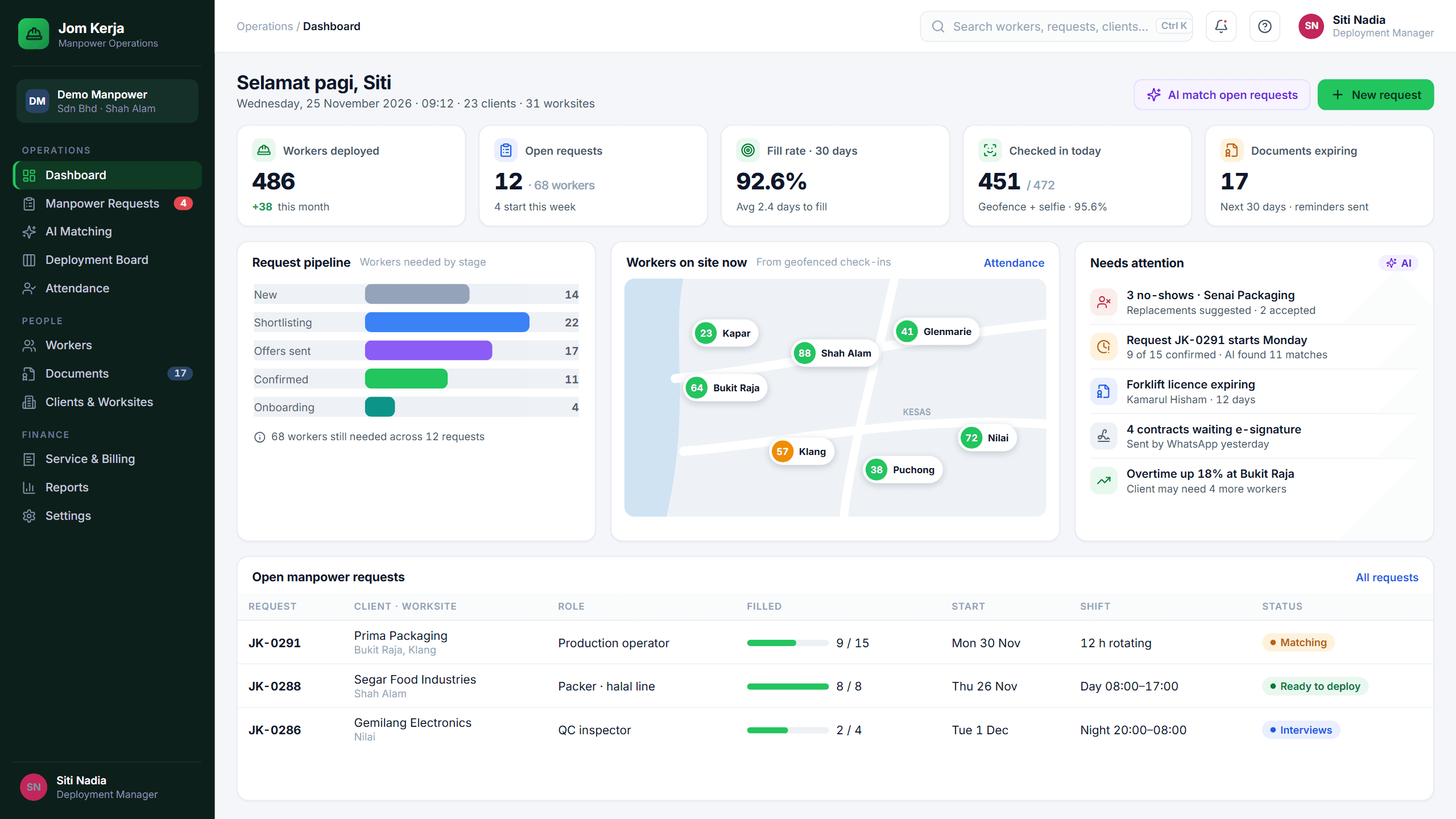
Workers deployed, open requests, fill rate, today's verified check-ins and expiring documents, with workers on site by location.
Client, worksite, role, headcount, skills, shift, start date, duration, rate and the worksite geofence.
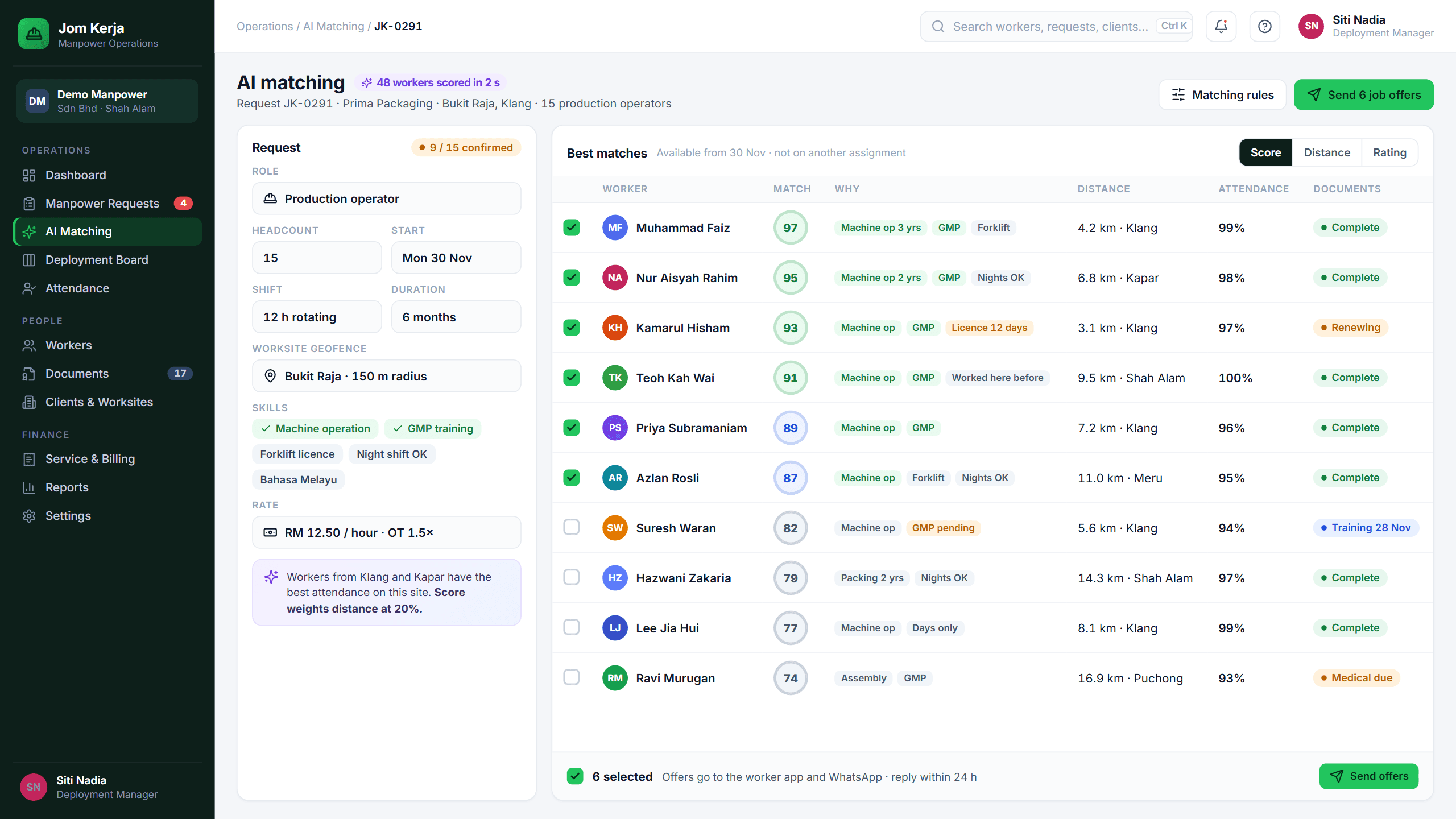
Every available worker scored by skills, distance, attendance record and documents, with the reasons shown.
Job offers to accept or decline, check-in, documents, contracts and hours on the worker's phone.
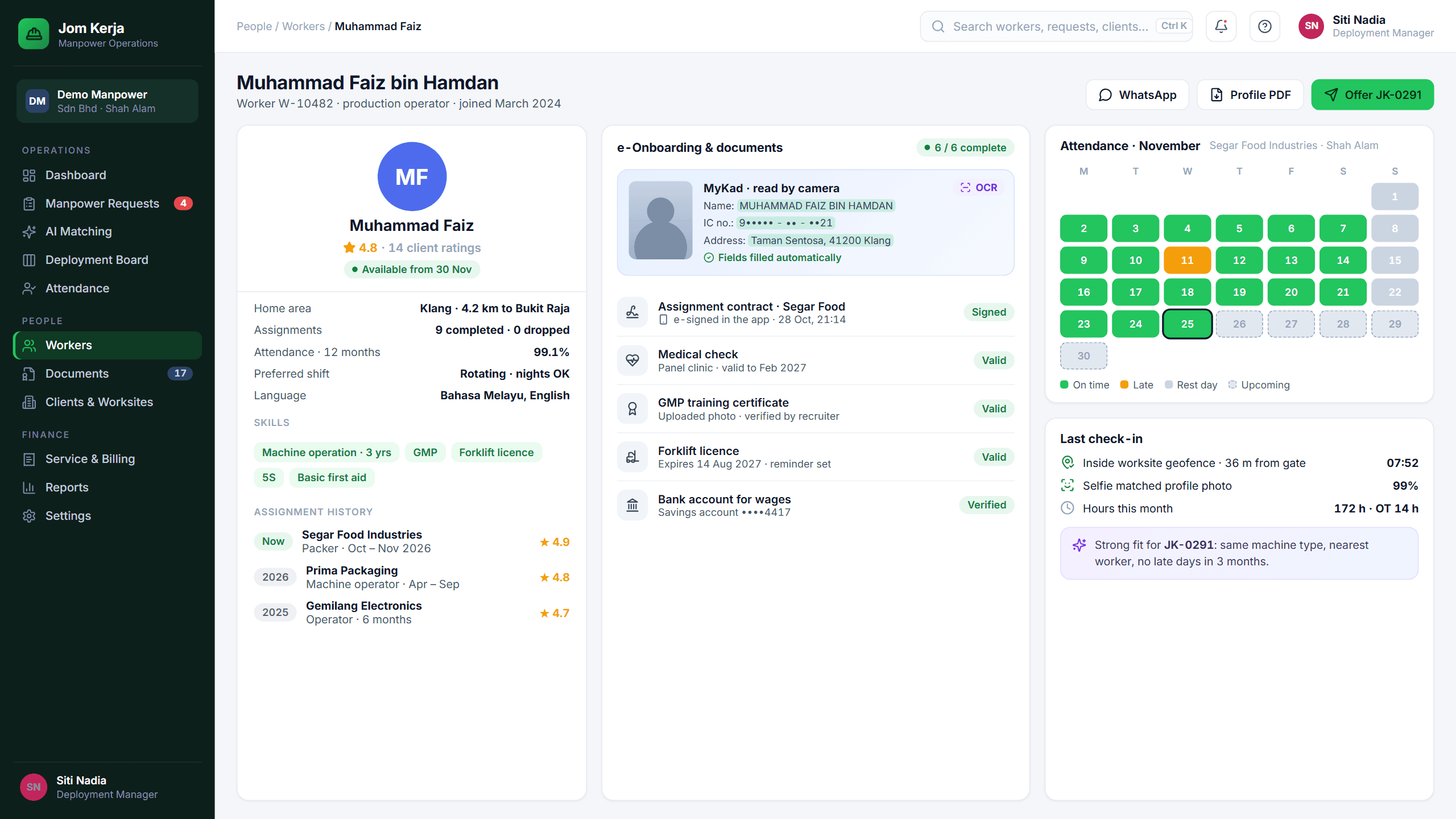
MyKad and certificates scanned by camera, details filled automatically, and contracts e-signed in the app.
Check-in only inside the worksite geofence, with a selfie matched to the worker's profile.
No-shows flagged straight away, with replacements suggested and offered automatically.
Clients confirm hours from verified check-ins online before service is billed.
Smart technology
Jom Kerja uses modern technology at every step, so requests fill faster and every hour billed is backed by a verified check-in.
Scores every available worker by skills, distance, attendance and documents.
Job offers, check-in, documents and hours on the worker's own phone.
The camera reads MyKad and certificates and fills in the details.
Assignment contracts signed in the app, with time and device recorded.
Check-in works only inside the worksite geofence.
A selfie is matched to the worker's profile photo at check-in.
Offers, reminders and expiring documents reach workers straight away.
Clients view their workers and confirm hours online before billing.
Product screens
Four screens of Jom Kerja, from the dashboard to the reports, shown with sample data. Select a screen to enlarge it.
Screen 01 · Dashboard
Workers deployed, fill rate, verified check-ins and the request pipeline, with workers on site and AI alerts.
Sample data · people, IDs, dates and figures are examples, not real records
Screen 02 · AI matching
A request's best workers scored by AI, with the reasons, distance, attendance and documents, ready to receive job offers.
Sample data · people, IDs, dates and figures are examples, not real records
Screen 03 · Worker profile
One worker's ratings, skills and history, MyKad read by camera, e-signed contract, documents and verified attendance.
Sample data · people, IDs, dates and figures are examples, not real records
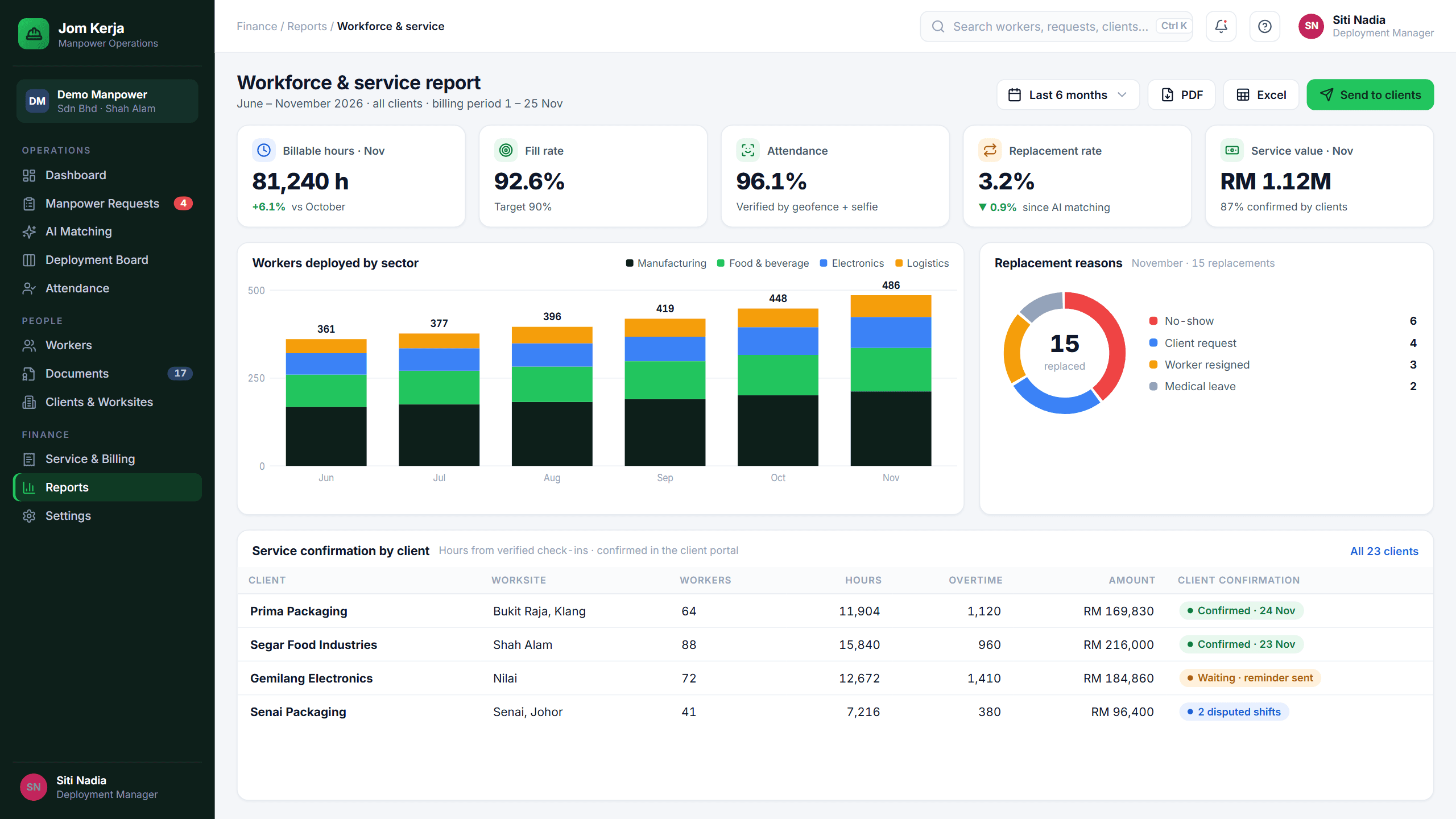
Screen 04 · Reports & analytics
Billable hours, fill rate, attendance, replacements and client-confirmed service value.
Sample data · people, IDs, dates and figures are examples, not real records
Worker app
Workers accept job offers, check in at the worksite with a selfie inside the geofence, and complete onboarding by scanning their MyKad and e-signing the contract.
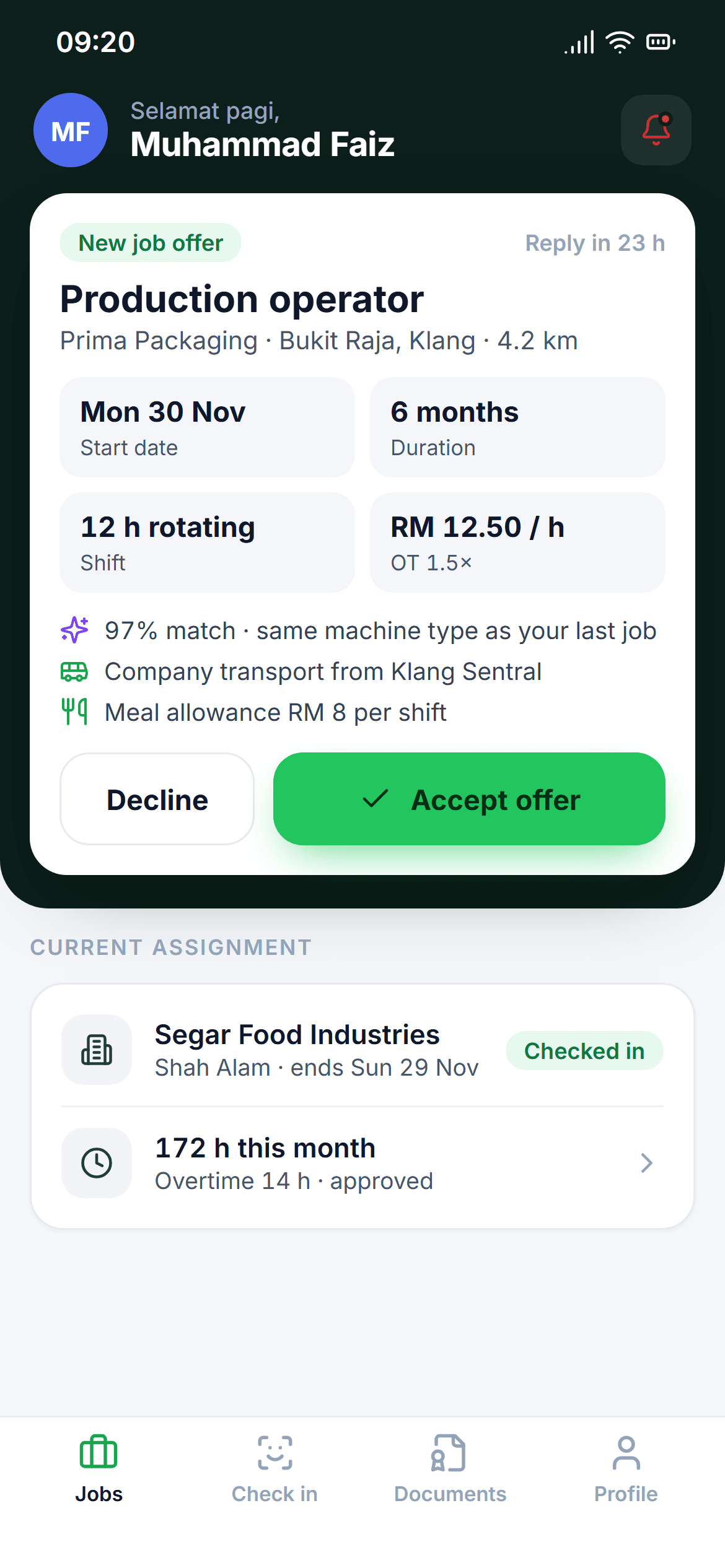
App · 01
A matched offer with dates, shift, rate and benefits, accepted in one tap.
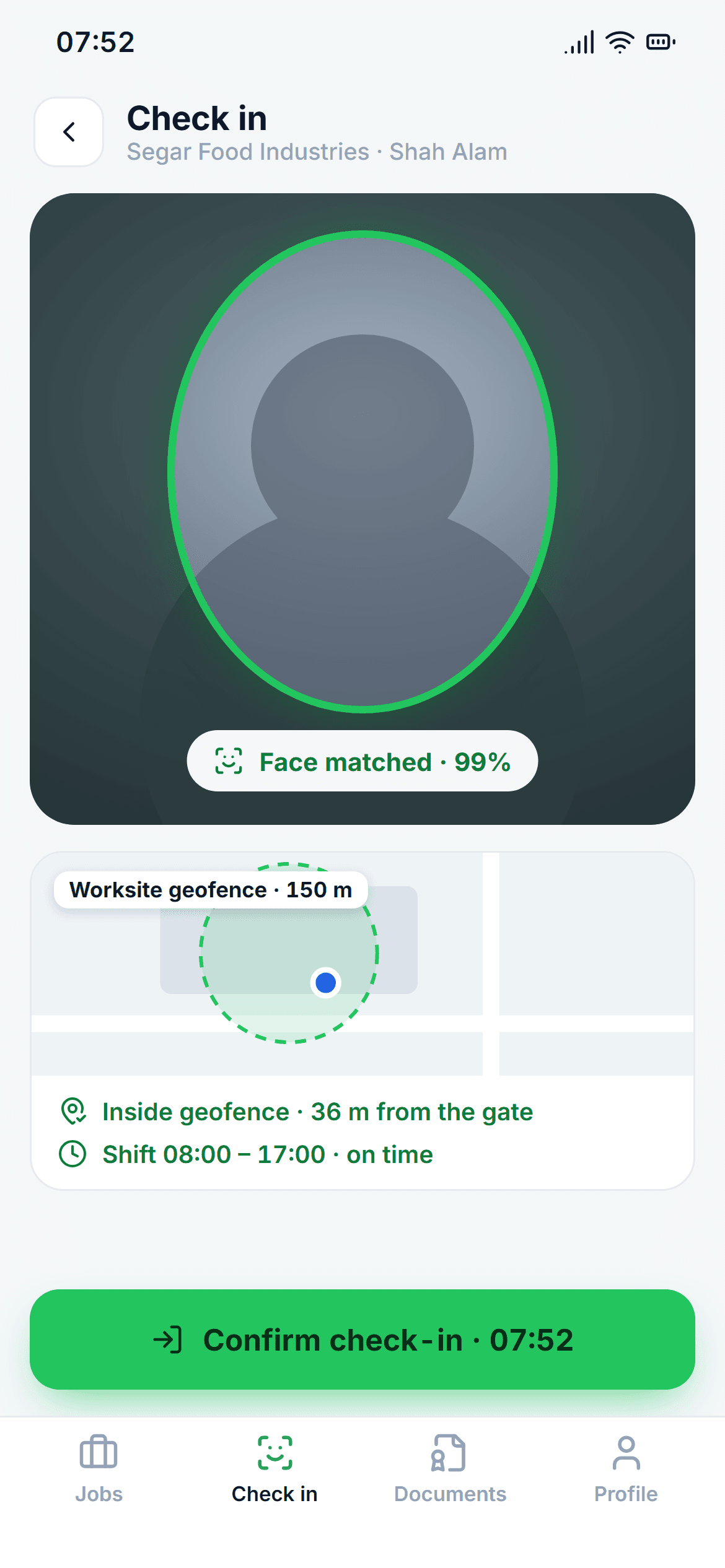
App · 02
Face matched and inside the worksite geofence before check-in is accepted.
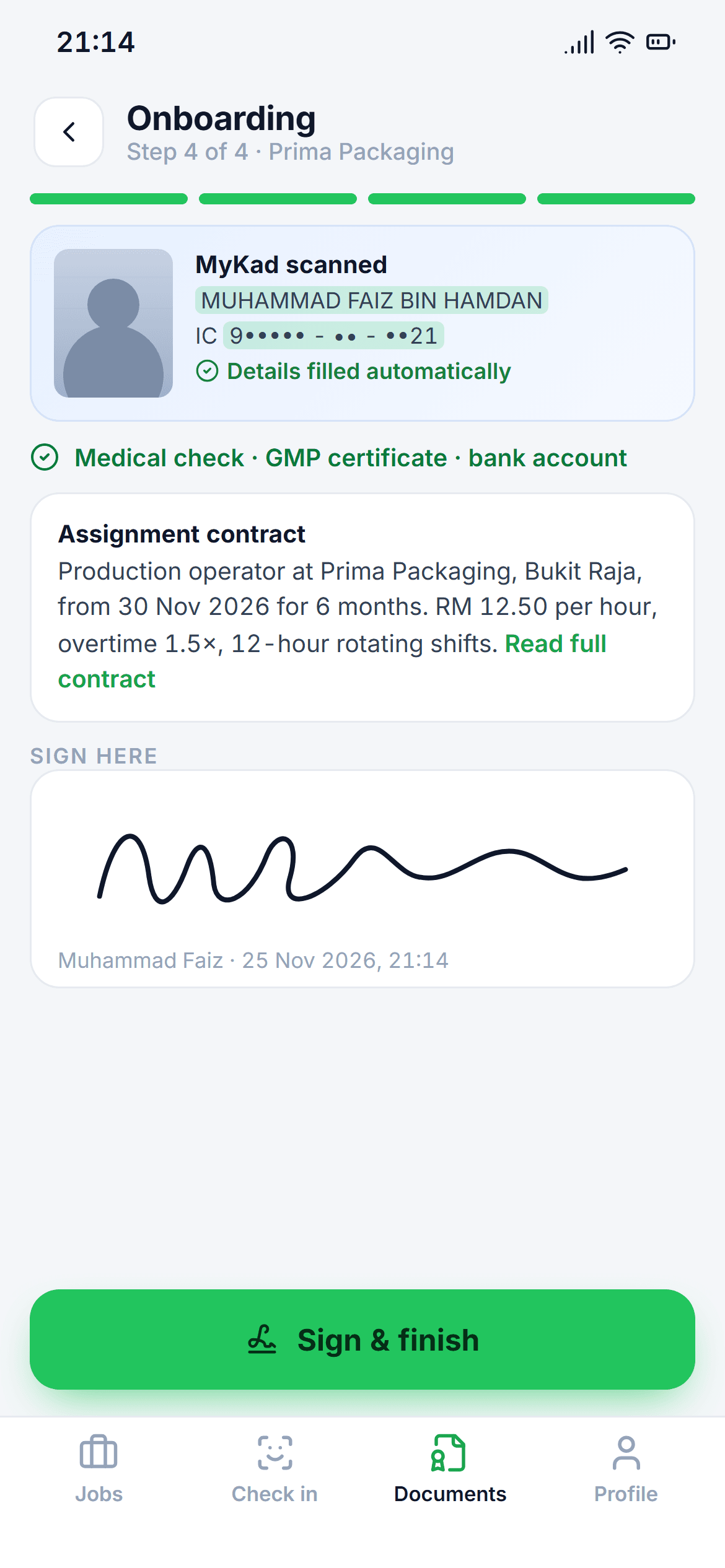
App · 03
MyKad scanned, documents done and the contract signed on screen.
Sample data · names, sites and times are examples, not real records
Modules
The modules of Jom Kerja, sharing the same records so information is entered once.
What the client needs.
01Workforce Dashboard
Assignments, requests and starts.
02Client & Worksite
Clients and their worksites.
03Manpower Requests
Role, headcount, skills and shift for each request.
Finding the right people.
04Worker Directory
Worker profiles.
05Skills & Availability
Skills and availability used for matching.
06AI Matching
Workers scored and shortlisted for each request.
07Assignment & Deployment
Assignments, start dates and deployment stage.
Keeping the service running.
08e-Onboarding
MyKad OCR, documents and e-signed contracts.
09Verified Attendance
Geofenced selfie check-in for every shift.
10Worker App
Offers, check-in and documents on the phone.
11Replacement Queue
Replacements and exceptions.
12Client Portal
Clients confirm hours online.
13Billing Handoff
Confirmed service handed to billing.
Workflow
How a request is designed to move through Jom Kerja.
At each step the record is designed to show its status, owner, next action and due date, and authorised users can return incomplete work with a reason.
Benefits
What Jom Kerja is designed to change for the people who use it every day.
Getting started
Step by step, starting from your own workflow.
Confirm scope and roles
We agree which modules, roles and rules your organisation needs.
Configure the workflow and records
Your workflow and the records it keeps are set up and approved with you.
Try it with sample data
Your team tries the system with sample data first, never your real records.
Review permissions and exceptions
Access rights, returned work and corrections are checked.
Go live with one workflow first
One end-to-end workflow goes live before the next is added.
Verify with your team
The people who use it confirm it works for them, and then more is added.
Questions
Yes. Jom Kerja is available and in use by customers. Each new customer's setup starts from the modules and roles described on this page. Request a demo to see it.
No. The Jom Kerja screens on this page are shown with sample people, records and figures. They are not screenshots of any customer's system and contain no real customer data.
Yes. The roles, workflow steps and the details of each module are agreed with you during setup.
No connections to other systems are assumed. If you need Jom Kerja to work with another system, it is discussed and agreed during scoping.
Jom Kerja is an administration system. It makes no placement or legal guarantees.
Request a demo
See Jom Kerja in a demo with our team and tell us how you handle client requests, deployment and attendance today.