
The problem
Customers are messaged without clear evidence of permission.
Contacts are kept with their permission evidence, and opt-outs and suppression are applied before a send.
Sales, Customers & Service
Every Message Permitted, Reviewed and Accounted For.
MsgPilot brings customer messaging into one place: an AI assistant answers common questions and hands over to your team, agents share one inbox with suggested replies, and campaigns go only to customers who opted in, with every read, click and sale measured.
Screens shown with sample data
What it does
MsgPilot is designed around permission. Contacts are imported with their messaging permission, suppression and opt-out lists are checked, templates are reviewed and campaigns are approved before an authorised send. Delivery events and replies come back into the workspace for follow-up, and usage and opt-outs are reviewed over time.
Who it’s for
User roles
Product status: available and in use. MsgPilot is a Zensoft product in use by customers, set up for each customer's roles and workflow. The screens on this page are shown with sample people and figures, not any customer's records.
Problems it addresses
The problem
Contacts are kept with their permission evidence, and opt-outs and suppression are applied before a send.
The problem
Templates carry a review status, and campaigns can only use approved templates.
The problem
Delivery events and replies return to the workspace, with a conversation inbox for follow-up.
Built for customer conversations
Customer messaging happens at the care desk, in the shop and wherever customers are. MsgPilot keeps every conversation answered and every campaign measured.

A message from the shop

Customer care team

Delivery update

Replying from the boutique

Planning a campaign
Illustrative photos.
Key features
8 key capabilities of MsgPilot, shown in the product screens below.
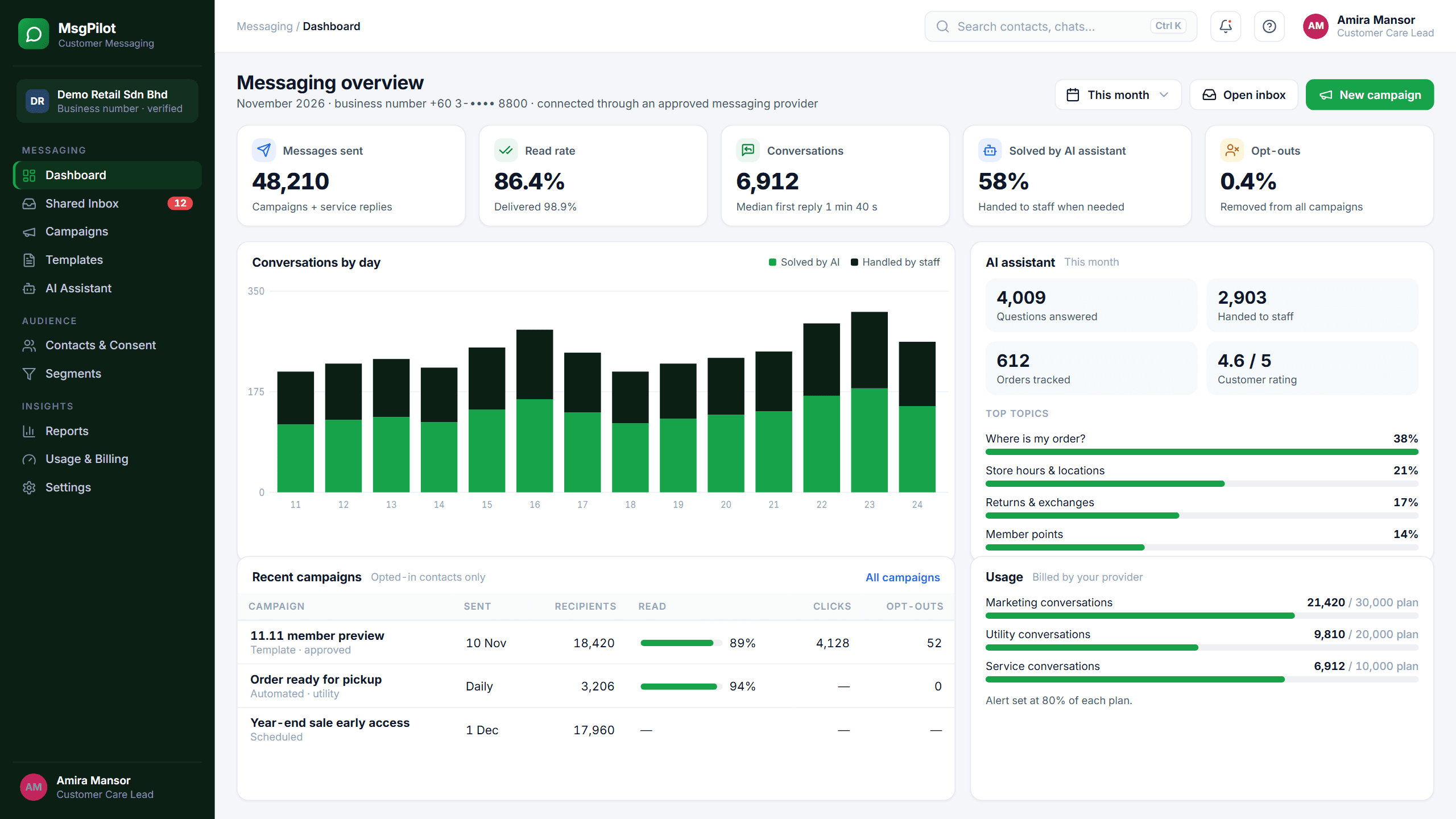
Messages sent, read rate, conversations, AI-solved chats and opt-outs, with recent campaigns and plan usage.
Every conversation in one inbox, assigned to the right person, with the customer's details and history beside it.
Answers common questions such as order status and store hours, and hands over to staff with a reason.
Reply suggestions in English or Bahasa Melayu, based on the conversation and the customer's orders.
Opt-in source and proof kept for every contact; STOP replies remove the contact from campaigns automatically.
Approved templates, segments of opted-in contacts, personalisation and frequency limits checked before sending.
Each message sent at the time that contact usually reads, within allowed hours.
Delivered, read, clicked and ordered, team performance and usage against the plan.
Smart technology
MsgPilot uses modern technology to answer faster, message only people who asked to hear from you and show what each message achieved.
Answers common questions at any hour and hands over to staff.
AI drafts replies in English or Bahasa Melayu for agents.
One inbox for the whole team, with assignment and labels.
Opt-in proof stored; opt-outs applied to every campaign.
Messages arrive when each contact usually reads.
Audiences by tier, purchases and area, with names and details filled in.
Reads, clicks and orders measured for every campaign.
Reply to customers and check campaigns from a phone.
Product screens
Four screens of MsgPilot, from the dashboard to the reports, shown with sample data. Select a screen to enlarge it.
Screen 01 · Dashboard
Messages, read rate, conversations and AI-solved chats, with recent campaigns and usage against the plan.
Sample data · people, IDs, dates and figures are examples, not real records
Screen 02 · Shared inbox
The team's conversations, an AI assistant handing a chat to an agent, suggested replies and the customer's consent record.
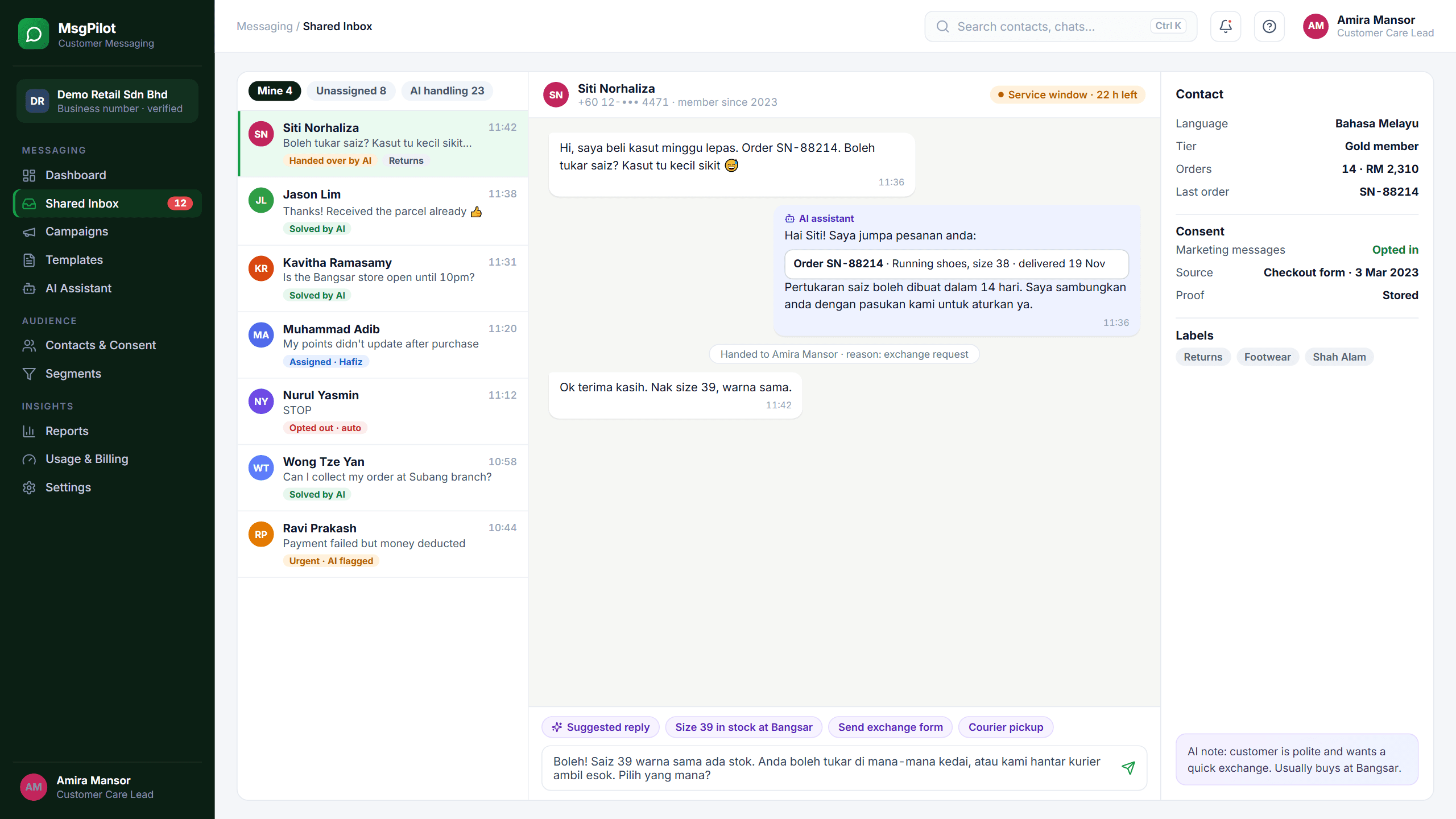
Sample data · people, IDs, dates and figures are examples, not real records
Screen 03 · Campaign
An approved template sent only to opted-in members, with consent checks, AI send times, expected results and a phone preview.
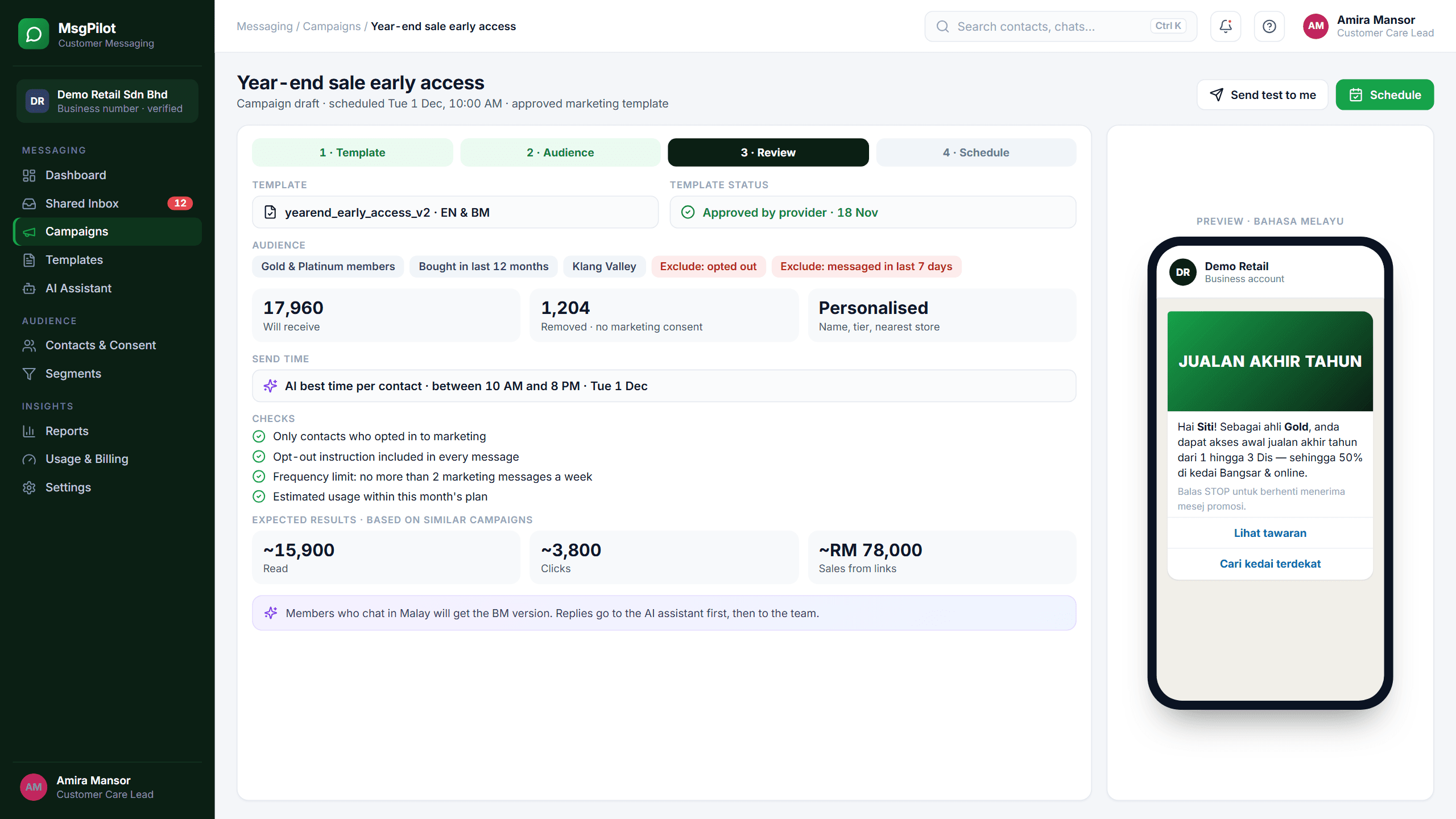
Sample data · people, IDs, dates and figures are examples, not real records
Screen 04 · Reports & analytics
A campaign funnel from sent to ordered, the best hour to message, team performance and an AI insight.
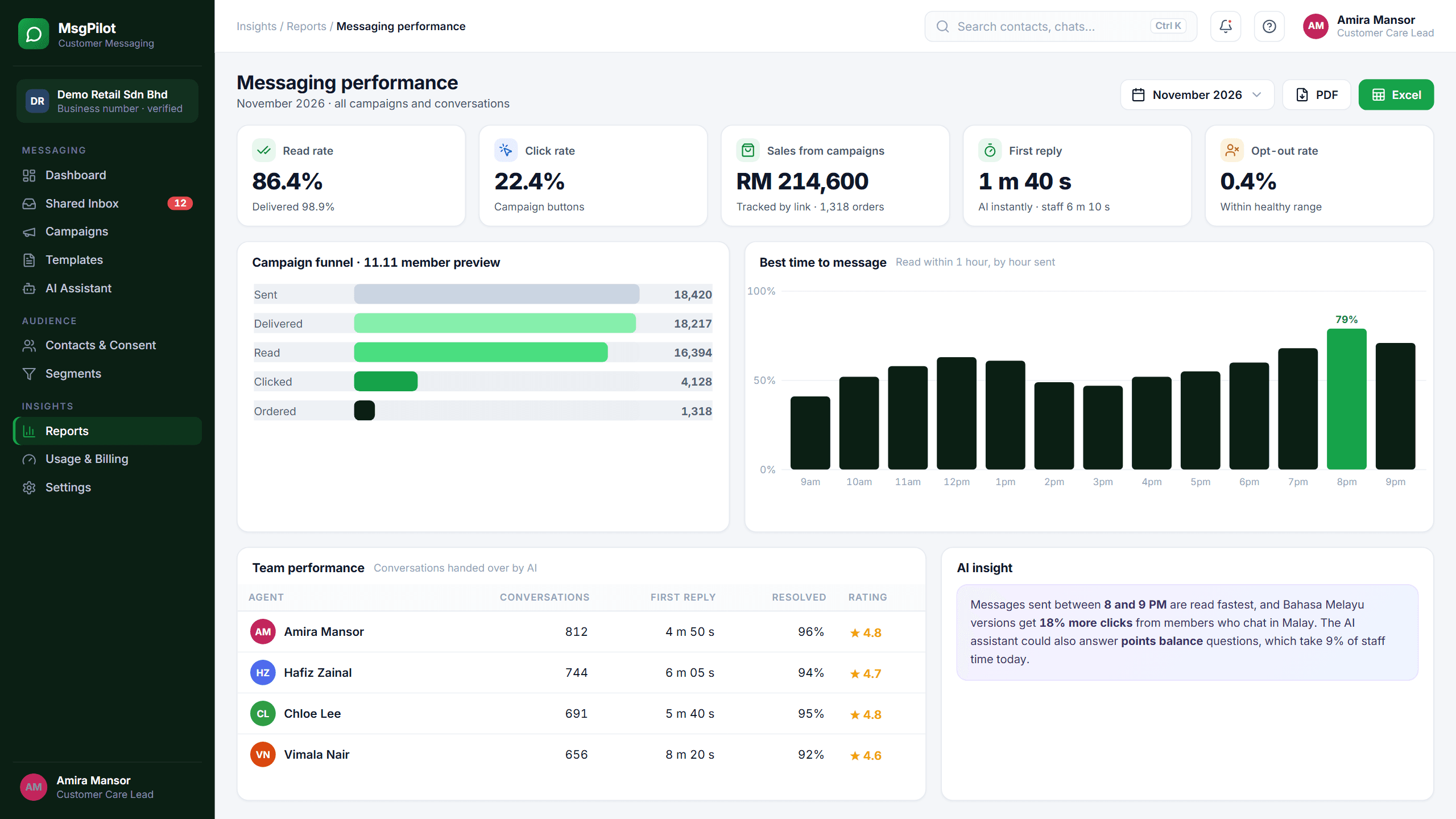
Sample data · people, IDs, dates and figures are examples, not real records
Agent app
Agents pick up conversations handed over by the AI assistant, reply with suggestions and follow campaign results from their phone.
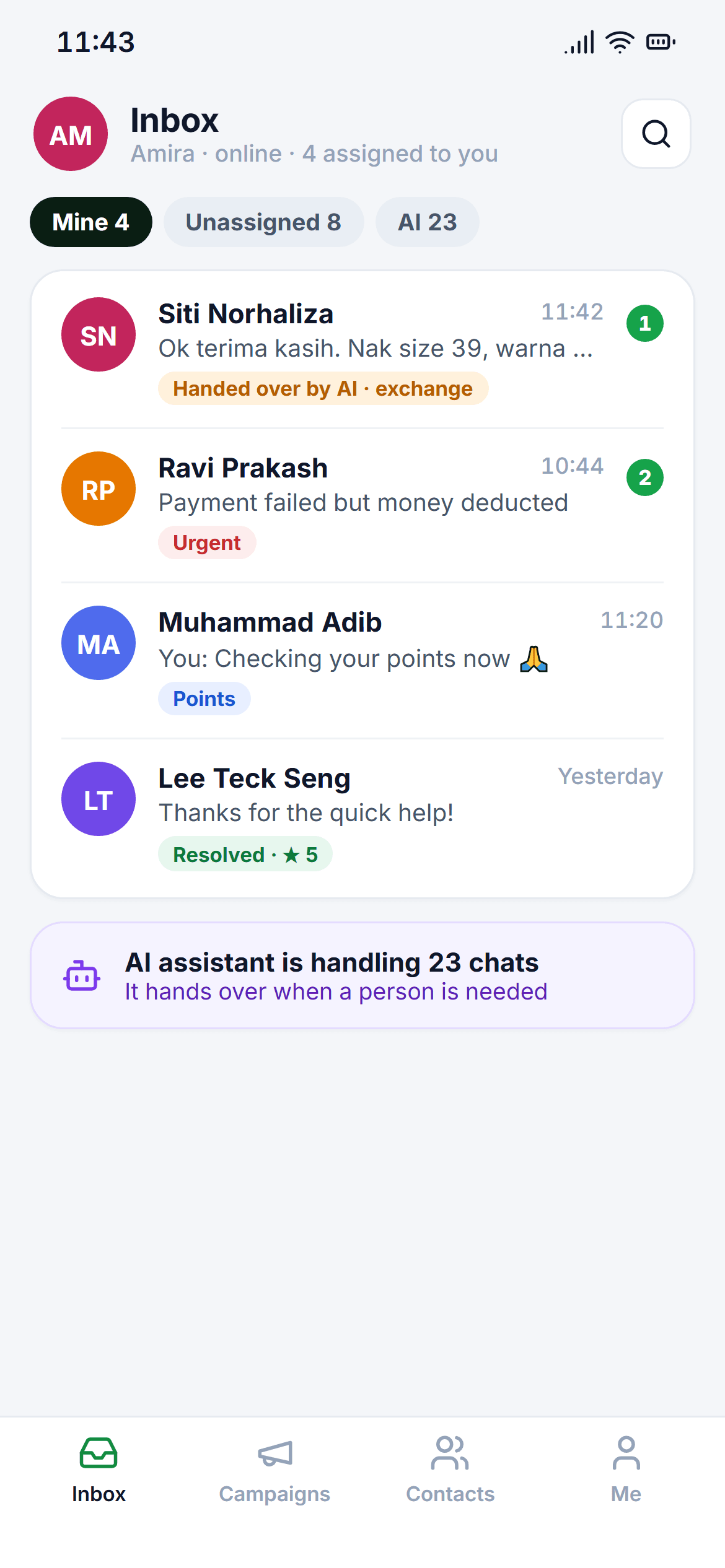
App · 01
Assigned chats, urgent flags and what the AI assistant is handling.
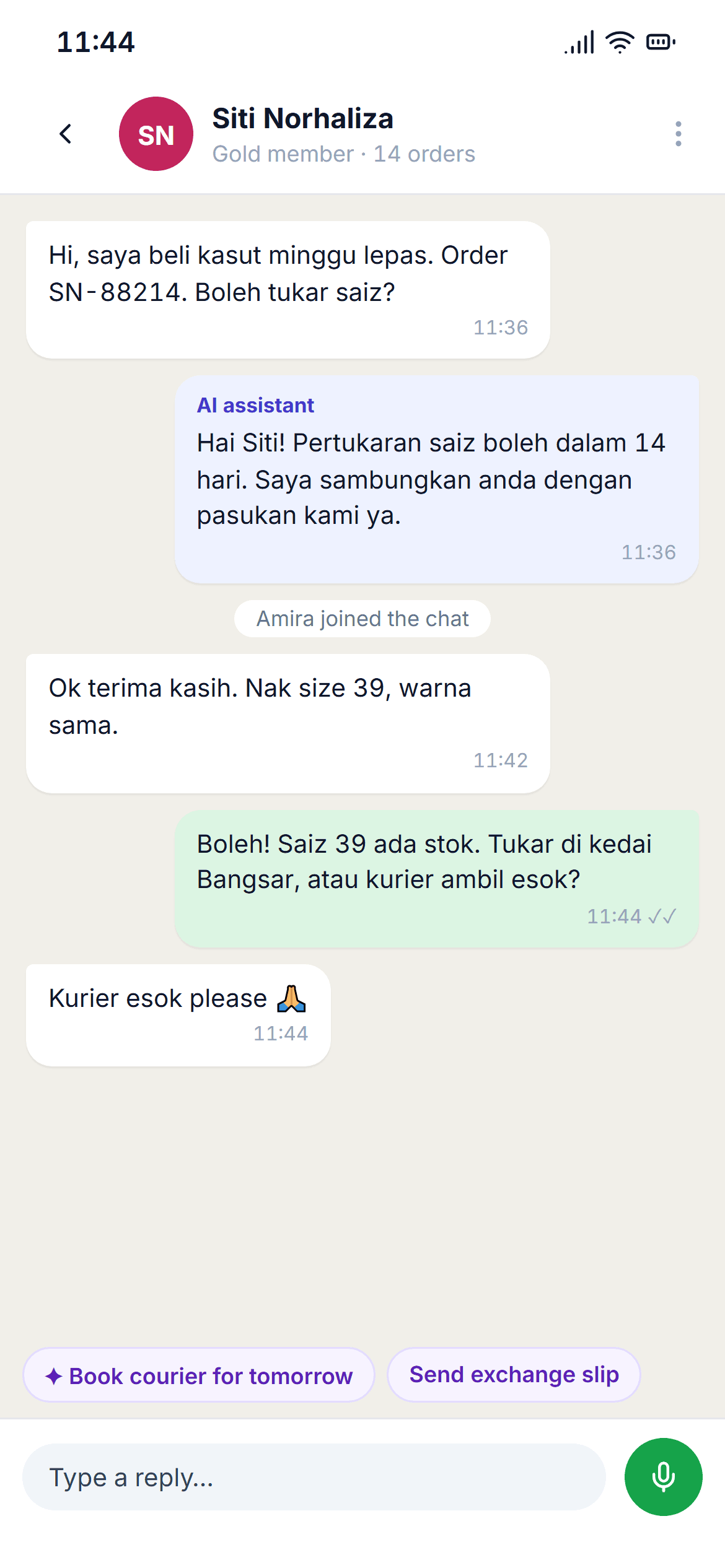
App · 02
A conversation picked up from the AI assistant, with suggested next steps.
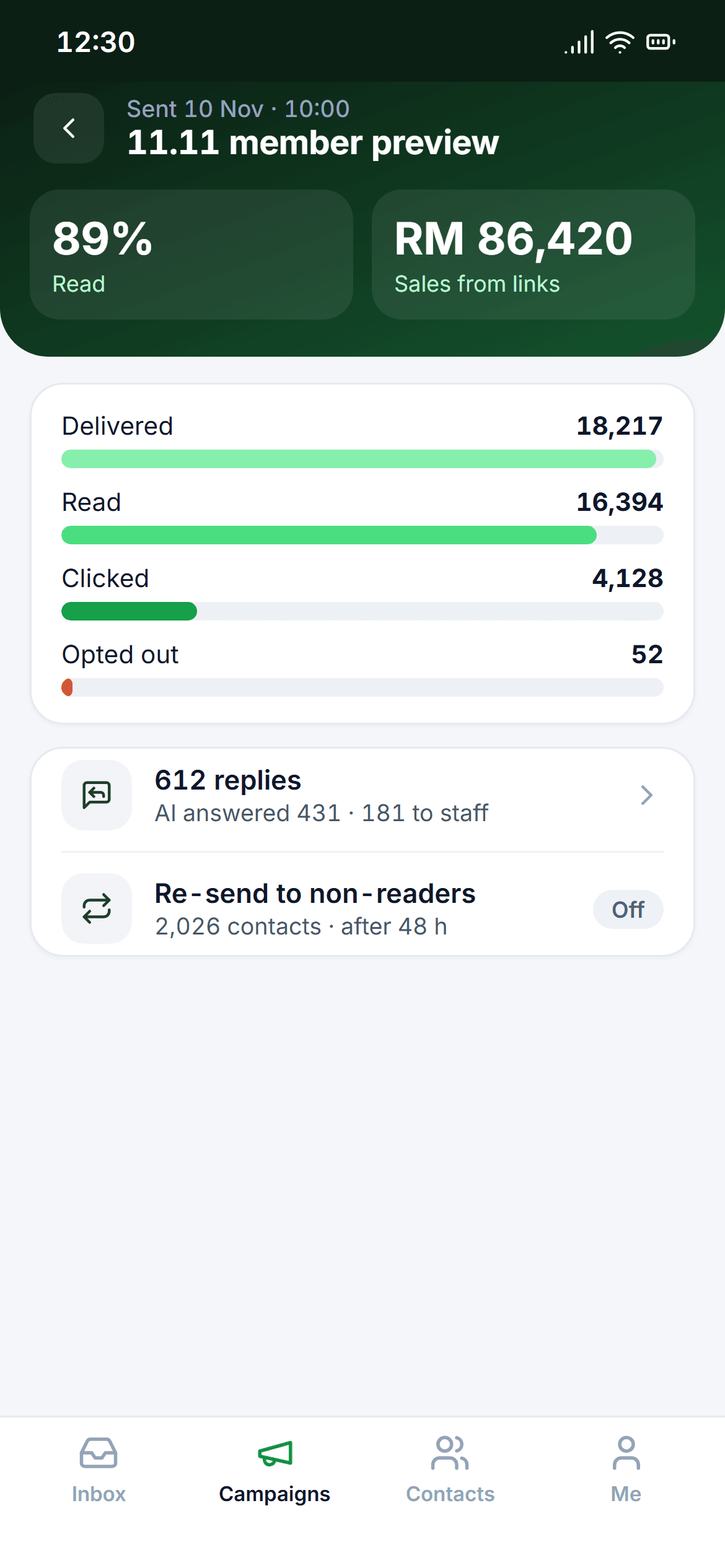
App · 03
Delivered, read, clicked, replies and sales from a campaign.
Sample data · names, sites and times are examples, not real records
Modules
The modules of MsgPilot, sharing the same records so information is entered once.
Who you can message, and from where.
01Messaging Dashboard
Campaign results and items to review.
02Workspace & Sender
Workspace settings and sender details.
03Contact Permissions
Contacts with their permission evidence.
04Suppression / Opt-out
Contacts who must not be messaged.
What is sent, and to whom.
05Template Library
Message templates and their review status.
06Campaign Builder
Campaigns built from approved templates.
07Audience Preview
The audience checked before sending.
Replies, events and usage.
08Conversation Inbox
Replies for agents to follow up.
09Delivery Event Log
Delivery events for each campaign.
10Usage Summary
Messaging usage over time.
11Access & Audit
Role-based access and an audit history.
Workflow
How a campaign is designed to move through MsgPilot.
At each step the record is designed to show its status, owner, next action and due date, and authorised users can return incomplete work with a reason.
Benefits
What MsgPilot is designed to change for the people who use it every day.
Getting started
Step by step, starting from your own workflow.
Confirm scope and roles
We agree which modules, roles and rules your organisation needs.
Configure the workflow and records
Your workflow and the records it keeps are set up and approved with you.
Try it with sample data
Your team tries the system with sample data first, never your real records.
Review permissions and exceptions
Access rights, returned work and corrections are checked.
Go live with one workflow first
One end-to-end workflow goes live before the next is added.
Verify with your team
The people who use it confirm it works for them, and then more is added.
Questions
Yes. MsgPilot is available and in use by customers. Each new customer's setup starts from the modules and roles described on this page. Request a demo to see it.
No. The MsgPilot screens on this page are shown with sample people, records and figures. They are not screenshots of any customer's system and contain no real customer data.
Yes. The roles, workflow steps and the details of each module are agreed with you during setup.
No connections to other systems are assumed. If you need MsgPilot to work with another system, it is discussed and agreed during scoping.
WhatsApp is a trademark of its owner. MsgPilot is a Zensoft product and is not affiliated with or endorsed by WhatsApp or Meta. Message delivery depends on an external messaging provider.
Request a demo
See MsgPilot in a demo with our team and tell us how you message customers and manage their permissions today.