
The problem
Timesheets arrive late, incomplete or not at all.
Submission checks and reminders help each week arrive complete and on time.
Human Resources & Administration
Every Hour Recorded, Reviewed and Approved.
TimeTrack makes timesheets almost automatic: start a timer in one tap, let AI turn meetings into suggested entries, approve on the phone with AI checks, and see project budgets, utilisation and billable time as the week goes on.
Screens shown with sample data
What it does
TimeTrack is designed around the weekly timesheet. Projects and task codes are set up once, employees enter their hours against them and submit the week, and their manager approves it or returns it with a reason. Corrections are resubmitted, the period is locked and approved time is exported for payroll, finance or reporting.
Who it’s for
User roles
Product status: available and in use. TimeTrack is a Zensoft product in use by customers, set up for each customer's roles and workflow. The screens on this page are shown with sample people and figures, not any customer's records.
Problems it addresses
The problem
Submission checks and reminders help each week arrive complete and on time.
The problem
Approvals show each week's hours and project split, and a timesheet can be returned with a reason.
The problem
Approved hours update each project's budget used and AI forecasts the final hours, so overruns show up weeks earlier.
Built for project teams
Project work happens at the office, at client sites and on the move. TimeTrack makes recording and approving that time quick, wherever people are.

Starting a timer

Project team

Working on the move

Approving on the phone

Client workshop
Illustrative photos.
Key features
8 key capabilities of TimeTrack, shown in the product screens below.
Hours this week, billable utilisation, approvals waiting, missing timesheets and billable value, with project budgets.
Start, pause and switch timers on the web or phone; time lands on the right project and task.
Meetings and email threads turned into suggested entries to add with one tap.
Hours by day, project and task, with billable and internal time and checks before submitting.
Long weeks, missing notes and weekend hours flagged; approve or return from the phone.
Budget used and AI-forecast final hours for every project, with at-risk projects flagged.
Billable utilisation by week and a workload heatmap that shows who is overloaded.
Approved billable hours and value by client, ready to send to invoicing and payroll.
Smart technology
TimeTrack uses modern technology to take the effort out of recording time, without location tracking.
Start and switch timers on the web or phone.
Meetings and email threads become suggested entries.
Log time, submit the week and approve from the phone.
Entries are saved offline and sync later.
Long weeks, weekend work and missing notes flagged.
Final project hours forecast from the work so far.
Reminders timed to each person's habits.
Approved billable time sent on for invoicing and payroll.
Product screens
Four screens of TimeTrack, from the dashboard to the reports, shown with sample data. Select a screen to enlarge it.
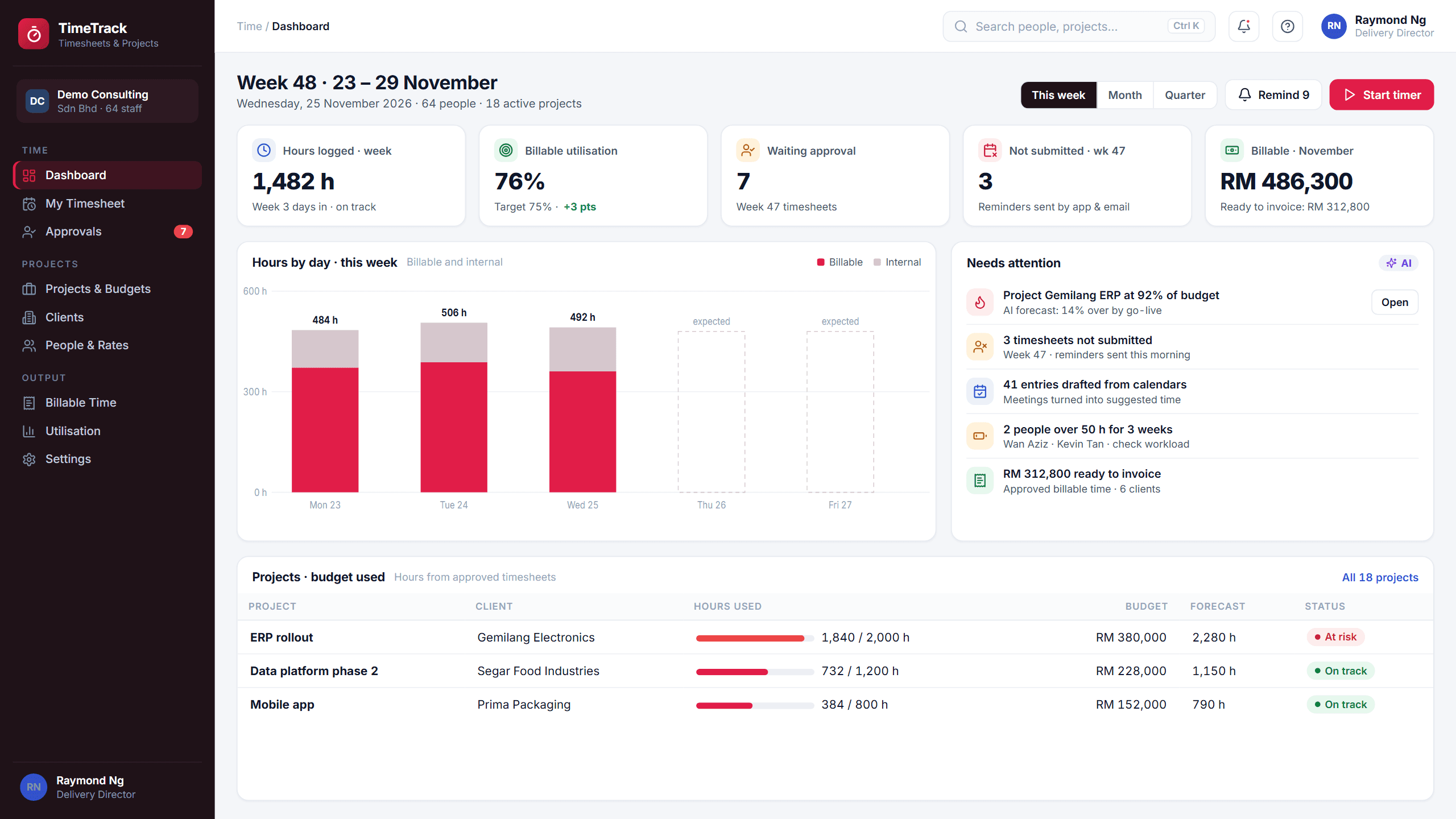
Screen 01 · Dashboard
The week so far: hours, utilisation, approvals and billable value, with AI alerts and project budgets.
Sample data · people, IDs, dates and figures are examples, not real records
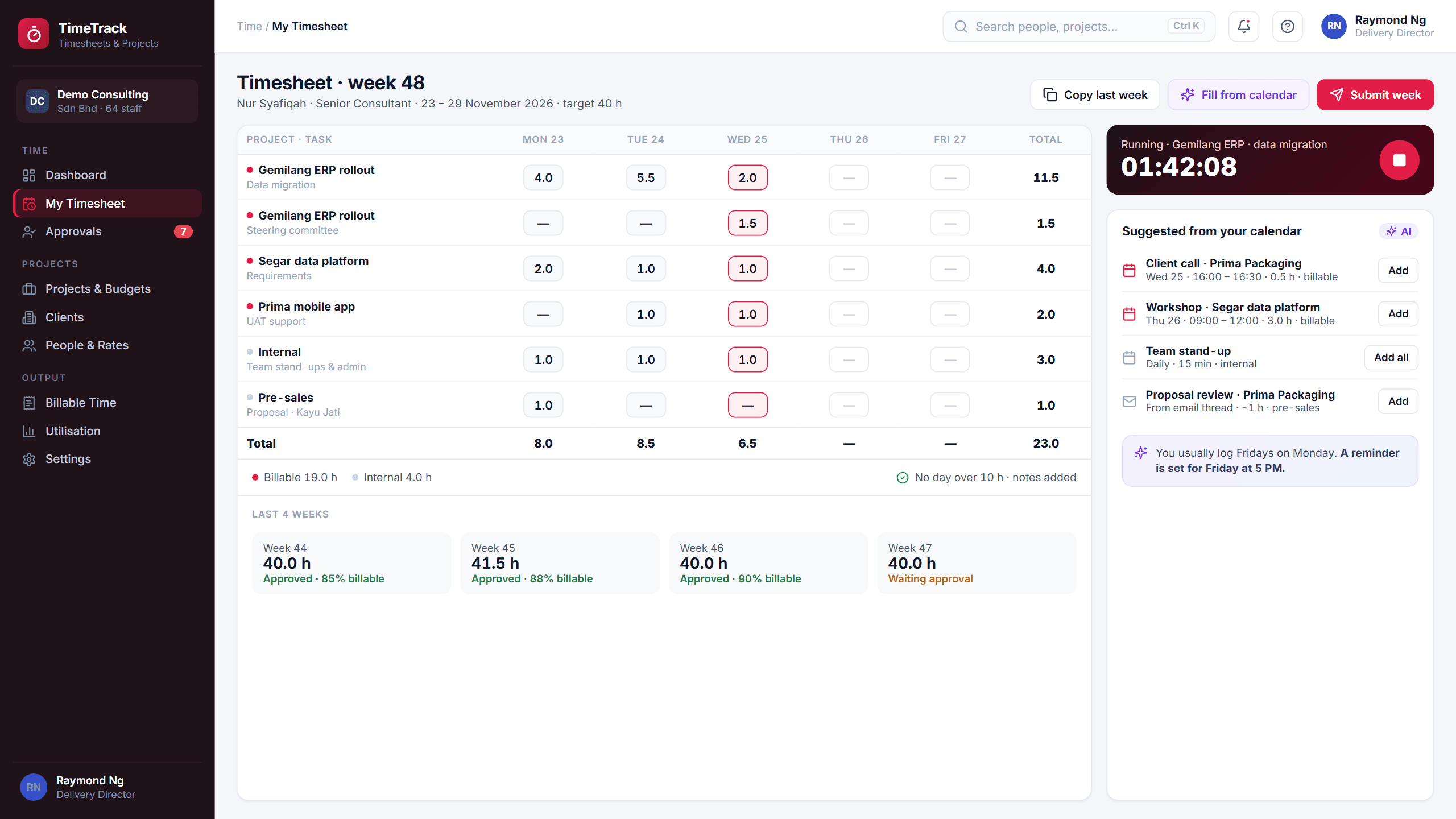
Screen 02 · Main operations
The week by project and day, a running timer and entries suggested by AI from the calendar and email.
Sample data · people, IDs, dates and figures are examples, not real records
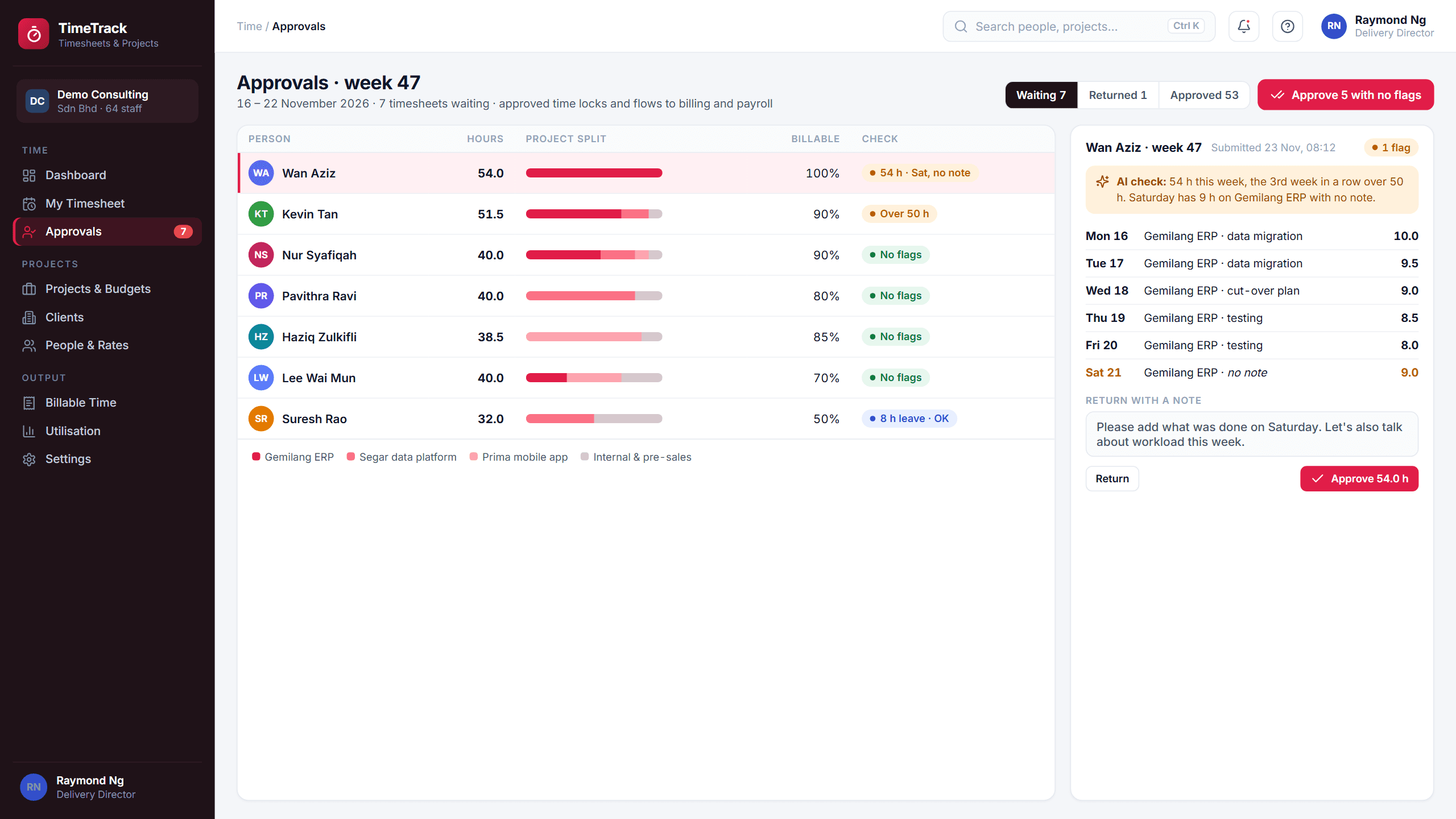
Screen 03 · Management
The team's submitted weeks with project split and AI flags, and one week opened day by day before approving.
Sample data · people, IDs, dates and figures are examples, not real records
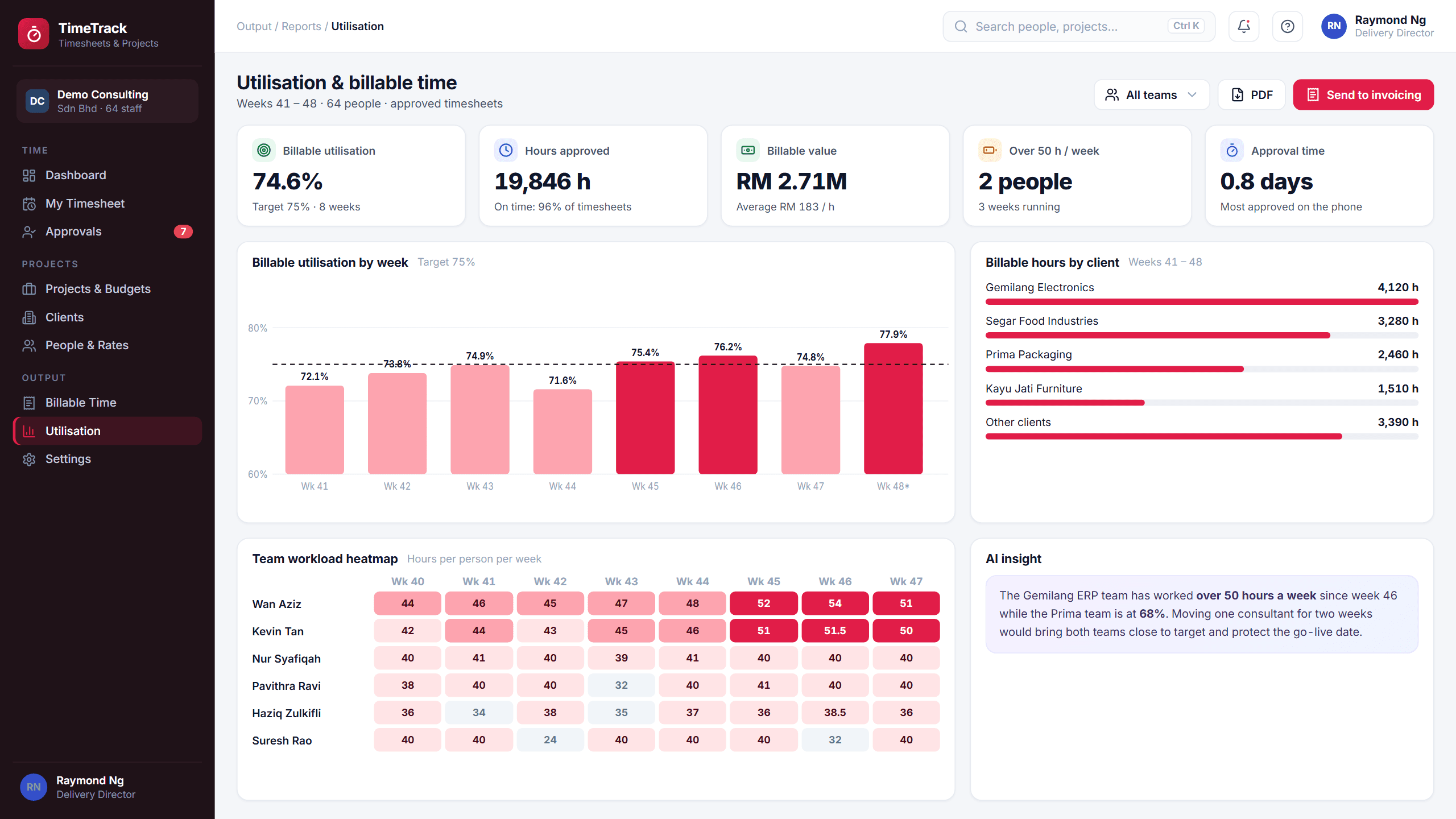
Screen 04 · Reports & analytics
Billable utilisation by week, hours by client, a team workload heatmap and an AI insight.
Sample data · people, IDs, dates and figures are examples, not real records
TimeTrack app
Staff run timers and review their week on the phone, and managers approve timesheets with AI checks from anywhere.
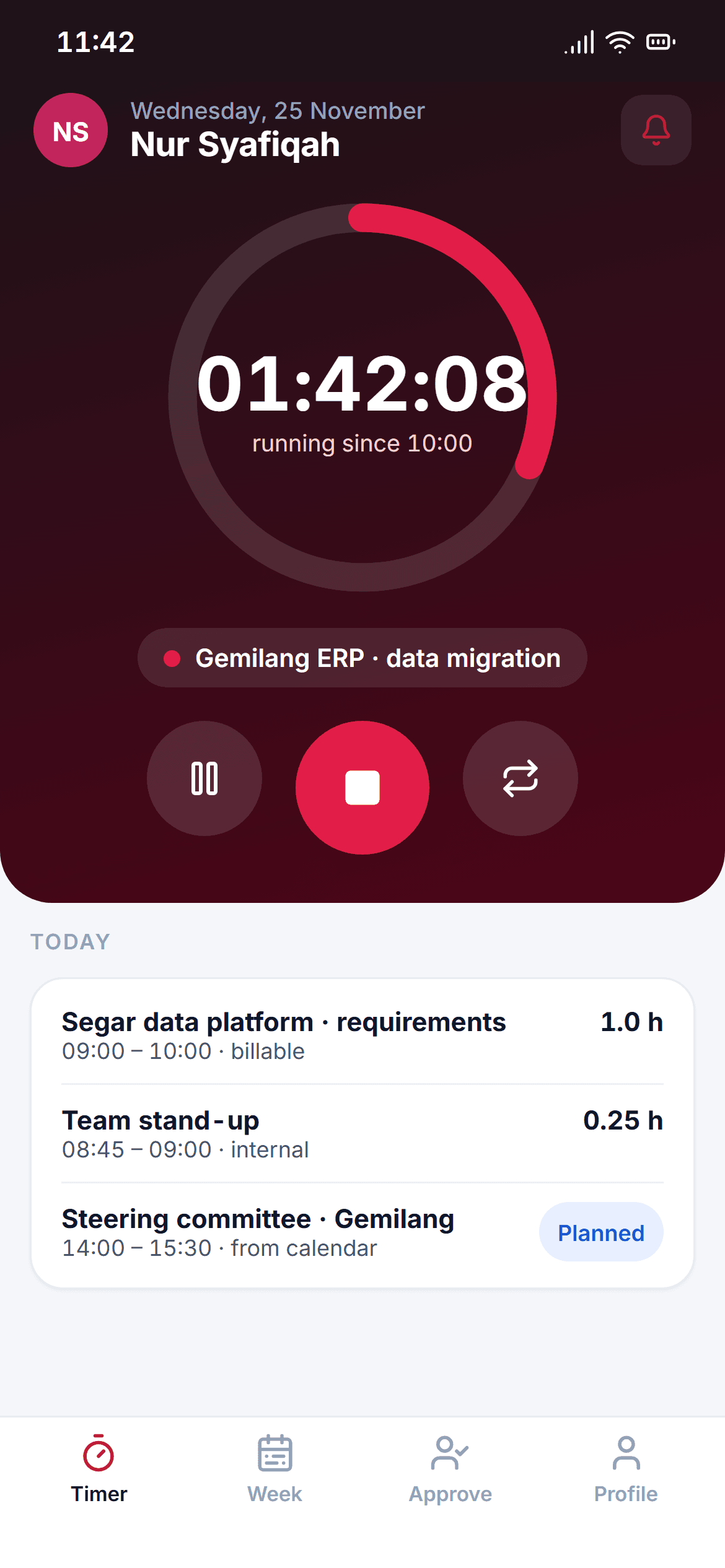
App · 01
A running timer on the current task, with today's entries.
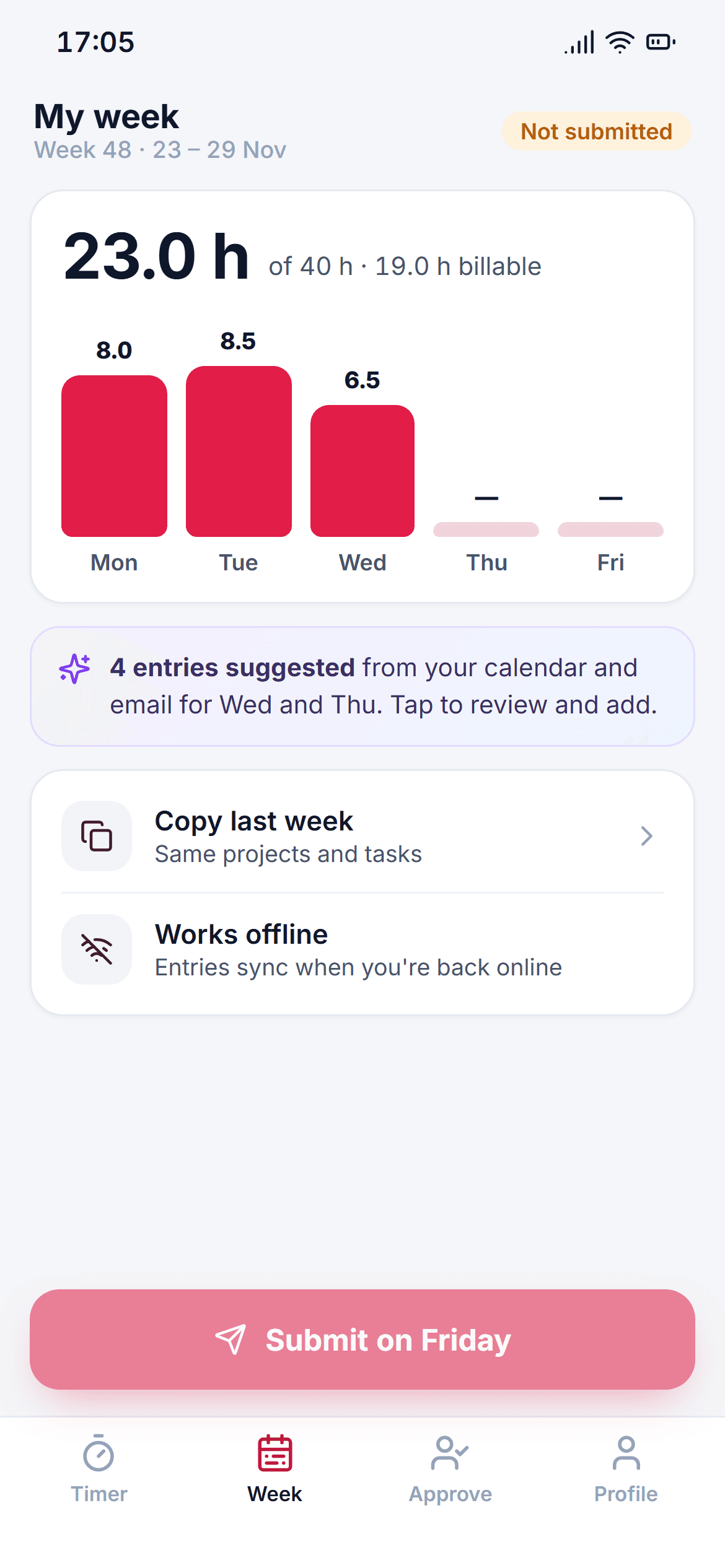
App · 02
Hours by day against the target, with AI suggestions to add.
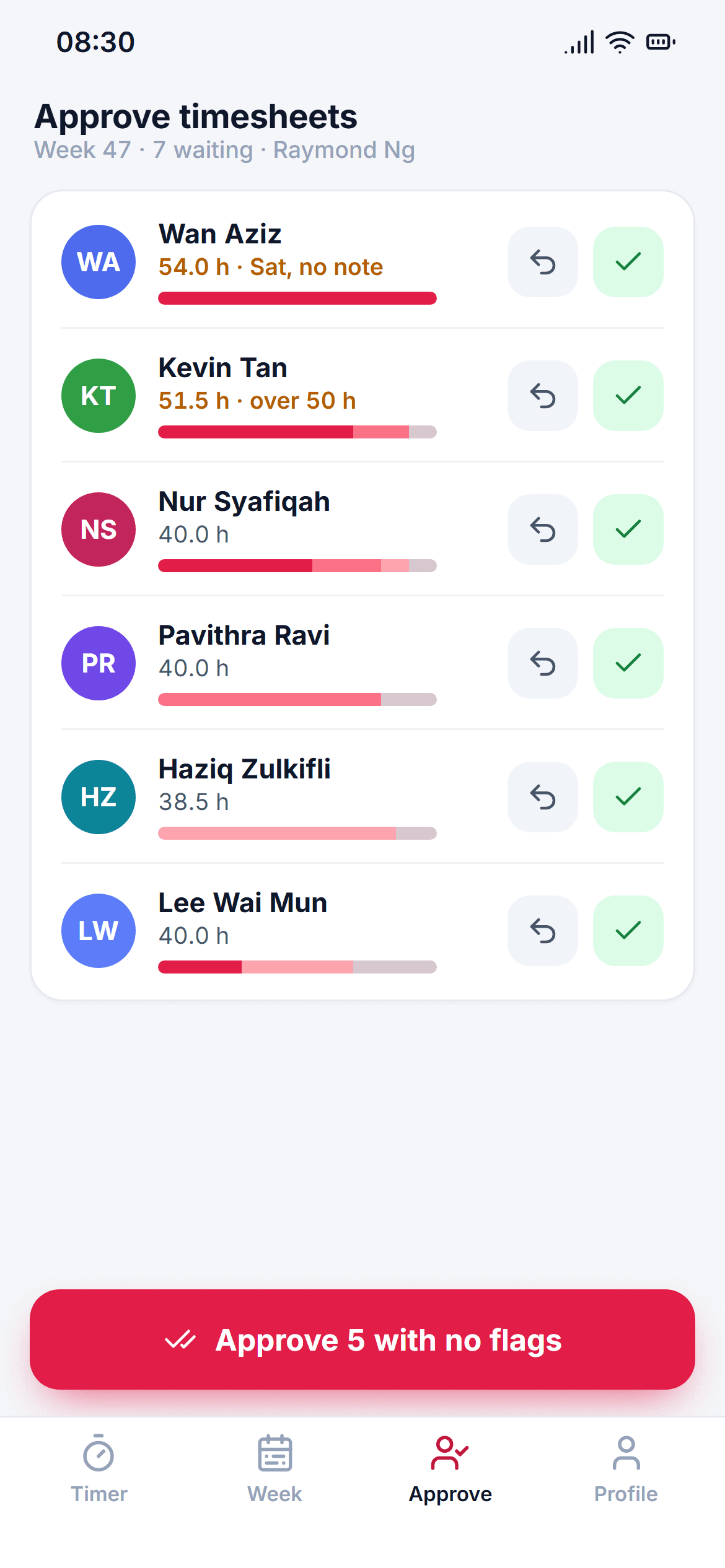
App · 03
The team's timesheets with project split and flags, approved in a tap.
Sample data · names, sites and times are examples, not real records
Modules
The modules of TimeTrack, sharing the same records so information is entered once.
People, projects and tasks.
01Timesheet Dashboard
Submitted, pending and unsubmitted time.
02People & Teams
Employees and the teams they belong to.
03Clients & Projects
Clients and the projects time is recorded against.
04Task Codes
Task codes used on timesheets.
Recording and approving time.
05Timers & Entries
Timers and individual time entries.
06AI Suggestions
Entries suggested from calendars and email.
07Weekly Timesheet
The week's hours by day, project and task.
08Submission & Approval
Submitted weeks and their approval.
09Corrections
Returned timesheets corrected and resubmitted.
Locking, reminding and reporting.
10Period Lock
Approved periods locked.
11Reminders
Reminders for missing timesheets.
12Utilisation & Budgets
Utilisation, workload and project budget forecasts.
13Export & Audit
Approved time exported, with audit history.
Workflow
How a timesheet is designed to move through TimeTrack.
At each step the record is designed to show its status, owner, next action and due date, and authorised users can return incomplete work with a reason.
Benefits
What TimeTrack is designed to change for the people who use it every day.
Getting started
Step by step, starting from your own workflow.
Confirm scope and roles
We agree which modules, roles and rules your organisation needs.
Configure the workflow and records
Your workflow and the records it keeps are set up and approved with you.
Try it with sample data
Your team tries the system with sample data first, never your real records.
Review permissions and exceptions
Access rights, returned work and corrections are checked.
Go live with one workflow first
One end-to-end workflow goes live before the next is added.
Verify with your team
The people who use it confirm it works for them, and then more is added.
Questions
Yes. TimeTrack is available and in use by customers. Each new customer's setup starts from the modules and roles described on this page. Request a demo to see it.
No. The TimeTrack screens on this page are shown with sample people, records and figures. They are not screenshots of any customer's system and contain no real customer data.
Yes. The roles, workflow steps and the details of each module are agreed with you during setup.
No connections to other systems are assumed. If you need TimeTrack to work with another system, it is discussed and agreed during scoping.
Request a demo
See TimeTrack in a demo with our team and tell us how time is recorded, approved and used in your organisation.