
The problem
Enquiries and trial classes are forgotten before the family decides.
An enquiry and trial register keeps every lead visible until the student is placed in a class.
Education
Every Class, Every Student, Every Guardian in View.
EduFlow runs the tuition centre and keeps parents close: students check in by QR or face and parents are told at once, teachers send AI-drafted class updates and progress reports, and fees are invoiced and paid online in the parent app.
Screens shown with sample data
What it does
EduFlow is designed around the student and their guardian. An enquiry becomes a student and guardian record, a trial or placement leads to a class group, and the student joins the timetable. Teachers record attendance and progress notes, the fee account is updated, and the centre keeps a log of its guardian follow-up.
Who it’s for
User roles
Product status: available and in use. EduFlow is a Zensoft product in use by customers, set up for each customer's roles and workflow. The screens on this page are shown with sample people and figures, not any customer's records.
Problems it addresses
The problem
An enquiry and trial register keeps every lead visible until the student is placed in a class.
The problem
Enrolment checks open seats and timetable overlap before a student joins a class group.
The problem
Parents are notified at check-in, receive progress reports and class updates, and pay fees in the parent app.
Built for the tuition centre
Tuition happens in classrooms, at the front door and at home. EduFlow keeps teachers, students and parents connected every class.

Face check-in

Small-group class

Arrival alert for parents

Homework upload

Reviewing progress
Illustrative photos.
Key features
8 key capabilities of EduFlow, shown in the product screens below.
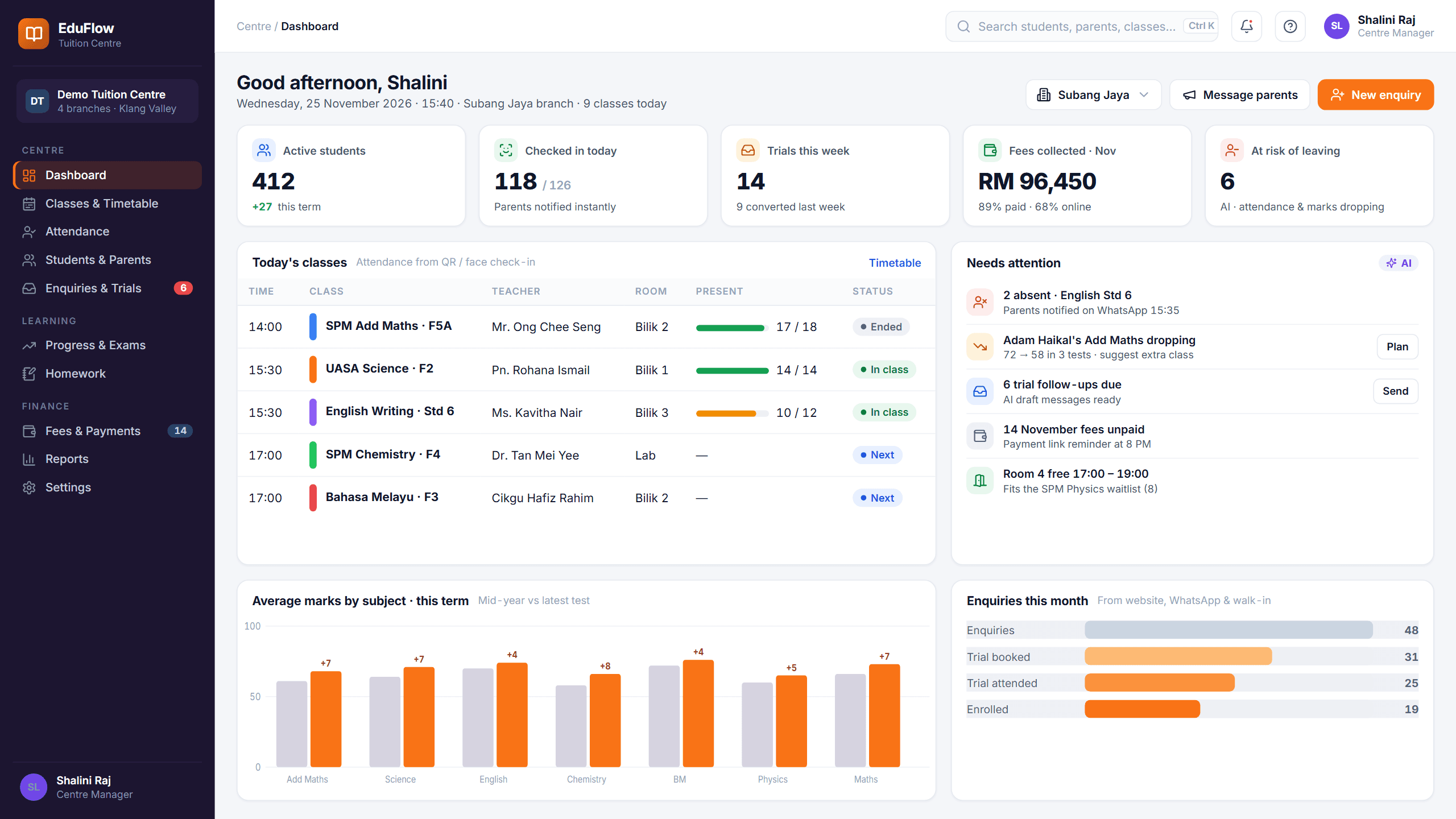
Students, today's check-ins, trials, fees collected and students at risk of leaving, with today's classes.
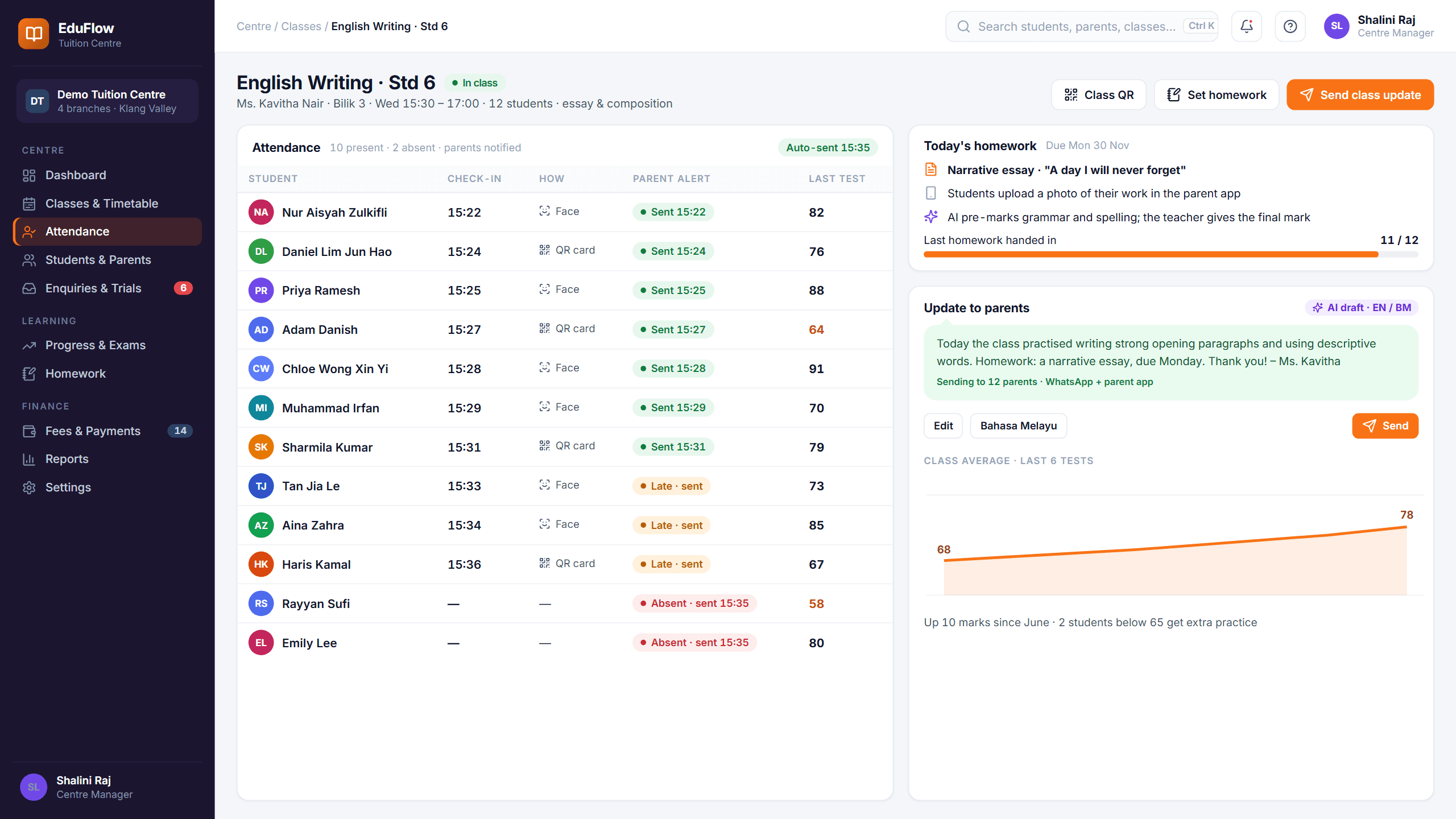
Students check in by QR card or face, and parents get a notification straight away.
Enquiries from the website and WhatsApp followed up with AI-drafted messages until the student enrols.
Classes, teachers and rooms by branch, with waitlists matched to free rooms.
Homework set in the system, photos uploaded by students, AI pre-marking and teacher marks.
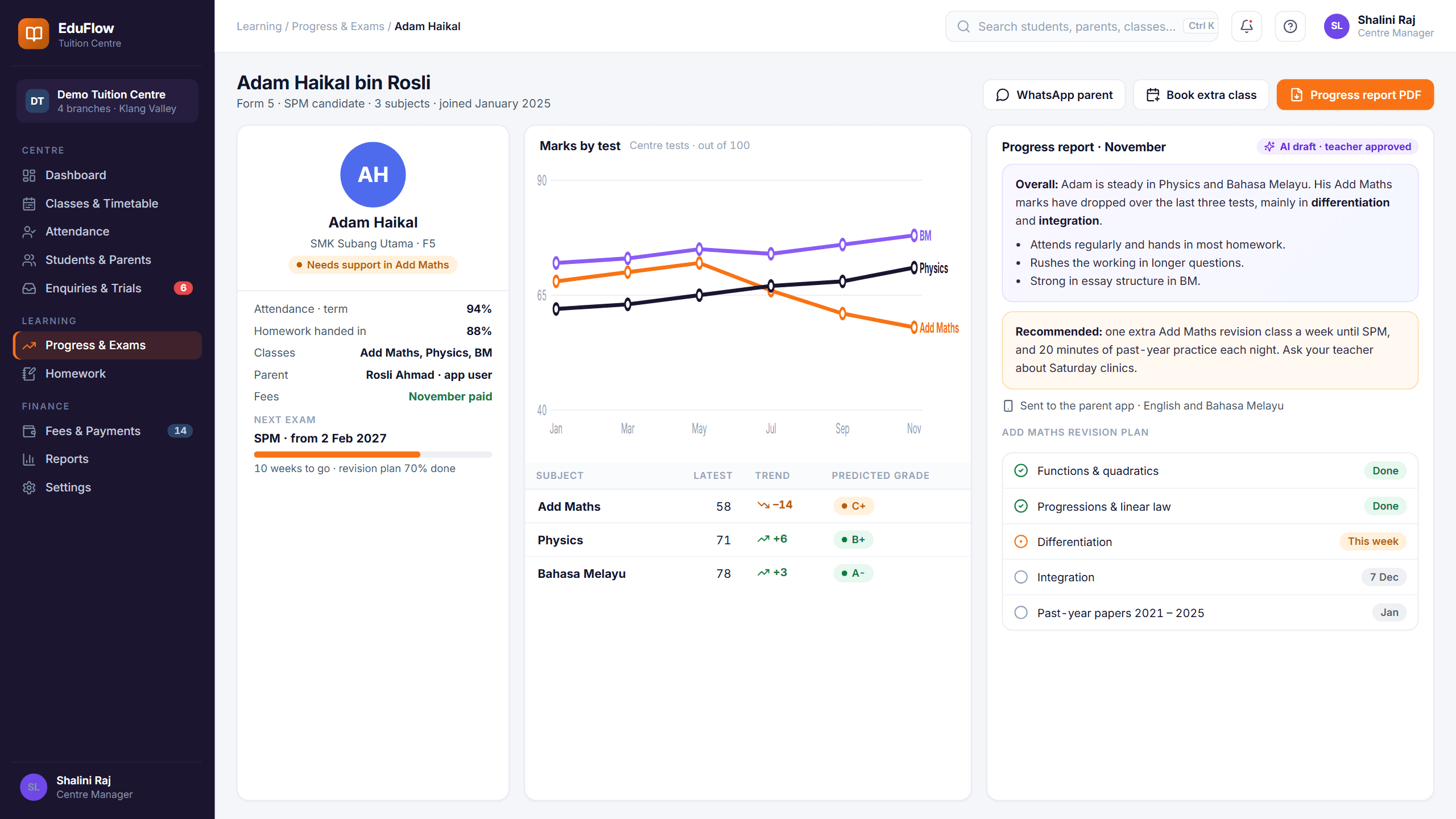
Monthly reports drafted from marks, attendance and homework, approved by the teacher, in English and Bahasa Melayu.
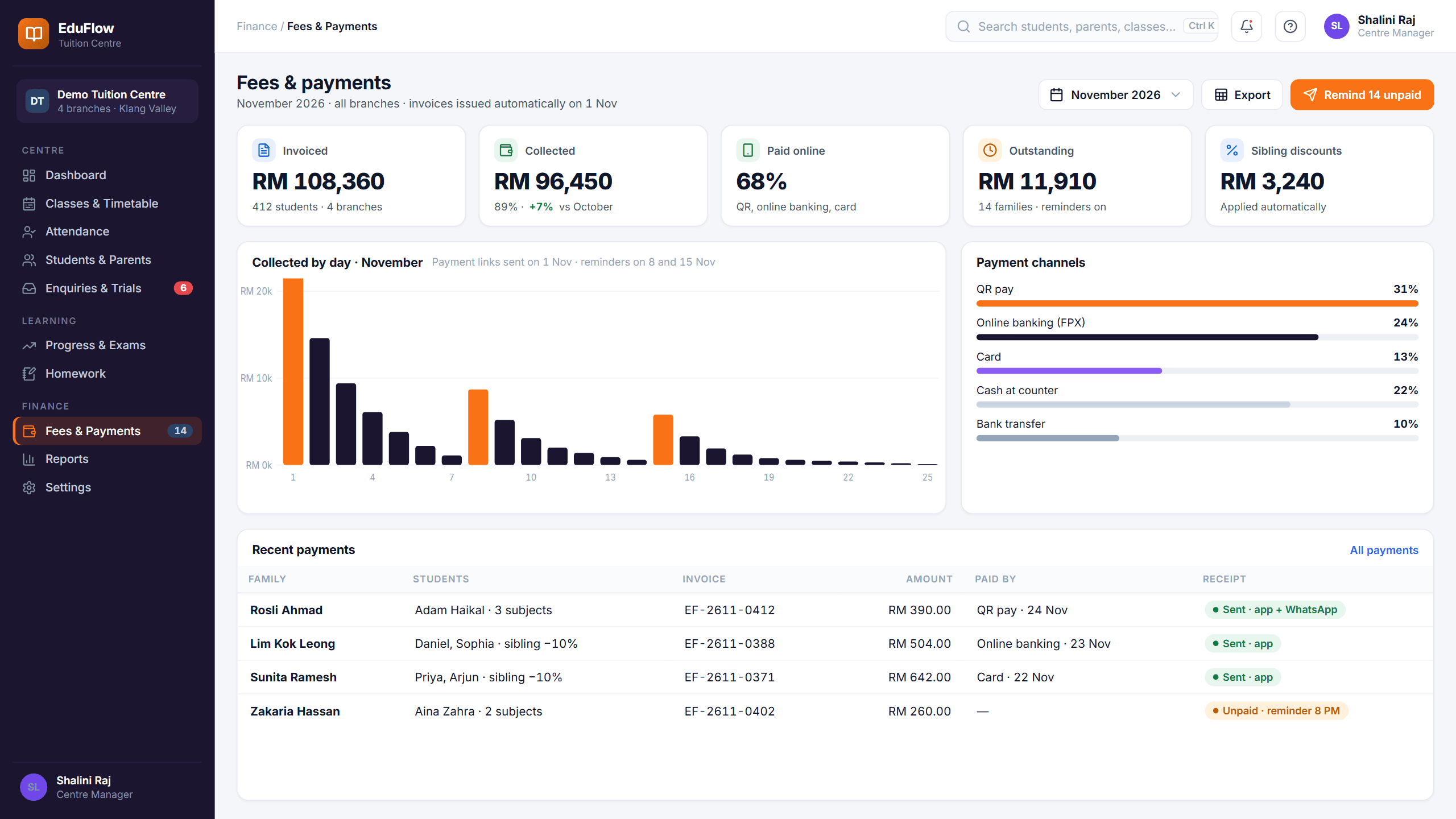
Invoices issued automatically with sibling discounts, paid by QR, online banking, card or auto-debit.
Arrival alerts, timetable, homework, progress, teacher messages and fee payment for every child.
Smart technology
EduFlow uses modern technology so parents always know what is happening, and the centre spends less time on admin.
Students check in at the door in a second.
Parents know their child arrived, or didn't.
Drafted from marks and attendance, approved by the teacher.
Students upload work; AI pre-marks grammar and spelling.
AI spots falling attendance and marks before a student leaves.
Class updates and reminders in English or Bahasa Melayu.
QR, online banking, card or auto-debit, with receipts sent automatically.
Every child's timetable, homework, progress and fees in one app.
Product screens
Four screens of EduFlow, from the dashboard to the reports, shown with sample data. Select a screen to enlarge it.
Screen 01 · Dashboard
Today's classes with live attendance, AI alerts, average marks by subject and the enquiry funnel.
Sample data · people, IDs, dates and figures are examples, not real records
Screen 02 · Class
A class roster checked in by face or QR with parent alerts, homework, and an AI-drafted update to parents.
Sample data · people, IDs, dates and figures are examples, not real records
Screen 03 · Progress
A student's marks over the year, predicted grades, an AI-drafted report approved by the teacher and a revision plan.
Sample data · people, IDs, dates and figures are examples, not real records
Screen 04 · Reports & analytics
Invoiced, collected and outstanding fees, payments by day and channel, and receipts sent automatically.
Sample data · people, IDs, dates and figures are examples, not real records
Parent app
Parents see when their child arrives, follow homework and progress, read teachers' messages and pay fees, for all their children in one app.
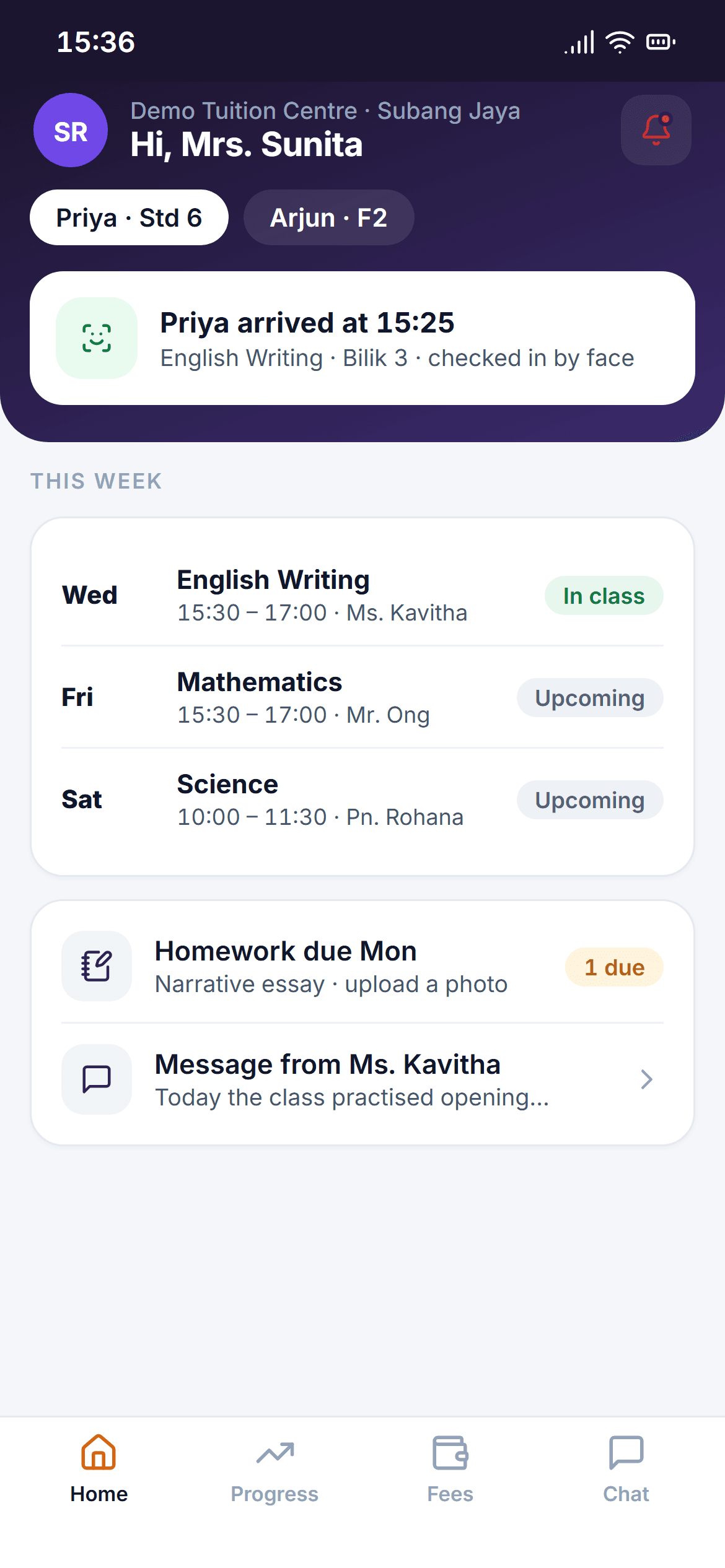
App · 01
Know the moment your child checks in, with the week's classes and homework.
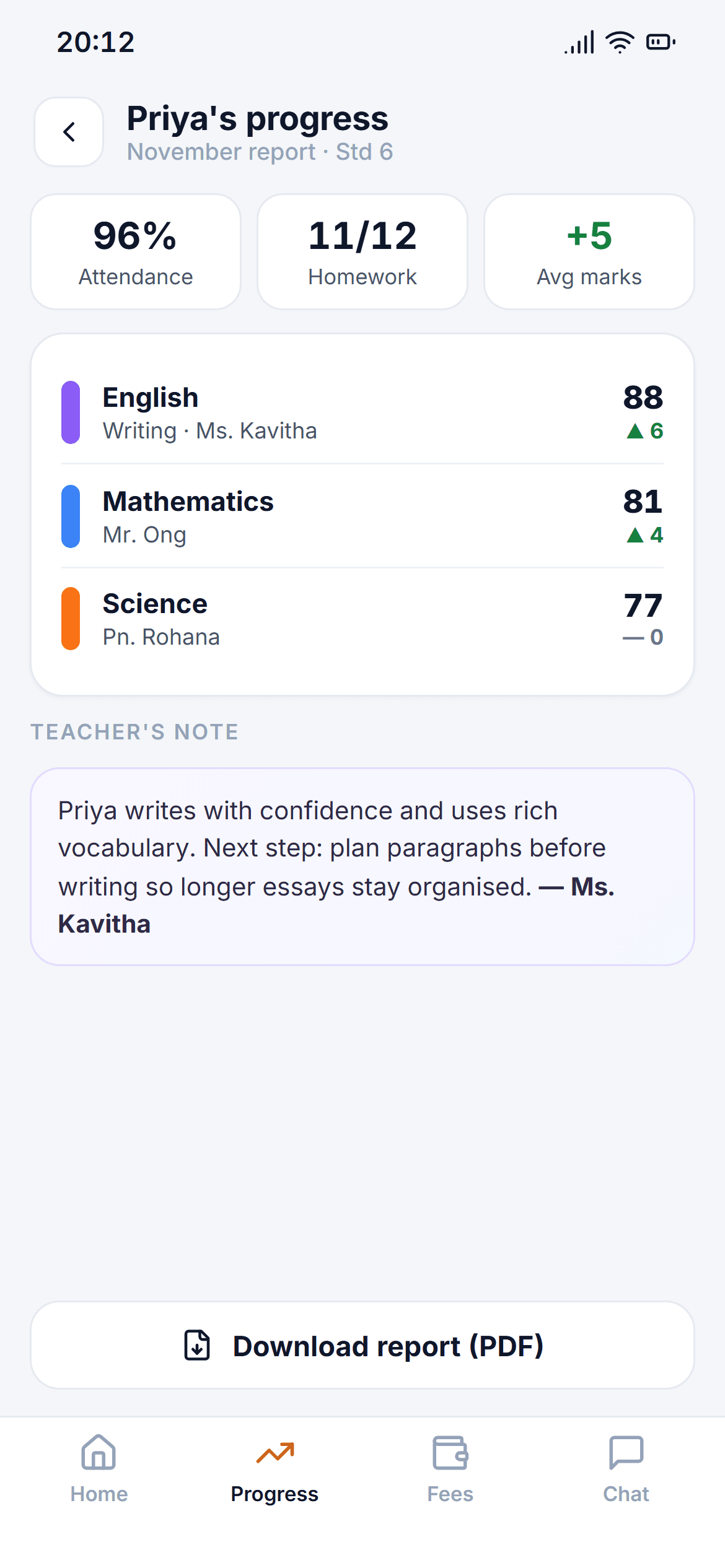
App · 02
Attendance, homework and marks by subject, with the teacher's note.
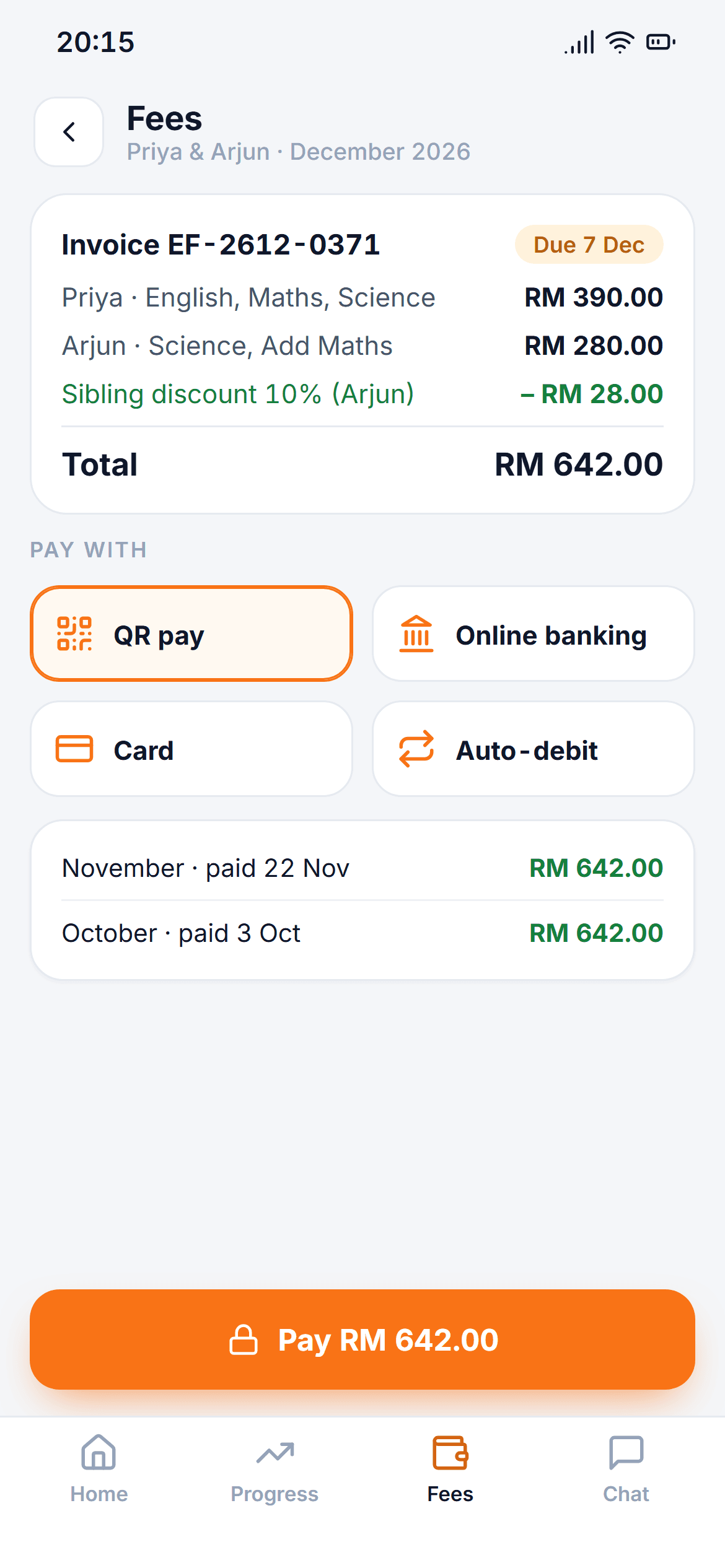
App · 03
One invoice for all your children, with sibling discount, paid in a few taps.
Sample data · names, sites and times are examples, not real records
Modules
The modules of EduFlow, sharing the same records so information is entered once.
Who learns at the centre.
01Centre Dashboard
Today's classes, attendance and follow-ups.
02Student & Guardian Directory
Students and their linked guardians.
03Enquiry / Trial Register
Enquiries and trial classes.
04Parent App & Messages
Alerts, class updates and chat with parents.
What is taught, when and where.
05Subjects & Class Groups
Subjects and the class groups for each.
06Teacher Directory
Teachers and their classes.
07Timetable & Rooms
Class times and room use.
Progress, payments and reporting.
08Attendance
Face and QR check-in with parent alerts.
09Progress & Homework
Marks, homework uploads and AI progress reports.
10Fees & Online Payment
Automatic invoices, discounts and online payment.
11Branch Reports
Attendance and centre reports by branch.
Workflow
How a student is designed to move through EduFlow.
At each step the record is designed to show its status, owner, next action and due date, and authorised users can return incomplete work with a reason.
Benefits
What EduFlow is designed to change for the people who use it every day.
Getting started
Step by step, starting from your own workflow.
Confirm scope and roles
We agree which modules, roles and rules your organisation needs.
Configure the workflow and records
Your workflow and the records it keeps are set up and approved with you.
Try it with sample data
Your team tries the system with sample data first, never your real records.
Review permissions and exceptions
Access rights, returned work and corrections are checked.
Go live with one workflow first
One end-to-end workflow goes live before the next is added.
Verify with your team
The people who use it confirm it works for them, and then more is added.
Questions
Yes. EduFlow is available and in use by customers. Each new customer's setup starts from the modules and roles described on this page. Request a demo to see it.
No. The EduFlow screens on this page are shown with sample people, records and figures. They are not screenshots of any customer's system and contain no real customer data.
Yes. The roles, workflow steps and the details of each module are agreed with you during setup.
No connections to other systems are assumed. If you need EduFlow to work with another system, it is discussed and agreed during scoping.
Request a demo
See EduFlow in a demo with our team and tell us how your centre handles enquiries, classes, attendance and fees.